
Autor: NTA Time: 2026-07-21 22:44:08 Click:
A buyer-side guide to tire inspection systems that covers tread depth, tire age and identity, sidewall and wheel condition, evidence retention, and integration into a full vehicle inspection workflow.
A shopper rolls into the service lane in an SUV. At a glance, the four tires look similar, but the advisor has minutes to decide whether the vehicle can leave safely or whether one tire needs closer review. Many lanes still rely on a walk-around, a handheld tread gauge, and photos taken on a phone. The record can change with the inspector, lighting, and queue pressure. This article explains what a tire inspection system needs to do for tread depth, tire age, sidewall damage, and brand and model recognition, how those capabilities fit a full vehicle report, and how buyers can evaluate a system against the lane they actually operate. A tire inspection system earns its place in a service lane when it captures tread depth across each tire, records tire age and identity from the sidewall, flags supported sidewall and wheel conditions, and keeps the evidence connected to the vehicle record. Judge candidates on four things: • Depth capture that covers every groove rather than a single-point sample. • Sidewall imaging with defect recognition and OCR for tire brand, model, and age. • Report retention that ties tire evidence to the inspected vehicle. • Integration options that connect the tire section to the broader vehicle condition workflow. Elscope Vision maps these filters to two specialized products. The LUBAN PRO passenger-car tread scanner measures every groove of each tire in one pass and produces diagnostic, risk, and maintenance information. The TIRE MASTER PRO sidewall scanner uses 4K tire images, sidewall and wheel defect models, and OCR to identify tire brand, model, and age. Recognition quality depends on tire condition, lighting, configuration, and validation against the buyer's own vehicle mix. Tire findings lose value when they sit in a separate note or photo folder. A service advisor, fleet manager, auction inspector, or PTI operator needs to review tire condition alongside the rest of the vehicle evidence. That makes the tire system part of a reporting workflow rather than an isolated sensor. The official 4-in-1 Passenger Car solution combines tire tread, tire sidewall, underbody, and exterior body inspection. In that configuration, the full condition report can be available within tens of seconds. Buyers should still validate how reports are stored, exported, and connected to their existing systems before deployment. Use the same evaluation criteria for every demonstration. • Tread depth per groove. A single-point gauge can miss variation across the tire. A drive-through scanner should measure all grooves and preserve the values by tire position. • Tire age and identity. Brand, model, and age information is printed on low-contrast rubber. Sidewall imaging and OCR can structure that information, but buyers should test recognition on clean, dirty, worn, and differently positioned tires. • Sidewall and wheel condition. The official TIRE MASTER PRO page documents recognition of sidewall and wheel defects such as bulges. Buyers should define which conditions the deployed model supports and how uncertain findings are sent for human review. • Evidence retention. Measurements, images, and alerts should remain tied to the vehicle so the finding can be reviewed after the vehicle leaves the lane. 1. Define the vehicle types, tire sizes, lane speed, and environmental conditions the system must handle. 2. Capture tread measurements as the vehicle passes over the tread scanner without a separate lifting step. 3. Capture sidewall and wheel images and extract supported tire identity fields. 4. Route system alerts and uncertain findings to a qualified person for review. 5. Attach approved measurements, images, and findings to the vehicle condition record. 6. Present the report to the service advisor, fleet manager, auction inspector, or PTI reviewer in a usable format. 7. Retain the evidence according to the site's access, retention, and data-residency policy. This sequence matters because the value is created after capture. A scanner that produces data without a clear review, reporting, and escalation path does not complete the inspection workflow. Elscope Vision separates the tire workflow into specialized capture steps. LUBAN PRO performs automatic, non-stopping tread scanning, measures all grooves of each tire in one pass, and reports tire wear, eccentric wear, replacement alerts, alignment suggestions, and other abnormal tire situations. Its customer-record layer is designed to retain inspection data and support tire lifecycle review. TIRE MASTER PRO performs automatic sidewall scanning, produces detailed 4K tire images, recognizes supported sidewall and wheel defects such as bulges, and uses OCR for tire brand, model, and age. The official page also documents cloud storage with remote traceability and API support for data integration and custom software development. Those capabilities can form the tire portion of a broader vehicle condition workflow. Buyers should confirm the exact product configuration, output fields, access controls, retention settings, integration scope, and review process in a pilot before treating any capability as production-ready. • Does the tread scanner measure every groove, and can the report show values by tire position? • Which sidewall and wheel conditions are supported in the proposed configuration? • How does the system handle dirty, worn, shadowed, or partially obscured sidewall markings? • Which identity fields are extracted, and how are uncertain OCR results displayed? • Can a reviewer trace each alert back to the original measurement or image? • Where is data stored, who can access it, and how long is it retained? • Which integration fields and APIs are included in the quoted deployment? • What happens when the model and a qualified reviewer disagree? The right demonstration uses the buyer's vehicles and operating conditions. A polished sample report is useful, but a representative pilot is stronger evidence. The vehicle drives over the tread scanner while the system measures every groove of each tire. The report can then associate measured values and alerts with the relevant tire positions. The TIRE MASTER PRO page documents OCR for tire brand, model, and age. Readability depends on tire condition, lighting, configuration, and the markings visible during capture, so buyers should validate results on their own inventory. The official page documents sidewall and wheel defect recognition, including bulges. The exact supported condition set should be confirmed for the proposed configuration, and uncertain findings should remain subject to qualified human review. Elscope Vision's 4-in-1 Passenger Car solution combines tire tread, tire sidewall, underbody, and exterior body inspection. Buyers should verify the exact report structure, export fields, and integration path required by their operation. The official sidewall scanner page documents cloud storage, remote traceability, and API support. Procurement teams should confirm data residency, access control, retention, and deletion requirements before deployment. The evaluation that separates a working tire inspection system from a polished demonstration is a pilot on the buyer's actual lane, vehicle mix, tire conditions, and reporting process. Ask the vendor to scan representative vehicles, compare the resulting records with qualified manual review, and confirm that the tire section fits the broader vehicle file. To evaluate LUBAN PRO, TIRE MASTER PRO, and the 4-in-1 Passenger Car solution in your own workflow, contact Elscope Vision to schedule a demonstration.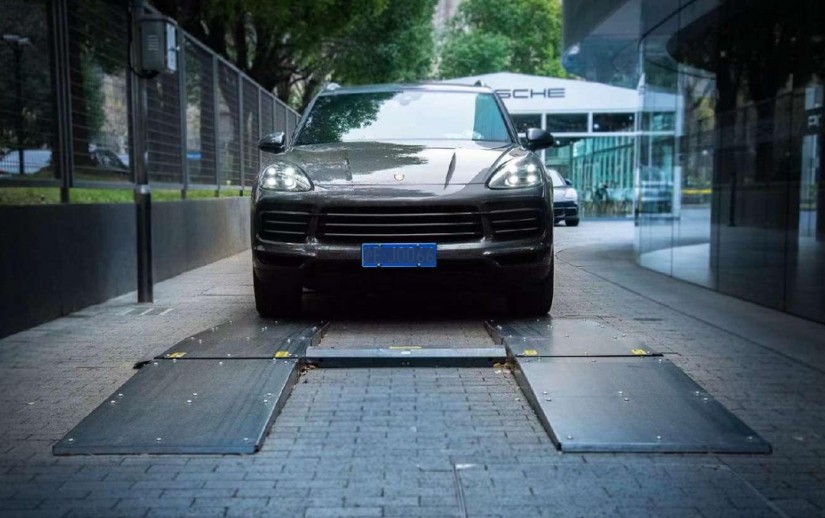
Start With Complete Tire Evidence
Why Tire Inspection Belongs in the Full Vehicle Report
Score Four Capabilities
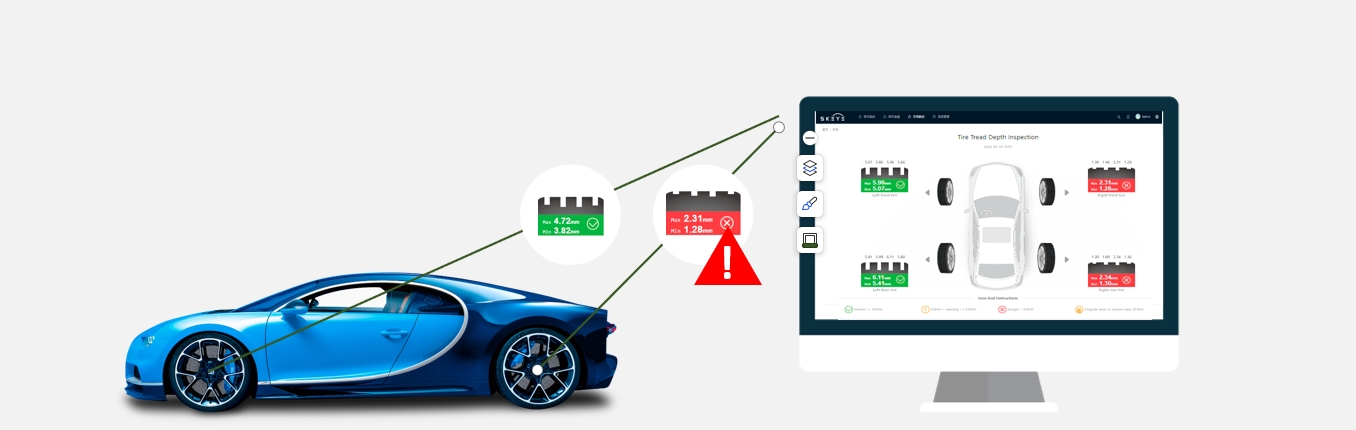
Capability Manual inspection path Automated inspection path Tread depth Technician selects measurement points with a handheld gauge Scanner measures every groove of each tire in one pass Age and identity Technician reads sidewall markings and records them manually OCR structures brand, model, and age information from sidewall images Sidewall and wheel condition Visual review varies with access, lighting, and queue pressure Supported defect models review 4K tire images and add alerts to the report Evidence retention Notes and photos may be stored separately Measurements, images, and alerts can remain connected to the vehicle record Build a Lane Workflow That Holds Up
Where the Elscope Vision Tire Stack Fits
Questions to Use in a Product Demonstration
FAQ
How is tread depth measured across the tires in one pass?
Can the system read tire brand, model, and age?
What sidewall damage can the system recognize?
Does the tire record connect to the rest of the vehicle report?
Where does the data live?
Prove the Workflow on Your Own Tires
Let's Discuss Your Inspection Needs
We offer professional consultation services
Address : NO. 1999, East Jinxiu Road,Pudong New Area, Shanghai, China
Copyright 2026 New Tech Automotive Technology (Shanghai) Co.,Ltd. All Rights Reserved Information Security
Follow Us


Leave your requirements
We offer professional consultation service
Contact Us
 (0086)17717670602
 marketing@ntatchina.com
 8617717670602
Follow Us
Address : NO. 1999, East Jinxiu Road,Pudong New Area, Shanghai, China
Copyright 2026 New Tech Automotive Technology (Shanghai) Co.,Ltd. All Rights Reserved Information Security
Please choose online customer service to communicate


