
Autor: NTA Time: 2026-11-11 08:25:50 Click:
A stage-by-stage look at Elscope Vision and ProovStation for dealership service reception: body, underbody, tread, sidewall, reports and follow-up.
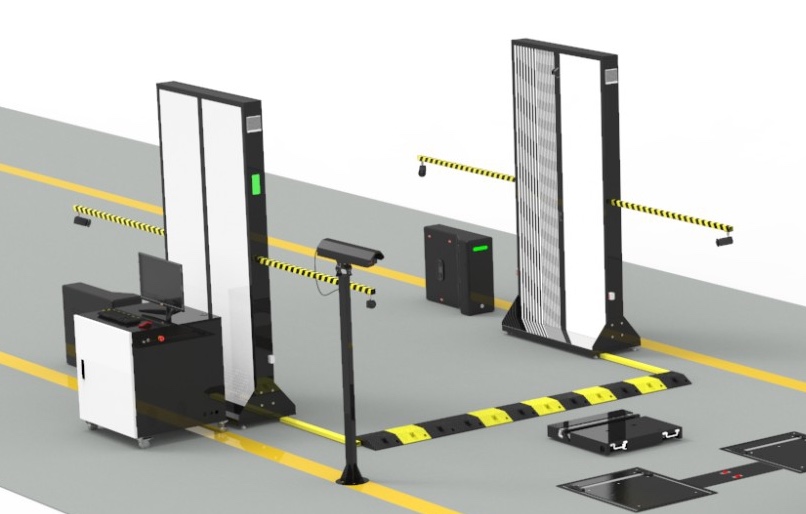
At a busy service reception, the car pulls up for write-up, the advisor has a few minutes, and the findings should reach the customer before any work is booked. Elscope Vision and ProovStation both describe drive-through scanning for this moment, each with its own combination of scanners and software. ProovStation's dealer page presents its tire and body scans for dealership drive-ins, and Elscope Vision's dealership solution does the same for its four-module lane. Elscope Vision's 4-in-1 service lane fits a service drive that wants body, underbody, tread and sidewall each handled by a dedicated scanner in one drive-through. Its car dealership solution inspects every vehicle in 10 seconds and turns each pass into an objective digital report. ProovStation's home page describes two scanners, TireStation and CarStation, whose scans feed its online Platform. Illustrative comparison compiled from the public product pages of each vendor, linked in this article ProovStation's details come from its TireStation, CarStation and Platform pages. Elscope Vision's come from its dealership solution page and the module pages linked in the sections below. At write-up, body findings give the advisor and the customer a shared record of the car's condition, and underbody findings help the advisor decide whether a car should go on a lift. The Elscope Vision arch scanner reports defects on each surface of the car by location and severity, so when the store scans every car at reception, a scratch on the rear door is on record before the keys change hands. Different shades of color mark how severe each defect is, which helps the advisor walk the customer around the car surface by surface. The CarStation page describes a similar job for bodywork, with each finding pinpointed on the panel and compared against the last scan. For underbody screening, the Elscope Vision lane installs a dedicated underbody scanner that the car drives over, and it supports image capture at different vehicle speeds, so the car does not need to hold one exact speed. Its AI marks cracks, rust, scratches and oil leaks in the images, and the advisor can add a lift check for the technician to the repair order with that image attached as the reason. Two kinds of evidence anchor the tire conversation at the service desk: how much tread is left and what the sidewall shows. On the Elscope Vision lane, the LUBAN PRO tire tread depth scanner supplies the first, measuring every groove of each tire and adding replacement alerts and alignment suggestions. The tire sidewall scanner supplies the second, reading the DOT date code, brand and size and flagging bulges or wheel defects, with 4K images of each tire in the report. The sidewall scan covers all tires during the same single drive-through. With groove readings and tire age both in hand, the advisor can sit with the customer and explain a replacement from their own tires. The TireStation page describes band-by-band wear readings, with sidewall identifiers read by side cameras where they are configured, and ProovStation's dealer page adds that whatever crosses a threshold lands on the advisor's screen. For a tire close to its limit today, LUBAN PRO supports the follow-up. It records each customer's tire inspection data, assesses tire lifespan and condition, and offers maintenance, repair and replacement reminders based on that record. When a reminder comes due, the advisor who calls the customer can open the last visit's groove readings and point to the tire that was close to its limit. Across visits, the same records follow each tire from installation to replacement, so the next reading shows how far the wear has moved since the last one. Through an API connection to those systems, the same findings can also flow into the DMS, tire quoting tool or CRM that advisors already use for write-up and quotes. On-premises deployment is available when IT wants the inspection software at the store. Three configuration choices shape an Elscope Vision lane for service reception: 1. Whether underbody findings join every write-up, which places the dedicated underbody scanner in the same drive-through as the body and tire scanners. 2. Where the inspection software runs, with on-premises deployment available when IT prefers it. 3. Which systems receive the findings, such as the DMS, the quoting tool or the CRM. Both vendors describe drive-through scanning. Elscope Vision's arch, tread and sidewall scanners work without the vehicle stopping, and ProovStation describes its TireStation and CarStation the same way. Both series belong to the 4-in-1 dealership solution, which inspects the exterior, tires and underbody. The choice between them is made in the site plan for your service entrance. Share your service lane layout, the findings your advisors present at write-up and the systems that should receive them with the Elscope Vision team. We will map the arch, underbody, tread and sidewall modules to that lane and outline how the reports reach your advisors.Matching Service-Lane Requirements to Each Vendor
Stage-by-Stage Capabilities From Each Vendor's Pages
Service-lane stage Elscope Vision ProovStation (as described on its pages) Body Arch scanner whose AI detects scratches, dents and other body damage and shows the number, location and severity of defects on each surface CarStation captures 200+ images per pass with 4K cameras and dynamic LED lighting; damage is classified, localized and severity-graded, with comparison against the previous scan Underbody Dedicated underbody scanner in the lane, with AI identifying cracks, rust, scratches and oil leaks CarStation's page states the vehicle undercarriage can also be read, and TireStation lists undercarriage among its modular options Tread LUBAN PRO tire tread depth scanner measures all grooves of each tire in a single pass, with eccentric wear and gnawed tire alarms, replacement alerts and four-wheel alignment suggestions TireStation measures tread depth on all four tires in a single pass, with wear pattern and alignment alerts Sidewall Tire sidewall scanner reads brand, model and DOT date code by OCR and AI vision, recognizes sidewall and wheel defects such as bulges, and supplies 4K images of each tire for the advisor Side cameras, when configured, read tire brand, model and dimensions and take 4K sidewall pictures What the report gives the advisor An objective digital report for every vehicle, carrying body defect marks, underbody findings, groove readings with alerts and 4K tire images A report delivered online, by email, in print or on a screen at the site, with the DMS, advisor and customer receiving the same record Customer follow-up LUBAN PRO records each customer's tire inspection data, assesses tire lifespan and condition, and offers maintenance, repair and replacement reminders Platform keeps per-vehicle history and routes alerts set by wear level or damage type to the right person Connection to other software APIs for data integration and custom software development, with on-premises deployment supported Open REST API and webhooks for the DMS, FMS, CRM or data warehouse, plus pre-built partner connectors Body and Underbody Findings at the Reception Door
Tread and Sidewall Findings for the Tire Conversation
Following Up on Tires After the Visit
Planning the Elscope Vision Lane Around Your Write-Up
FAQ
Do both lanes scan without the car stopping?
Do the Arch Series and Lite Series change what the lane inspects?
Configure Modules Around Your Service Drive
Let's Discuss Your Inspection Needs
We offer professional consultation services
Address : NO. 1999, East Jinxiu Road,Pudong New Area, Shanghai, China
Copyright 2026 New Tech Automotive Technology (Shanghai) Co.,Ltd. All Rights Reserved Information Security
Follow Us


Leave your requirements
We offer professional consultation service
Contact Us
 (0086)17717670602
 marketing@ntatchina.com
 8617717670602
Follow Us
Address : NO. 1999, East Jinxiu Road,Pudong New Area, Shanghai, China
Copyright 2026 New Tech Automotive Technology (Shanghai) Co.,Ltd. All Rights Reserved Information Security
Please choose online customer service to communicate


