
Autor: NTA Time: 2026-11-11 08:23:24 Click:
Separate installed inspection lanes from remote acquisition tools on a UVeye alternatives list, and see where an Elscope Vision 4-in-1 lane fits a dealer group.
When a dealer group looks for UVeye alternatives, the candidates can include lane equipment alongside apps that gather trade-in photos before a visit. For an operations or capital purchasing team, those are separate purchases that deserve their own budget line and their own owner. Sorting candidates by where each product does its work, on your lane or before the car arrives, keeps the comparison manageable. For condition recorded on your own lane every time a car arrives, Elscope Vision's dealership inspection hardware is the installed option: a 4-in-1 lane that inspects the exterior, tires and underbody as the vehicle drives through. Acquisition and valuation stay with the tools your stores already use, and an integration project can bring the lane report into them. Illustrative grouping of purchase categories prepared by Elscope Vision; the Elscope Vision and UVeye details come from the product pages linked in this article UVeye's own lane products sit in the first row. Its How it works page describes a drive-through gateway with synchronized multi-angle cameras and names Atlas Lite as the system for AI inspections in dealership lanes. Alternatives to it are other installed lanes, compared on what each one inspects, where it is installed and where its reports go. When we sort a shortlist, three signs place a product in the installed row: 1. Named physical units, such as an arch, floor plates, a camera pole or side cabinets. 2. Automatic capture as the vehicle drives through, without the car stopping. 3. A set of lane configurations to choose from when the equipment is planned for a site. On Elscope Vision's car dealership solution, the physical units are four named scanners set along one lane. Each vehicle is inspected in 10 seconds as it drives through, producing an objective digital report, and the lane comes in two configurations, the Arch Series and the Lite Series, so a store can choose the one that suits its site. Illustrative contrast between the first two rows of the table above The rendering below shows those physical units on an Arch Series lane: the arch over the lane, a control cabinet with its monitor, a camera pole, a side cabinet and the plates on the lane floor. The lane covers the body, the underbody and both the tread and the sidewall of every tire, using an arch scanner, an underbody scanner, a tire tread depth scanner and a tire sidewall scanner in a single drive-through. Because the scan runs on arrival, the report describes the car as it stands at your store that day. A store can arrange for service advisors to write up the visit from it and for used-car appraisers to begin a trade-in review from the same record. Candidate positions for a lane are the points where arriving cars converge, such as the service drive or the used-car intake, and an installation assessment decides which of them suits the equipment. A group rollout then sets which stores and entrances come first, with each site planned for its own traffic. Each of the other three purchases meets the lane at a handoff the store designs: 1. Remote acquisition. Customer photos and details arrive before the visit, and the lane adds a current record of body, tires and underbody once the car is on site. Our guide to moving from remote trade-in photos to an on-site inspection covers how appraisers compare the two, with the customer's description and the store's own record of the same car side by side. 2. Valuation. Values and offers stay in your appraisal software. With API integration and on-premises deployment available on the dealership solution, report content can reach that software through an integration project, and appraisers find the condition evidence where they already value the car. 3. Listing. For stores that also want listing images taken on site, Elscope Vision's used-car solution pairs the AI inspection with automatic exterior and interior photography and interactive 360° views. A capital request for inspection hardware reads more clearly when it answers five site questions up front: 1. The entrance. Name the entrance arriving cars pass at the first store, whether the service drive or the used-car intake. 2. The traffic. Record how many cars cross that entrance on a typical busy day, so the approval shows the expected use of the lane. 3. The readers. List the departments that will open the report, service, used-car or both, and the manager who owns the lane day to day. 4. The receiving system. Identify the system that should hold the reports and whether IT prefers an on-premises deployment for the inspection software. 5. The rollout order. Use the arrivals expected to cross each candidate lane as one input when deciding which store goes first. The same five answers make a ready brief for the first conversation with our team. The two work at different moments and serve different uses, so they combine well. The remote tool gathers photos and details before the visit, the lane records the car once it is on site, and the appraiser compares both before making an offer. A strong candidate is a store where most vehicles pass one entrance and where both service and used-car staff will read the reports. The pilot can then test how the lane serves each department, which informs plans for the next sites. Tell the Elscope Vision team which store you would start with, which departments will read the reports and which system should receive them. We will assess where an Arch Series or Lite Series lane could be installed and how its reports reach your teams.Sorting the Shortlist by Where the Car Is
Purchase category Where the work happens What it produces Who uses the output On-site condition inspection An installed lane at the store, as the vehicle drives through A condition report on body, tires and underbody Service advisors, technicians and used-car appraisers Remote acquisition Before the car arrives, from photos and details the customer submits A preliminary picture of the car for the acquisition team Acquisition and sales staff Valuation Appraisal software at the used-car desk Value guidance that the appraiser turns into the store's offer Used-car managers and appraisers Listing and merchandising A photo station at the store Exterior and interior images and 360° views for online listings Marketing and online sales Three Signs of Installed Inspection Hardware
Question Installed inspection lane Remote acquisition workflow Who captures the vehicle Scanners at the store, as the car drives through The customer, before the visit When capture happens On arrival at the store Before the car reaches the store What the store receives A condition report from the lane Customer-submitted photos and details Who acts on it first Service advisors and appraisers at the store The acquisition team preparing its first conversation 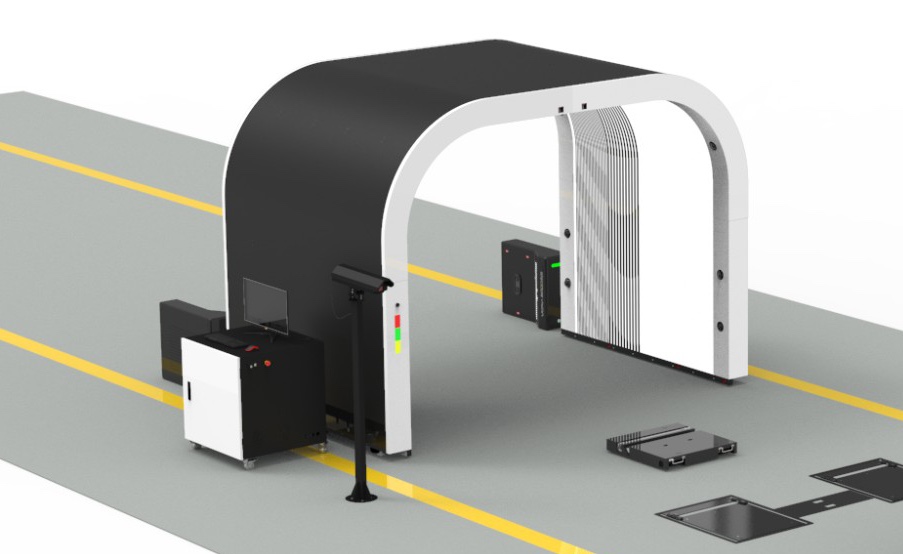
What an Installed Elscope Vision Lane Adds at the Store
How the Lane Works With Acquisition, Valuation and Listing Tools
Bonus tips: Preparing an Installed Lane for Capital Approval
FAQ
Can a store run an installed lane and a remote trade-in tool at the same time?
How should a group choose the first store for a lane?
Plan an Installed Lane for Your First Store
Let's Discuss Your Inspection Needs
We offer professional consultation services
Address : NO. 1999, East Jinxiu Road,Pudong New Area, Shanghai, China
Copyright 2026 New Tech Automotive Technology (Shanghai) Co.,Ltd. All Rights Reserved Information Security
Follow Us


Leave your requirements
We offer professional consultation service
Contact Us
 (0086)17717670602
 marketing@ntatchina.com
 8617717670602
Follow Us
Address : NO. 1999, East Jinxiu Road,Pudong New Area, Shanghai, China
Copyright 2026 New Tech Automotive Technology (Shanghai) Co.,Ltd. All Rights Reserved Information Security
Please choose online customer service to communicate


