
Autor: NTA Time: 2026-10-15 09:55:40 Click:
A lane-sizing method for vehicle logistics hubs that plans around car-carrier batch arrivals instead of hourly averages, with formulas for lane count, clearance time and peak queue space plus a worked example.
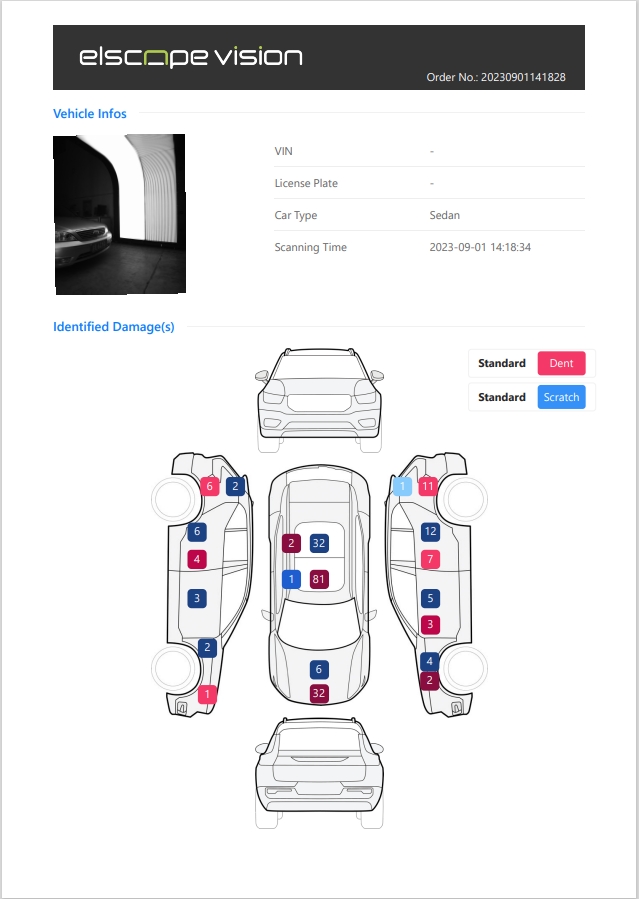
A vehicle logistics inspection lane should be sized for the design batch it must clear within a target time window, not for average hourly traffic. Vehicles reach the lane as truckloads, rail cuts and vessel discharge waves, so the planning question is how many vehicles are released in the busiest window and how quickly each one needs an arrival scan. Lane sizing takes four inputs: the design batch, the release profile of the unloading crew, the effective cycle time per scan in your lane, and the clearance target. From those, a planner can calculate the number of lanes and the staging space for the queue, then add a review share and review time to size the staffing behind the scanner. Official product image of the Elscope Vision arch scanner with its operator console. Take an illustrative hub that receives 480 vehicles over a 16-hour operating day, an average of 30 vehicles per hour. That figure suggests one lightly used lane, yet the same hub could see around 200 vehicles released within a single hour when a rail cut and several truck carriers are unloaded together. The average hides the shape of arrivals. Truck carriers can release a full deck in a short burst, rail cuts can feed a steady stream for an hour or more, and a vessel discharge can run for an entire shift. When the lane falls behind, the cost can appear in three places. Vehicles may wait in the unloading area, carrier drivers may wait for the handover record, and vehicles may be moved into the parking grid before their arrival condition has been recorded. Start with arrival records that cover every arrival mode, typical overlaps between events and any seasonal peaks the hub expects. Each arrival event needs enough detail to rebuild when vehicles actually reached the lane. From these records, calculate the vehicles released in the busiest 60 or 120 minutes of each day. Choosing the design level is a service decision, so test a high percentile of that distribution against the delay the hub can accept and the staging space it has. The arch scanner product page describes automatic body scanning with no stopping required, at 10 seconds per vehicle and up to 1,500 vehicles per day. These are product capability figures. Lane sizing uses the effective cycle time measured on site: the interval between one vehicle entering the scan and the next vehicle entering it. The effective cycle time reflects the capture pass and everything around it in your layout. Time the components below during a site trial to find the bottleneck, then measure the actual entry-to-entry interval rather than adding steps that happen in parallel. Convert the interval into an hourly scan rate: 3,600 divided by the effective cycle time in seconds. Apply a planning factor below 100 percent, because driver spacing varies and queues build quickly when a lane runs near its limit. If the site rule sends some vehicles through a second time, divide the scan rate by (1 + rescan share) to get vehicles completed per hour. Three capacity formulas cover most sizing decisions. Each uses the planned completion rate per lane from Step 2, and the first two give lower bounds that the release profile then has to confirm. 1. Minimum lanes = design batch divided by (planned completion rate per lane multiplied by the clearance window in hours), rounded up. 2. Minimum clearance time = design batch divided by (number of lanes multiplied by the planned completion rate). Vehicles released late in the window can leave lanes idle early on, so the actual finish time comes from stepping through the release profile. 3. Peak staging spaces = the largest value, over the release period, of vehicles released so far minus vehicles completed so far, plus any queue already waiting when the batch starts. A simple way to apply all three is a minute-by-minute table of vehicles released, vehicles completed and vehicles waiting. With an even release that runs faster than the lanes, the queue grows steadily and peaks when the release ends; a front-loaded release, such as several truck decks unloaded at once, peaks earlier and higher. The numbers below are illustrative assumptions for a hypothetical hub. They are not industry benchmarks or measured results from any site. 1. Design batch: one rail cut of 180 vehicles plus two truck carriers of 8 vehicles each, for 196 vehicles released evenly over 60 minutes. 2. Effective cycle time: 40 seconds per scan, giving 90 scans per hour per lane. 3. Planning factor: 75 percent, giving 67.5 planned scans per hour per lane. 4. Rescan share: 3 percent of vehicles pass a second time, giving about 65.5 completed vehicles per hour per lane. 5. Clearance target: every vehicle in the batch has an arrival scan within 120 minutes of release starting, with no queue waiting at the start. Sizing by the 30-vehicle hourly average would point to one lane. Sizing by the batch shows that one lane misses the 120-minute target by about an hour and needs space for roughly 130 waiting vehicles. In this simplified example, two lanes meet the target with a peak queue of about 65 vehicles. A third lane mainly reduces staging demand, supports a shorter clearance target or keeps capacity available when one lane is out of service. To turn the queue into site space, multiply the peak queue by the length each waiting vehicle occupies in your layout, including the gap between vehicles. If one approach road cannot hold that length, options include parallel stacking lanes or another inspection lane, which trades staging area for equipment. Scanning is the first stage of the handover. Where the site procedure sends vehicles with findings to a human review before acceptance, the review queue fills at the scan completion rate multiplied by the review share. Official Elscope Vision sample body inspection report with dent and scratch markers on each vehicle view. The arch scanner report shows the total number, location and severity of defects on each vehicle surface, with severity shown in different color shades. Because findings are located by surface, a reviewer can start at the marked areas, and the site can time those reviews during its batch trial to set its own review-time assumption. Continuing the example, assume 20 percent of vehicles need a review and each review takes 3 minutes. Two lanes complete about 131 vehicles per hour, which creates about 79 reviewer minutes per hour, so two reviewers with 60 working minutes each keep pace; the whole batch adds about 118 reviewer minutes. The pull-aside bays need the same check, or vehicles waiting for review will back up into the scan lane. Minimum bays, based on average review flow, = review vehicles per hour multiplied by the minutes each one occupies a bay, divided by 60 and rounded up. With about 26 review vehicles per hour and an assumed 4 minutes per vehicle including entry and exit, the example needs at least 2 bays, and a third gives room for uneven arrivals. Decide early who drives each vehicle through the lane, the carrier driver or yard staff, because it affects vehicle spacing in Step 2 and who is present at review. Where both parties are on site, holding the review at the pull-aside bay lets carrier and yard staff compare the marked areas on the vehicle before the handover record is closed. Several operating choices change the design batch or the cycle time without another lane. Each one should be tested against the same arrival records used in Step 1. 1. Meter the release: where carrier and rail schedules allow, unload at a rate the lanes can absorb, so vehicles wait on the transport mode rather than in a congested staging area. 2. Share lanes by time: let an outbound dispatch lane take inbound overflow during known batch windows, provided it has spare capacity, the traffic routes do not cross and each scan carries the correct event label. 3. Place the lane on the natural route: position the arch between the unloading area and the parking grid so no extra vehicle moves are added. 4. Add a pull-aside bay after the arch: vehicles needing review leave the flow without blocking the next scan. 5. Capture identification before the arch: matching VIN or plate ahead of the scan, with a reliable link to the scan record, keeps identification out of the cycle time. The Elscope Vision 4-in-1 solution for passenger cars inspects the exterior, tire tread, tire sidewalls and underbody in one drive-through. Where a hub adds those checks, measure the effective cycle time for the full configuration rather than for the body scan alone. Run the trial during a real batch event, not with a single vehicle at a quiet hour. Time-stamp every vehicle at release, scan start, scan end and review completion, then recalculate the planned completion rate from those records. The Elscope Vision arch scanner supports API integration and on-premises deployment. The integration design for the project should map the scan timestamps and records the planner needs into the yard or logistics system, so they can be combined with unloading records into a measured queue profile for each arrival mode. Repeat the calculation whenever the arrival pattern changes, such as a new rail schedule, a larger vessel rotation or a new manufacturer contract. 1. Keep separate design batches for truck, rail and vessel arrivals, because each mode creates a different queue shape. 2. Track the share of vehicles reaching parking without an arrival scan as a daily signal that the lane plan is under pressure. 3. Review the planning factor once measured cycle times from routine operation are available, replacing the trial values. Treat a long discharge as a sustained release rate rather than a single batch. When the lanes' planned completion rate stays comfortably above a steady release rate, the queue stays short; when it falls below, staging demand grows for the whole shift, so metering or an additional lane becomes the main decision. Sharing can work when inbound batches and outbound loading peaks happen at different times of day and the combined demand fits the lane's planned rate. Each scan needs a clear event label, such as arrival or dispatch, so records from the same vehicle are not confused later. A practical starting point is to test the 90th and 95th percentiles of the busiest-hour volume against the site's staging space and clearance target. The final choice depends on how much delay the hub's service commitments allow on the heaviest days, so test the selected level against higher-volume release profiles to see whether the lanes still meet the clearance target and staging limit. If your team is sizing inspection lanes around truck, rail or vessel arrivals, contact the Elscope Vision team to discuss your site requirements and arrange a demonstration.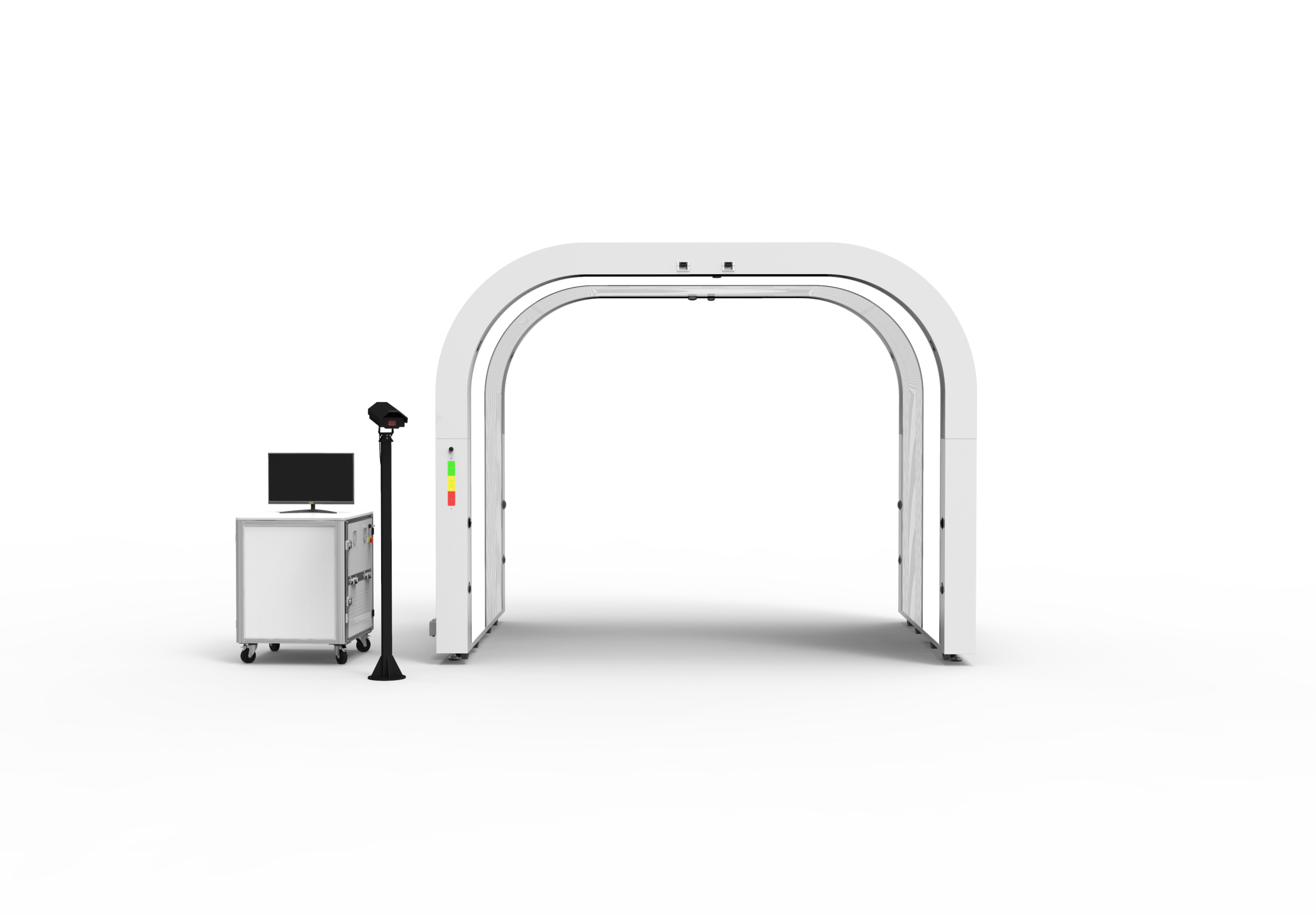
Why hourly averages understate lane demand
Step 1: Describe demand as batches, not traffic
Field Why it matters for sizing Arrival mode (truck, rail, vessel) Each mode has a different batch size and release pattern Batch size (vehicles per event) Sets the volume the lane must absorb Unload start and end time Gives the release window and release rate Overlapping events in the same window Combined batches set the true peak Time each vehicle reached the lane Shows the real queue, not the planned one Handover deadline for the batch Sets the clearance target Step 2: Measure the effective cycle time per scan
Component What to measure Capture pass Time from entering to leaving the scan zone Spacing between vehicles Gap drivers keep at the lane's set speed Vehicle identification Time to match VIN or plate to the scan record Approach and exit Turning space, crossings and merges near the lane Step 3: Calculate lanes, clearance time and staging space
A worked example with stated assumptions
Option Completed vehicles per hour Clearance time Queue when release ends (peak under even release) 1 lane About 65 About 3.0 hours About 130 vehicles 2 lanes About 131 About 1.5 hours About 65 vehicles 3 lanes About 197 About 1.0 hour, set by the last release Near zero Step 4: Size the review step behind the lane
Step 5: Use operating levers before adding hardware
Step 6: Validate the sizing in a batch trial
Bonus tips: keeping the lane plan current
FAQ
How should a hub handle a vessel discharge that runs for a full shift?
Should the arrival scan and the dispatch scan use the same lane?
Which percentile should a planner use for the design batch?
Plan your batch-ready inspection lane
Let's Discuss Your Inspection Needs
We offer professional consultation services
Address : NO. 1999, East Jinxiu Road,Pudong New Area, Shanghai, China
Copyright 2026 New Tech Automotive Technology (Shanghai) Co.,Ltd. All Rights Reserved Information Security
Follow Us


Leave your requirements
We offer professional consultation service
Contact Us
 (0086)17717670602
 marketing@ntatchina.com
 8617717670602
Follow Us
Address : NO. 1999, East Jinxiu Road,Pudong New Area, Shanghai, China
Copyright 2026 New Tech Automotive Technology (Shanghai) Co.,Ltd. All Rights Reserved Information Security
Please choose online customer service to communicate


