
Autor: NTA Time: 2026-10-30 17:08:43 Click:
How multi-site groups read published module scope for PTI stations and logistics yards, and why cross-site version alignment belongs in the rollout plan.
A group rolling inspection out across several stations or yards needs to know which modules have been deployed at sites like its own, and whether site five will produce records that line up with site one. For multi-site vehicle inspection, published deployments at PTI stations, PTI centers and logistics yards give the group candidate configurations to discuss, and the rollout plan is where it works out the second point. Elscope Vision publishes deployment scope by module: its announcements and solution pages name which inspection modules run in which kind of site, which gives a multi-site group a concrete starting point. For PTI, two 2026 deployment announcements describe a tread-and-underbody station and a four-function center, and the table below adds the logistics side. Scenario coverage tells a group which modules have been put to work in an inspection center, a vehicle logistics yard or another site type. Version compatibility concerns the group's own estate: whether every site runs a software and report version that lets central teams read records side by side. The rollout plan fixes that version baseline and the acceptance criteria each site is checked against. Starlinks' post describes its own yards, and Elscope Vision's logistics page features a Starlinks customer story video. Elscope Vision's solution pages present the 4-in-1 as four scanners, and the layout rendering above shows them as separate pieces of lane equipment: an arch, floor units and a control cabinet. With a two-module PTI deployment already published, a group can plan tread-and-underbody sites alongside four-function sites. We recommend writing the rollout plan before the first installation, so the first site's confirmed module set, version and report format carry over to the sites that follow. 1. Site and module register. List every site with its inspection duty and the module set it will run, for example tread and underbody at one station type and the full four functions at another. 2. Version baseline. Record the software and report version each site goes live on, and agree how updates are scheduled across sites so that one location does not drift ahead of the others without a plan. During a phased rollout, the plan also states how central reporting reads records from sites that are on different versions. 3. Common report fields. Define which report fields central teams read across all sites, and how fields from modules that only some sites run are shown when they are absent. 4. Vehicle key. Fix the identifier that ties one vehicle's records together when it is inspected at more than one site. Logistics yards may handle new vehicles that do not carry registration plates yet, while the group's PTI stations may work from plates. A group running both picks one primary identifier and a rule for linking the other to it. 5. Integration and deployment per site. Elscope Vision supports both cloud storage and on-premises deployment, its 4-in-1 solution supports API integration, and the Turkish announcement describes inspection data connecting to existing systems through APIs. For each site, the plan names the management system that receives results and where inspection data is kept, in the cloud or on premises. It also covers how results are handled while a site's connection to central systems is interrupted. 6. Acceptance at the first site. Treat the first site's acceptance results as the reference that later sites are checked against, including the version, the report format and the sample vehicles confirmed at sign-off. 7. Site sequence. Set the order in which sites go live. Before the next group of sites starts, review the template against the sites already running, and arrange for staff from a live site to help train the next site's team. Illustrative example: when a high-volume center runs all four functions and a smaller station runs tread and underbody, group reporting has to be built around the modules each site actually runs. Tread and underbody are the modules both station types share, so they are the natural candidates for cross-site comparison. To compare them, the group can require both station types to use the same tread and underbody report fields, set the conditions for comparing results, and check both at each site's acceptance. Body and sidewall results come only from the four-function sites, so central reporting should measure those findings against the vehicles inspected at sites that run the relevant module. A station without sidewall inspection has no sidewall result, which is not the same as a result of zero defects, and the reporting design has to keep the two apart. Group reports that let managers filter by the module set each site runs make that distinction visible. In this illustrative example, one option for the first site is a four-function center, where the report fields and layout for body, tread, underbody and sidewall results can be discussed and agreed during the first acceptance. Its tread and underbody fields then become the reference that two-module stations are checked against at acceptance. For a logistics network that adds yards over time, a record of the date each yard's scanners went live shows which inspection areas its historical records cover. Elscope Vision's PTI and vehicle logistics 4-in-1 pages list the same four scanners: arch, tire sidewall, underbody and tire depth. A group can choose to plan both site types in one rollout. For each site, the items to settle then include its module set, its report recipients and the system it sends results to. The rollout plan sets the target software and report version for each site, the installation record shows what each site went live on, and each site's acceptance check compares the two. Later updates are logged against the same baseline, so a site that updates ahead of the others shows up in the record. Share your list of locations, their inspection duties and the go-live order with Elscope Vision to work through a phased rollout site by site, starting before the first lane goes in.Scenario Coverage and Version Compatibility Are Separate Questions
Published Module Scope by Scenario
Scenario (Illustrative, compiled from the public sources listed) Published module scope Source Defined in the group's rollout plan PTI station, two modules Tire tread and underbody inspection equipment Elscope Vision announcement, September 15, 2026 (Turkey) Which stations start with this scope and which data fields they share with four-function sites PTI center, four functions Vehicle body, tire tread depth, underbody and tire sidewall inspection in one drive-through Elscope Vision announcement, October 28, 2026 (Middle East) Report layout the group adopts as its common format Vehicle logistics yards Car recognition camera, tire tread depth scanner, underbody scanner, arch 360 scanner and tire sidewall scanner Starlinks' own blog post, April 1, 2026 (yards in Jeddah and Riyadh, with Dammam listed as coming soon) How each yard's records reach the shared yard management system PTI and logistics solution pages Arch scanner, tire sidewall scanner, underbody scanner and tire depth scanner Elscope Vision PTI and vehicle logistics 4-in-1 pages Each site's integration target and deployment architecture 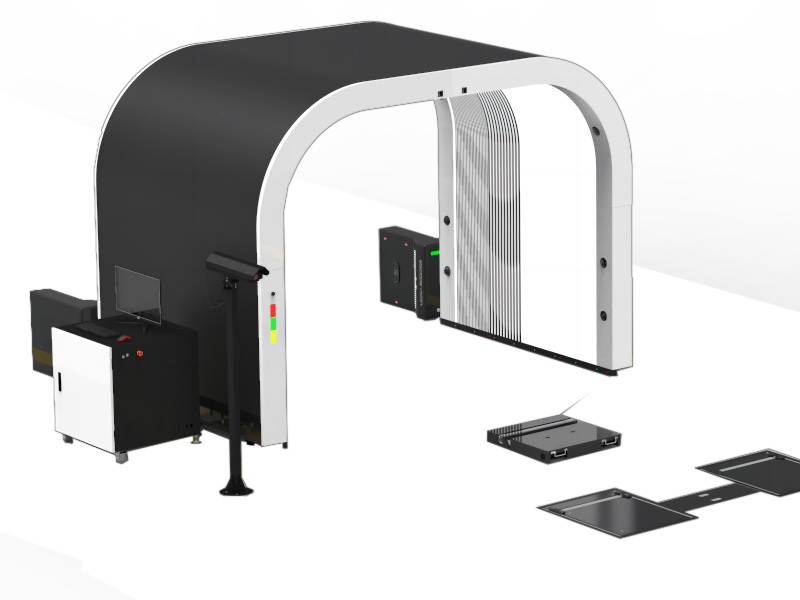
Turning Published Scope Into a Site-by-Site Plan
Comparing Records When Sites Run Different Module Sets
FAQ
Can one rollout cover PTI stations and logistics yards together?
What confirms that two of our sites run matching versions?
Sequence Your Sites Before the First Install
Let's Discuss Your Inspection Needs
We offer professional consultation services
Address : NO. 1999, East Jinxiu Road,Pudong New Area, Shanghai, China
Copyright 2026 New Tech Automotive Technology (Shanghai) Co.,Ltd. All Rights Reserved Information Security
Follow Us


Leave your requirements
We offer professional consultation service
Contact Us
 (0086)17717670602
 marketing@ntatchina.com
 8617717670602
Follow Us
Address : NO. 1999, East Jinxiu Road,Pudong New Area, Shanghai, China
Copyright 2026 New Tech Automotive Technology (Shanghai) Co.,Ltd. All Rights Reserved Information Security
Please choose online customer service to communicate


