
Autor: NTA Time: 2026-08-20 18:32:22 Click:
Explains how operators can inventory inspection data, set recovery objectives, separate copies, restore dependencies, and prove recovery through tests.
An on-premise inspection server is the production system, not the backup. Hardware failure, configuration error, malware, facility disruption, or an unsuccessful update can make images, reports, settings, and integrations unavailable at the same time. Restoring only the image folder may still leave the lane unable to identify records or communicate with connected systems. This article explains how to inventory the full data set, define recovery objectives, protect independent copies, restore dependencies in order, and prove the plan with test evidence. A workable recovery plan covers source images and measurements, structured reports, operational databases, configuration and calibration records, software and rule versions, access and audit logs, API queues, credentials, and the systems needed to use them. It also defines how much loss is acceptable, how quickly each service must return, who owns every step, and how a test will prove recovery. Three concepts anchor the plan: • Recovery Point Objective (RPO): the maximum acceptable data gap, expressed in time or inspection events. • Recovery Time Objective (RTO): the target time for restoring a service or data set. • Restore evidence: dated records showing that the selected backup can be restored and validated. The Elscope Vision Passenger Vehicle 4-in-1 Solution combines body, underbody, tread, and sidewall inspection modules and supports API-based integration. The underbody scanner product page describes local data storage and API support. Those capabilities can support a recovery design, but they do not create backup, redundancy, immutability, or disaster recovery by themselves. The NIST Contingency Planning Guide for Federal Information Systems provides a useful neutral planning model: identify critical resources, develop recovery strategies and procedures, test the plan, and maintain it as systems change. Operators should adapt that approach to their own obligations and architecture. Begin with the business services the inspection lane provides, then trace every supporting component. A typical inventory includes: • source body, underbody, tread, and sidewall images or measurements; • structured findings, reports, annotations, and review history; • vehicle and scan-session identifiers; • operational databases and indexes; • application, module, model, rule, and schema versions; • configuration, calibration, site, lane, and device mappings; • user, role, access, configuration-change, export, and audit logs; • API messages, retry state, reconciliation status, and endpoint mappings; • secrets, certificates, keys, and credential-recovery procedures; • operating systems, databases, drivers, application packages, and licenses; • network, identity, storage, time, and monitoring dependencies. Do not place secrets or private keys in an ordinary backup without an approved protection and recovery method. A backup that restores data but not the ability to decrypt, authenticate, or validate it is incomplete. The table is a planning template. The operator fills in the RPO and RTO after business-impact analysis; the values should not be copied from another site. Document dependencies between tiers. A report archive may be intact but unusable until the database index, application version, and encryption keys are restored. A second copy on the same server does not protect against server failure or compromise. Design separation across failure domains. Depending on risk and architecture, that may include a separate storage system, an offsite location, cloud object storage, offline media, or an immutable snapshot. The recovery design should answer: • Can a compromised production account alter the backup? • Does the backup survive loss of the server, room, or site? • Are copies encrypted and are recovery keys protected separately? • Is data transferred and retained according to policy and applicable law? • Can the organization restore without an unavailable individual or vendor account? • Is capacity monitored before the backup target fills? Immutability and offline copies reduce the chance that the same event damages production and backup data. They still require expiration rules, monitoring, and restore testing. Recovery is a dependency sequence, not a file-copy race. A typical order is: • Phase 1: safety, facilities, power, network, time, and core identity services. • Phase 2: protected secrets, certificates, and recovery credentials. • Phase 3: supported operating system, database, drivers, and application version. • Phase 4: site, lane, device, configuration, and calibration data. • Phase 5: operational databases and scan-session indexes. • Phase 6: current reports, images, measurements, and review history. • Phase 7: integrations, API queues, retries, and reconciliation controls. • Phase 8: older archives and lower-priority reporting. Document variations for partial failures. Losing an API endpoint is different from losing the inspection database. A runbook should identify which components can remain online, which must stop, and which approved alternate process applies. Inspection data is interpretable only with its context. Back up the software, model, rule, schema, and taxonomy versions associated with the record. Preserve configuration and calibration exports after approved changes and link them to the change record. Do not restore an old database into an incompatible application version without a tested migration path. Likewise, do not assume that a newly installed model can reproduce the original finding. Historical records should remain linked to the version that produced them. The record is not complete merely because it exists in the inspection system. If a DMS, fleet platform, PTI application, or other system did not receive it, the business workflow may still be incomplete. Back up or reconstruct the information needed to identify pending, acknowledged, failed, retried, and duplicate events. After recovery, reconcile both sides before replaying messages. Use stable event identifiers so the receiving system can detect duplicates where supported. Credentials and certificates need a separate recovery procedure. Record ownership, renewal, revocation, and emergency replacement without exposing secret values in the runbook. 1. Select a documented scenario. State which systems, data sets, and failure conditions the test covers. 2. Protect production. Use an isolated environment or approved method that cannot overwrite live data or send unintended events. 3. Identify the backup set. Record its creation time, scope, protection state, and expected RPO. 4. Restore foundational dependencies. Validate network, time, identity, credentials, database, and application prerequisites. 5. Restore configuration and calibration. Confirm site, lane, device, version, and mapping data. 6. Restore representative records. Open images, measurements, reports, annotations, and review history from different dates and modules. 7. Validate referential integrity. Confirm vehicle, scan-session, evidence, finding, and user references still match. 8. Test integration safely. Reconcile and transmit approved test events, including retry and duplicate handling. 9. Measure against objectives. Record actual data gap, restore time, failures, workarounds, and residual risk. 10. Close corrective actions. Assign owners, retest criteria, approvals, and plan updates before declaring the exercise complete. Calendar-based exercises are useful, but change-triggered testing is equally important. Review or retest after significant software, model, database, configuration, storage, network, identity, API, credential, hardware, site, or retention changes. Retest after a real incident and after any failed backup or restore validation. Track coverage across scenarios. Repeating only a file-level restore does not prove full lane recovery, API reconciliation, credential recovery, or site-loss readiness. Is local storage the same as a backup? No. Local storage describes where production data resides. Backup requires an independent recoverable copy and a tested procedure. What RPO and RTO should an inspection site use? Set them through business-impact analysis based on vehicle volume, alternate procedures, contractual obligations, evidence needs, and technical dependencies. Can backups run while the lane operates? That depends on the deployed storage, database, application, performance, and consistency controls. Test the selected method under representative load. Does the API automatically back up inspection data? No. API support can enable transfer or integration, but the operator must design the target, schedule, integrity checks, protection, retention, and recovery procedure. What proves that a backup is usable? A successful restore with validated records, dependencies, integrations, measured objectives, and closed corrective actions. Disaster recovery succeeds when the lane can resume an approved workflow with trustworthy evidence, known versions, controlled access, and reconciled downstream events. A complete inventory and repeated restore tests expose missing dependencies before an incident does. Contact Elscope Vision to discuss how Passenger Vehicle 4-in-1 data and API capabilities can fit into your on-premise backup and recovery architecture.Direct Answer: Protect Every Dependency and Prove the Restore
Inventory the Complete Recoverable System
Classify Recovery Tiers by Business Impact
Recovery tier Example components Questions for setting RPO Questions for setting RTO Lane-critical Current configuration, calibration, operational database, active credentials How many inspection events can be reconstructed safely? How long can the lane use an approved alternate procedure? Evidence-critical Source images, measurements, findings, review history What dispute, regulatory, or contractual evidence cannot be recreated? When must reviewers and customers regain access? Integration-critical API queue, mappings, certificates, reconciliation state How many messages can be replayed or rebuilt? When do connected systems begin creating operational risk? Governance-critical Access, change, export, deletion, and audit logs What history must remain continuous? When must investigation and oversight resume? Reference and archive Older completed records and approved exports What retention policy applies? Can restoration wait until critical services are stable? 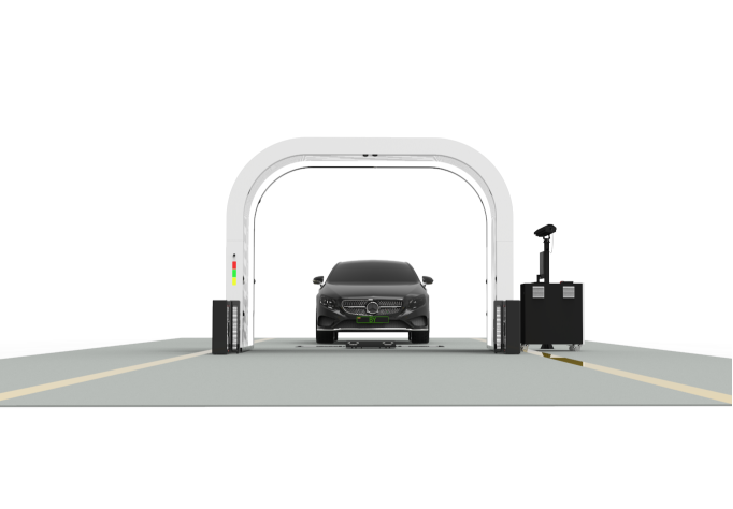
Use Independent and Recoverable Copies
Define the Restore Order Before an Incident
Preserve Configuration and Change Context
Treat API Queues as Recoverable State
Run the Restore Test in Ten Steps
Retest When the System Changes
FAQ
Recover the Workflow, Not Just the Files
Let's Discuss Your Inspection Needs
We offer professional consultation services
Address : NO. 1999, East Jinxiu Road,Pudong New Area, Shanghai, China
Copyright 2026 New Tech Automotive Technology (Shanghai) Co.,Ltd. All Rights Reserved Information Security
Follow Us


Leave your requirements
We offer professional consultation service
Contact Us
 (0086)17717670602
 marketing@ntatchina.com
 8617717670602
Follow Us
Address : NO. 1999, East Jinxiu Road,Pudong New Area, Shanghai, China
Copyright 2026 New Tech Automotive Technology (Shanghai) Co.,Ltd. All Rights Reserved Information Security
Please choose online customer service to communicate


