
Autor: NTA Time: 2026-10-15 09:57:02 Click:
An operating model for shared inspection hubs serving several dealerships and fleets: how to assign each scan to a client, keep client data separate, and reconcile billing from one event log.
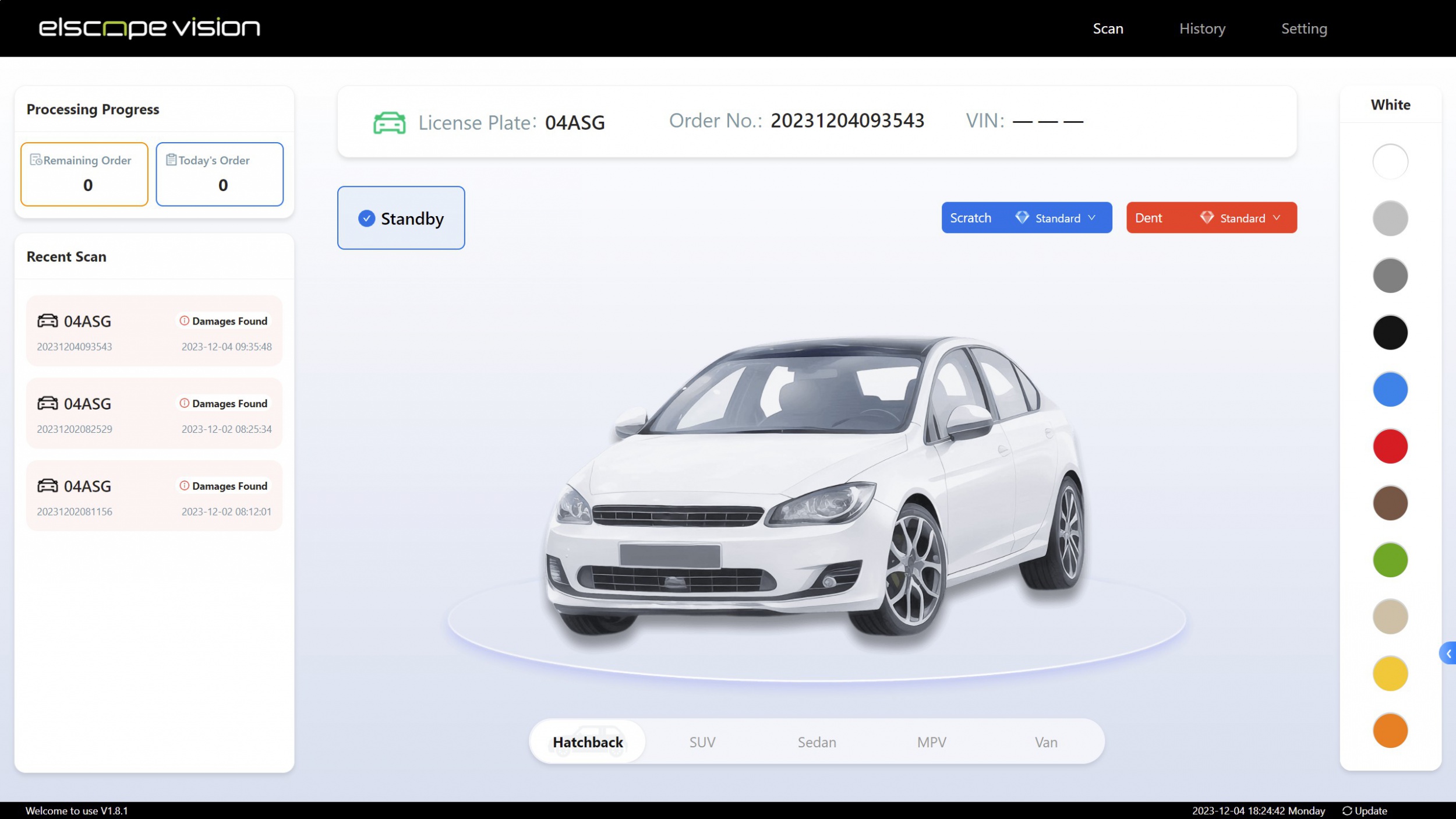
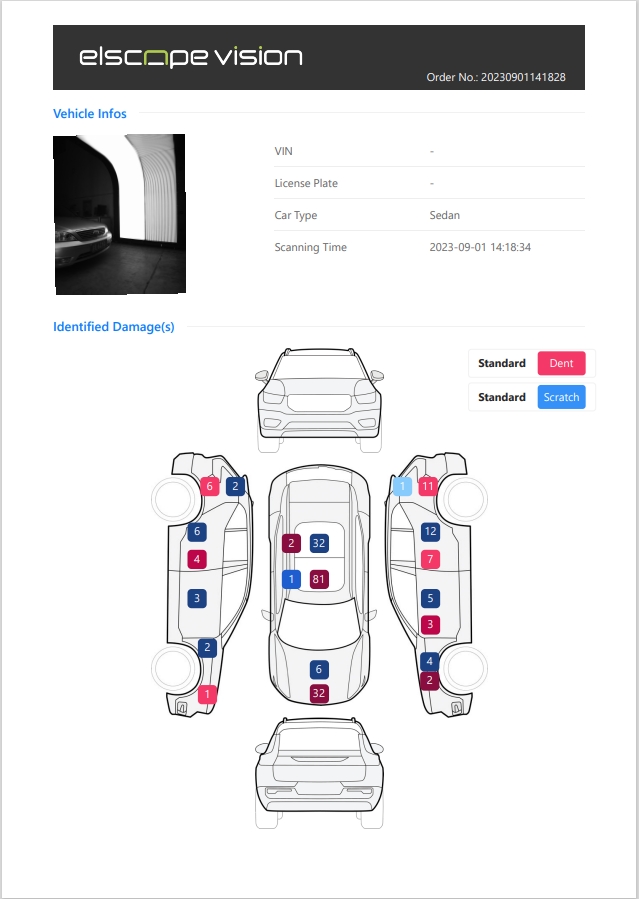
A shared vehicle inspection hub can serve several dealerships and fleets from one lane when three rules are fixed before the first vehicle arrives. Every inspection is assigned to one client account before the scan, or held in a hub-only queue until it is, every record is stored and delivered inside that client's boundary, and every invoice line is generated from the same event log that produced the report. The inspection equipment supplies the standardized record. The hub's own software layer owns the tenancy rules, the price book and the reconciliation, so those rules have to be designed, written into client contracts and tested at go-live. Isolation sets the boundary of what each client account can reach, and roles and sharing rules then work inside that boundary. That is why it comes before billing design, and a hub can consider three models, or combine them by client size. Deployment flexibility matters here. Elscope Vision's Passenger Vehicle 4-in-1 Solution supports API integration and on-premises deployment, and the official page states that data is stored locally with secure access and full traceability. A hub can therefore host the inspection server at its own site and build its client-segregation layer on the API during project integration, including field mapping, access control and delivery logic. With a hub-managed on-premises server, the hub controls where records sit. Access controls, retention rules and client contracts around that storage support the hub in meeting applicable privacy requirements. Attribution errors can expose records to the wrong client and create billing disputes. The rules below are designed to keep one owner per inspection and to log every exception. 1. Before the lane: pre-register vehicles from client manifests or work orders, keyed on VIN with license plate as a secondary key. VINs under U.S. rules in 49 CFR Part 565 follow a fixed 17-character structure, while plate assignments can change depending on local registration rules. 2. At lane entry: confirm the client by matching the plate or VIN to an open work order, so the inspection is created under that account before the scan starts. 3. For double claims: apply an agreed payer rule. When a fleet vehicle is serviced at a dealership, the inspection is assigned to the client on the active work order, and routine sharing with the other party follows the permissions set out in both client contracts. 4. For unmatched vehicles: route them to a hub-only quarantine queue. Staff assign them to an account within an agreed window, or the inspection is closed as non-billable and never delivered. 5. For re-scans: give every physical pass its own scan attempt ID and link re-scans to the original inspection ID, so the client sees one inspection history and billing can apply the re-scan rule to each attempt. 6. For reassignments: log every change with the old account, new account, reason, approver and timestamp. Revoke the first client's access in hub views and the API feed at reassignment, and handle any copy already delivered through the agreed correction process. Throughput is the reason attribution belongs before the scan. The vehicle logistics solution describes scanning one vehicle in 10 seconds and inspecting up to 1,500 vehicles per day, so deferring ownership decisions to the end of a shift adds reconciliation work quickly. With ownership fixed at entry, the lane keeps moving while report delivery and billing run afterwards from the stored record. Official Elscope Vision inspection software screen with license plate, order number and VIN fields. The capture screen shown includes license plate, order number and VIN fields alongside a recent scan list. The hub maintains the mapping between that order number, the client's work order and the client account ID, and checks it before any report is delivered or billed. A 4-in-1 drive-through covers the exterior, tire tread, tire sidewalls and underbody in one pass. One physical pass can therefore produce four module results, and the contract has to say whether the client pays per inspection or per module. The hub's integration should record completion per module, so a partial pass is counted under the contract's incomplete-module rule rather than argued case by case. Pricing itself belongs in the hub's price book. The contract only needs to fix how scan attempts and inspections become countable units. These fields let the hub and the client match an invoice line to a report without opening either system's database. 1. Inspection ID and scan attempt ID. 2. Client account ID and client site or branch code. 3. VIN, license plate and the client's work order or purchase order reference. 4. Lane ID and scan timestamp. 5. Modules contracted and modules completed. 6. Report ID, platform order number and report status: complete, partial, re-scanned or voided. 7. Billable flag with a reason code, such as hub fault or client request. 8. Price code reference from the hub's price book. 9. Delivery channel and delivery timestamp. The calculation below uses invented figures and assumes a contract that bills per scan attempt and excludes hub-caused re-scans. Each hub replaces the figures with its own event log. 1. Scan attempts assigned to Client A in the month: 1,240, made up of 1,190 first passes and 50 re-scans. 2. Hub-caused re-scans flagged non-billable: 38. 3. Client-requested re-scans: 12, billable under this contract. 4. Quarantined attempts still unassigned at month end: excluded until assigned, so they never inflate any client's total. 5. Billable scan attempts: 1,240 minus 38 equals 1,202, each priced by the module mix recorded on that attempt. The client receives the attempt-level file with the invoice. Disputes are then settled line by line against inspection and attempt IDs rather than against totals. Shared export folders and report links without access control can break client isolation at the last step. Each client should have its own API credentials, its own delivery endpoint and portal views filtered by client account and user role. Elscope Vision's 4-in-1 solutions generate a standardized digital inspection report, which gives the hub one consistent base for its dealership and fleet deliverables. On the Dragate arch scanner report, body defects are shown by total number, location and severity on each vehicle surface, with severity highlighted in different shades of color. Official Elscope Vision sample body inspection report with dent and scratch markers on each vehicle view. The illustrated report includes fields for order number, VIN, license plate and scanning time, which the hub maps to its own inspection ID. With that mapping and the delivery logic in place, the hub can use API integration to push each report to the right client system once the attribution rules confirm the owner. Clients will eventually ask who opened their records and what happens to their data when the contract ends. Two published frameworks help structure the answer. 1. Use the Access Control and Audit and Accountability control families in NIST SP 800-53 Rev. 5 as a checklist for role-based access, access logging and log review. 2. When GDPR applies and the hub processes personal data on a client's behalf and under its instructions, the hub acts as a processor. GDPR Article 28 requires processors to act on documented instructions, delete or return personal data and existing copies at the end of the service at the controller's choice unless law requires storage, and allow audits. 3. Log every view, export, API pull, reassignment and deletion with user, client account, record ID and timestamp. 4. Define retention separately for billing records and inspection records, since their purposes and applicable requirements can differ. 5. Test offboarding before go-live: export one client's full history, delete it from storage and backups on the agreed schedule, confirm a backup restore does not bring it back, and confirm no other client's data changed. 1. Run a weekly report of quarantined and reassigned inspections per client, because rising numbers can signal manifest or attribution problems before they become invoice disputes. 2. Give each client a sample attempt-level file during onboarding so their finance team approves the reconciliation format early. 3. Separate lane operator roles from client account administration, so staff who drive vehicles through cannot change ownership of a record. 4. Review access logs for each client quarterly and share a summary with clients who request it. That depends on the sharing terms both clients agreed with the hub. The inspection sits under the client on the active work order, and routine sharing works best as a logged permission rather than a default view. The inspection is reassigned with a logged reason and approver, and the first client's access in hub views and the API feed is revoked. The original scan time and the correction time are both kept, and any invoice line already issued is credited and rebilled under the contract. The client opens a dispute ticket against the inspection ID, and a hub reviewer with dispute rights opens that inspection's stored report and images under a logged access. The outcome is recorded on the same inspection, so the original finding, the review note and any billing adjustment stay together. A separate line makes extended retention easier to reconcile when fleets need longer audit retention than dealerships. A clear retention term with a deletion trigger also simplifies offboarding. The lane equipment can stay shared, because separation happens at the account, storage and delivery layers. A dedicated server instance is an option for a client whose security review requires it. If your team is planning a multi-client inspection hub and wants to see how the 4-in-1 inspection flow, standardized reports and API integration fit your client model, contact Elscope Vision to discuss your inspection setup.Choose a client isolation model first
Isolation model How records are separated Best fit Main operating cost Logical separation Shared database; every record carries a client account ID, and access rules filter by it Many small dealerships with similar needs Access rules must be tested on every report, export and API call Partitioned storage Separate database schema or storage partition per client, shared application Mid-size fleets that ask for clean deletion at contract end More partitions to back up, monitor and migrate Dedicated instance Separate server instance for one client, run at the hub or the client's site A large client with its own security review or data-location terms Separate upgrades, credentials and support for each instance Attribute every inspection event to exactly one client
Define the billable unit before the first invoice
Billable unit What counts Works well for Rule to write down Per completed inspection One inspection ID with all contracted modules completed Dealerships buying a standard intake check What happens when one module is incomplete Per module Body, tread, sidewall or underbody result, each counted separately Fleets that only need tires on most visits Which modules are bundled at a single rate Per re-scan An additional scan attempt on the same inspection ID Clients who request re-scans after cleaning or repair Whether hub-caused re-scans are excluded from billing Per delivery or integration Report pushes to a client system, extra exports Clients with their own fleet or dealer systems Whether API delivery is included in the base fee Per retention period Storage kept beyond the contracted term Fleets with long audit needs Retention term and deletion trigger Reconciliation fields every event should carry
Monthly reconciliation framework
Deliver reports only to the client that owns them
Build the audit trail and plan client offboarding
Bonus tips: running a multi-client hub day to day
FAQ
Can a fleet see inspections of its vehicles that a dealership paid for?
What should happen when a vehicle is scanned under the wrong client?
How should the hub handle a client who disputes a finding?
Should storage beyond the contract term be billed separately?
Does one inspection system need separate hardware for each client?
Plan client separation before the first scan
Let's Discuss Your Inspection Needs
We offer professional consultation services
Address : NO. 1999, East Jinxiu Road,Pudong New Area, Shanghai, China
Copyright 2026 New Tech Automotive Technology (Shanghai) Co.,Ltd. All Rights Reserved Information Security
Follow Us


Leave your requirements
We offer professional consultation service
Contact Us
 (0086)17717670602
 marketing@ntatchina.com
 8617717670602
Follow Us
Address : NO. 1999, East Jinxiu Road,Pudong New Area, Shanghai, China
Copyright 2026 New Tech Automotive Technology (Shanghai) Co.,Ltd. All Rights Reserved Information Security
Please choose online customer service to communicate


