
Autor: NTA Time: 2026-08-09 22:30:46 Click:
An AI tire sidewall scanner uses 4K cameras, OCR, and AI vision algorithms to read tire brand, model, size, and DOT date-code information during a non-stop drive-through pass. AI models also flag documented sidewall and wheel defects such as bulges. Elscope Vision stores the resulting data in the cloud for traceability and supports API integration.
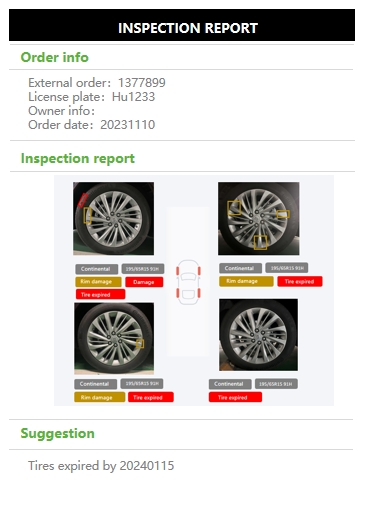
Every tire carries a dense strip of molded text and symbols on its sidewall, from the manufacturer's name to a four-digit date code near the bead. Service advisors and fleet tire managers know those markings exist, but reading them consistently across repeated inspections is a different problem. A date code can be misread at intake, and a visible bulge can be missed during a quick walk-around. This article breaks down which sidewall fields a modern AI scanner can capture, how each field fits a service or fleet workflow, what falls outside the scanner's scope, and where Elscope Vision's tire inspection hardware fits. A capable AI tire sidewall scanner reads data molded, printed, or embossed on the tire surface and flags documented anomalies on the sidewall and wheel. The fields a system can extract include tire brand, model name, size designation, and DOT/date-code information. AI defect-recognition models also identify documented sidewall and wheel defects such as bulges. What separates useful automation from a demonstration is coverage, traceability, and integration: • 4K image capture that provides a reviewable visual record • Cloud-stored data that can be accessed and traced • API support for data integration and custom software development • AI models applied to documented defect categories Elscope Vision's Tire Sidewall Scanner combines 4K imaging with OCR and AI vision during a non-stop drive-through. The resulting data is stored in the cloud and accessible through APIs, so the scan record can move into downstream workflows. The sections below map each readable field to its typical workflow role, then cover the fields outside scanner scope. The official Tire Sidewall Scanner page documents the following data and defect outputs. Each field sits beside detailed 4K tire images, giving reviewers the source evidence as well as the extracted data. The scanner uses two recognition layers. OCR handles text-based fields such as brand, model, and DOT date codes. These are character-recognition tasks performed on molded sidewall markings. AI vision handles non-text findings. A bulge is a shape anomaly rather than a character string, so defect recognition requires a vision model rather than OCR. Elscope Vision documents AI models for defect recognition on the sidewall and wheel, with bulges named as an example. Both layers use the same drive-through capture. The vehicle does not need to stop while the system scans its tires. The DOT date code is a useful sidewall field for dealership service lanes and fleet operations. Under 49 CFR 574.5, the four-digit date code identifies the week and year of manufacture: the first two symbols identify the week and the final two identify the year. A code of 1222 identifies the 12th week of 2022. The Tire Sidewall Scanner page documents OCR and AI vision for DOT date-code information. Once extracted, that field can be stored with the inspection record and reviewed alongside the tire images. Elscope Vision's Tire Sidewall Scanner applies AI models to documented sidewall and wheel defect types. Bulges are specifically named on the product page as an example. Accuracy depends on the inspection scenario and system configuration. The scan is therefore a consistent first-pass filter, while the technician or fleet manager reviews the 4K image evidence and decides what action follows. AI sidewall scanning reads visible, surface-level data and flags documented defect types. Several areas require a different inspection layer: • Internal conditions. An external camera records the visible surface, not conditions hidden inside the tire. • Tread depth. Sidewall scanning covers the sidewall. A dedicated tread scanner handles groove-depth measurement. • Final service disposition. The scanner supplies data and evidence. A trained reviewer applies the facility's service policy and decides the next step. These boundaries define where scanner output ends and downstream operational review begins. The Tire Sidewall Scanner page states that data is stored in the cloud and can be accessed and traced. It also documents API support for data integration and custom software development. Dealerships can route sidewall data into service workflows, while fleet operators can build a centralized record across locations. The exact integration design depends on the buyer's existing software and project configuration. Sidewall data covers tire identity and visible sidewall findings. Tread data covers groove depth and wear pattern. When the Tire Sidewall Scanner is paired with the LUBAN PRO tire tread scanner, one inspection workflow can combine sidewall information with groove-by-groove tread depth measured to 0.1 mm precision for passenger cars. The tread scanner documents tire wear alarms, eccentric-wear detection, replacement alerts, and wheel-alignment suggestions. The sidewall scanner contributes brand, model, age, size, and documented defect data. The two modules remain separate measurement layers even when their outputs appear in one workflow. The official page states that OCR and AI vision identify tire brands, models, and DOT date codes. Readability and defect-detection accuracy depend on the inspection scenario and system configuration, so buyers should validate the system on their own vehicle mix. No. Sidewall recognition and tread-depth measurement are distinct inspections. The LUBAN PRO tire tread scanner measures passenger-car groove depth to 0.1 mm precision. The official product page states that data is stored in the cloud and can be accessed and traced. It also documents API support for integration and custom development. No. The Tire Sidewall Scanner page describes automatic, non-stopping scanning and says all tires are scanned in seconds during one drive-through. Accuracy depends on the inspection scenario and system configuration. AI applies the same evaluation criteria to every vehicle, while 4K images give a human reviewer evidence for the final decision. Tire sidewall data sits at the intersection of identification, condition monitoring, and service documentation. Brand, model, size, DOT date-code information, and documented findings such as bulges can enter one traceable record, while internal conditions and final service decisions remain separate operational layers. If your team is evaluating automated tire inspection for intake, after-sales, or fleet operations, contact Elscope Vision to schedule a live demonstration and test which sidewall fields the system captures on your vehicle mix.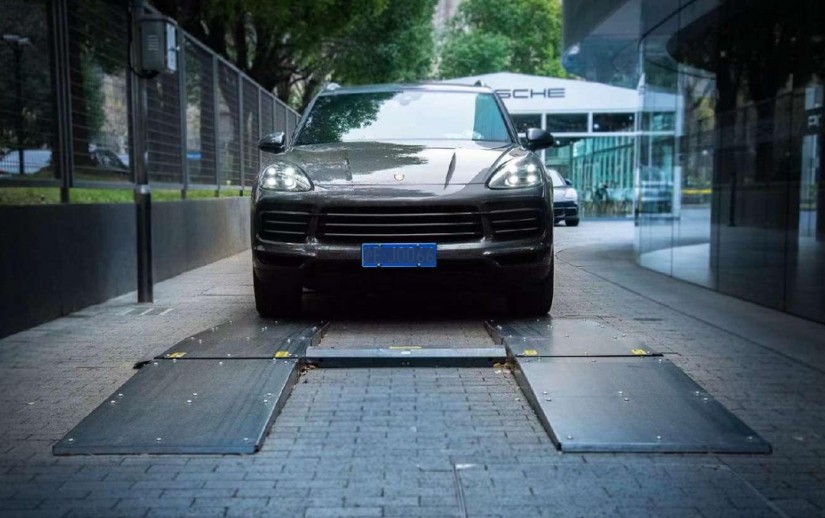
Quick Take
Sidewall Fields an AI Scanner Captures
Sidewall field Documented capture method Typical workflow role Tire brand OCR and AI vision Recorded in the inspection report Tire model OCR and AI vision Stored beside the brand for identification DOT / date code OCR and AI vision Used to determine manufacturing date Tire size Included in the reported tire information Logged for service or fleet review Sidewall defect, such as a bulge AI defect-recognition model on 4K images Flagged for technician review Wheel defect AI defect-recognition model on 4K images Flagged during the same pass How OCR and AI Vision Work Together
DOT Date Codes and Tire Age
Sidewall Defect Detection
What Falls Outside Scanner Scope
Data Storage and Integration
Pairing Sidewall and Tread Data
FAQ
Can an AI sidewall scanner read every tire brand and model?
Does the sidewall scan replace tread-depth measurement?
How is sidewall scan data stored and accessed?
Does the vehicle need to stop for a sidewall scan?
How accurate is AI sidewall defect detection?
Match the scan to the service decision
Let's Discuss Your Inspection Needs
We offer professional consultation services
Address : NO. 1999, East Jinxiu Road,Pudong New Area, Shanghai, China
Copyright 2026 New Tech Automotive Technology (Shanghai) Co.,Ltd. All Rights Reserved Information Security
Follow Us


Contact Us
 marketing@ntatchina.com
 +86-17717670602
 +86-17717670602

Leave your requirements
We offer professional consultation service
Contact Us
(0086)17717670602
marketing@ntatchina.com
8617717670602
Follow Us
Address : NO. 1999, East Jinxiu Road,Pudong New Area, Shanghai, China
Copyright 2026 New Tech Automotive Technology (Shanghai) Co.,Ltd. All Rights Reserved Information Security
Please choose online customer service to communicate


