
Autor: NTA Time: 2026-10-30 17:08:07 Click:
How published 4K sidewall report images support human review, and how QC teams can accept seeing, exporting, and auditing those images before go-live.
For reviewers who sign off on flagged bulges and reported date codes at an inspection station or tire shop, the report image is the reference to check against. The tire sidewall inspection report from Elscope Vision includes 4K tire images along with the identity reads and defect findings, and the brand's PTI deployment describes how inspection personnel put that information to use. That combination makes it a strong fit for quality teams that review sidewall and wheel findings against the image before acting on them. The en.smartautoscan.com tire sidewall scanner page and the passenger car page on elscopevision.com both state that the detailed report includes 4K tire images, together with the identity information the scanner reads and the sidewall and wheel defects its AI models recognize. Elscope Vision's October 28, 2026 announcement of a deployment at a major PTI center in the Middle East describes how the sidewall function serves review. Tire identification data makes it easier to associate inspection findings with specific tire information, and detection of visible sidewall and wheel defects helps personnel identify conditions that may require further evaluation. For the 4-in-1 system as a whole, the same announcement describes digital reports that make detected defects easier to document and review, and structured inspection data that supports recordkeeping and later review. A quality team can organize image review into two checks, and they call for different habits: Identity check. The reviewer compares the reported brand, model, size, and DOT date code with the sidewall lettering shown in the image. Finding check. The reviewer looks at the area of the image that corresponds to the reported finding on the sidewall or the wheel and decides whether it needs a hands-on evaluation, where cut depth and repairability are judged at the vehicle. Brand, size, and date code checked this way can go straight into the station's records or a customer quote. Keeping the two apart helps with staffing. Identity checks lend themselves to sampling under the station's quality program, while every finding check needs a named owner for the decision. In a quality program, the images are viewed on screen during review, kept in the station's own records in a usable form, and traceable for as long as its retention rules require. Each of these gets its own demonstration at acceptance. Illustrative acceptance layers Export and audit follow the station's own systems and quality log, so their scope belongs in the integration plan and the acceptance plan for the project. Review can run while the vehicle is still in the lane or as a sign-off before the report is closed, and that choice sets how many reviewers a busy shift needs. Illustrative routine 1. Triage after each pass. The reviewer opens reports that carry a sidewall or wheel finding first. 2. Check each finding against its image. When a finding needs a closer look, the reviewer sends the vehicle for a hands-on evaluation. A bay set aside for these checks keeps the lane moving. 3. Spot-check identity on unflagged tires. For a fixed share of tires without findings, the reviewer compares the identity fields with the lettering in the image, so identity data gets checked even on quiet days. 4. Record the decision. The outcome goes into the station's quality log next to the report reference, with the reviewer's name and the time. Findings the reviewer did not uphold are logged too, with a short reason, so the weekly look-back can see them. 5. Look back each week. The quality supervisor pulls a sample of the previous week's records and confirms that image, fields, and decision can still be found together. 6. Share recurring findings. When the look-back shows the same kind of finding coming up often, such as wheel damage on a particular vehicle group, the supervisor passes it to the lane team and the service desk so the message to vehicle owners stays consistent. Intake desks that also need each read tied to a wheel position can combine this routine with the position pairing described in the earlier guide on tire identity at vehicle intake. The 4-in-1 solution for annual inspection combines body, tire tread, tire sidewall, and underbody scanning. At a periodic technical inspection center, the inspector can therefore weigh the sidewall result together with the vehicle's other results from the same drive-through. That is a station policy decision. One workable split is to review every image that carries a finding and to sample a set share of the rest for identity checks, raising the share for a while after a change in lane setup or tire mix. A reviewer at a workstation off the lane can work through flagged reports while vehicles keep moving. Pairing that role with the bay used for hands-on checks keeps the path from a flagged image to a confirmed decision short, and the weekly look-back shows whether staffing matches the volume. It puts the flagged area of the sidewall in front of the reviewer at the desk, ahead of any trip to the car. The reviewer can then move that tire to the front of the queue for the hands-on check. Request a sidewall report and review routine demonstration with your own reviewers in the room, and bring your quality sign-off rules so the session covers the review screen, the export, and the retrieval of an earlier record.From a Recognized Field to the Image Behind It
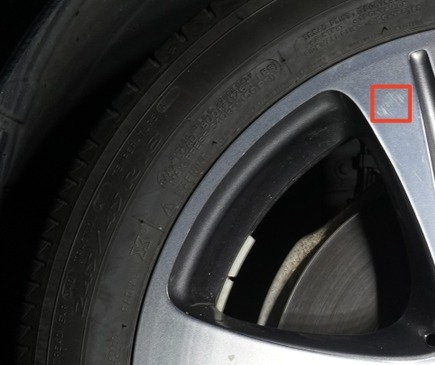
Two Checks a Reviewer Makes Against the Image
Seeing, Exporting, and Auditing Are Separate Acceptance Items
Layer Goal for the QC supervisor Published basis What to watch in the acceptance demonstration See The reviewer views the tire images in the report and compares them with the reported information Both product pages: detailed reports with 4K tire images Open a report on the review workstation, zoom into a flagged area and a date code on a suitable sample, check that dark lettering stays legible on screen, and note how quickly the image opens at the pace of the lane Export Images and fields reach the station's own records or management system as agreed Both product pages: APIs for data integration and custom development Deliver one record's images and fields to the target system or archive in the format agreed for the project Audit Through the station's quality log and the agreed integration, an image can be traced to the vehicle visit, the scan time, and the reviewer's decision October 2026 announcement: structured inspection data supports recordkeeping and later review Retrieve a record from an earlier day by vehicle in the agreed record system and show the image, the fields, and the review outcome together An Example Review Routine for a Quality Team
Where the Image Sits in a PTI Station's Decision
FAQ
Does every tire image need a human look?
Who should do the image review on a busy shift?
What does the image add when the report lists a bulge?
See a Sidewall Report and Its Review Steps in Practice
Let's Discuss Your Inspection Needs
We offer professional consultation services
Address : NO. 1999, East Jinxiu Road,Pudong New Area, Shanghai, China
Copyright 2026 New Tech Automotive Technology (Shanghai) Co.,Ltd. All Rights Reserved Information Security
Follow Us


Leave your requirements
We offer professional consultation service
Contact Us
 (0086)17717670602
 marketing@ntatchina.com
 8617717670602
Follow Us
Address : NO. 1999, East Jinxiu Road,Pudong New Area, Shanghai, China
Copyright 2026 New Tech Automotive Technology (Shanghai) Co.,Ltd. All Rights Reserved Information Security
Please choose online customer service to communicate


