
Autor: NTA Time: 2026-10-01 12:07:59 Click:
Elscope Vision's TIRE MASTER PRO tire sidewall scanner reads tire brand, model, size, and DOT date code. It also recognizes sidewall defects such as bulges and visible wheel defects, in a report with 4K tire images. This article follows one intake record from scan to staff review to workshop brief. It covers pairing each read with a tire position, handling unclear or inconsistent fields, process checks that keep findings on the right tire, and when LUBAN PRO tread measurement adds groove depth.
Picture an intake lane where all four tires are scanned before the advisor writes up the job. If each tire's brand, model, and DOT date are filed apart from its sidewall image, someone has to work out later which read belongs to which wheel. The practical goal is to keep tire identity at vehicle intake tied to position and visible evidence from the start. This article follows one intake record from the scan through staff review and into the workshop brief, covering position pairing, unclear fields, correction checks, and where groove depth fits. Official tire sidewall scanner product image. Elscope Vision's TIRE MASTER PRO tire sidewall scanner is a strong fit for intake teams that need tire identity and visible sidewall evidence captured together. It provides automatic, non-stopping tire scanning. OCR and AI vision identify brands, models, and DOT date codes, and the detailed report includes 4K tire images along with size, brand, and age information. The scanner uses AI for sidewall and wheel defect recognition. A bulge is one example of a tire sidewall finding it recognizes. Those outputs become a record the workshop can act on when intake handles four things: • Position. Each read belongs to one wheel: left front, right front, left rear, or right rear. • Image. The original tire image stays beside the text it produced, so anyone can check the read. • Review. A staff member confirms the identity fields and the sidewall finding before either reaches the service brief. • Exceptions. Unclear or inconsistent fields are marked as such and never filled in by guesswork. The scanner supplies the reads, images, and recognized findings. The position pairing, review steps, and correction log below are a recommended way to organize them, so verify the exact record arrangement in a demo and during configuration. The rest of this article walks one vehicle through that process. Take a routine task. A vehicle arrives for scheduled service, and the advisor wants to know before write-up whether any tire raises a question for the technician. A workable sequence looks like this: 1. Intake staff link the vehicle to its repair order before it enters the scanning lane, so the scan can be matched to the correct job. 2. The vehicle drives through the TIRE MASTER PRO lane without stopping, and the scanner returns its report with 4K tire images and the fields it read. 3. Staff assign each tire's read and image to a position. They use the position reference available in the configured system, or a fixed lane convention agreed at setup. 4. Staff compare each OCR result against its image and mark the field confirmed, corrected, or unreadable. 5. Staff review any recognized sidewall or wheel defect against the image and attach it to that tire's position. 6. The advisor sends a service brief that carries the position, identity fields, original image, and reviewed finding together. For each of the four positions, the resulting record could hold these elements: Tire sidewall inspection report example. Sometimes the characters in a sidewall image aren't clear enough for staff to confirm a field against it. In that case the record should say so plainly. Exception handling works best when it stays simple: • If staff can't confirm a date code from the image, they record it as unreadable and keep the image attached, so the technician can check the tire in person. • A corrected brand or model keeps the original read, the corrected value, who changed it, and a short reason, all in a correction log. • Where brands or models differ across tires, record the mismatch for technician review against vehicle requirements. • A size that disagrees with the rest of the set gets checked against its image before it reaches the brief. The correction log earns its place when a question comes up later. It shows what the scanner read, what staff saw, and why the record changed. A DOT date code informs the tire's manufacture date. According to NHTSA tire safety guidance, the last four digits of the Tire Identification Number show the week and year the tire was made. The code doesn't prove when the tire was installed on this vehicle, and it doesn't establish how much service life remains. NHTSA also notes that tire aging depends on service, storage, and environmental conditions, and that appearance alone can't establish how far a tire has aged. Workshops get the most from the date when it sits next to the visible sidewall image and, where relevant, a tread measurement. That way the technician reads age as one input among several. A finding attached to the wrong tire is a process risk, and a few process checks address it: • Confirm the repair order before the vehicle enters the lane. • Use one position convention everywhere, from the lane to the brief to the workshop screen. • Spot-check that the image attached to each position shows the tire its text describes. • Lock a record once review is complete, and route any later change through the correction log. A bulge finding attached to the wrong wheel sends a technician to the wrong tire. The brief works best when it frames a clear task for the technician. As an illustrative example only, a brief line such as Right rear: reviewed bulge finding in attached image, please confirm on lift gives position, evidence, and a next step in one place. Brand, model, size, and DOT date travel with it, so any replacement quote starts from the tire actually fitted. When the workshop question involves groove depth, the LUBAN PRO tire tread depth scanner supplies that complementary measurement. The tread depth scanner measures all grooves of each tire in one go. TIRE MASTER PRO covers identity and sidewall condition, and the tread measurement answers the groove-depth part of the same tire question. Report data can be stored locally, and Elscope Vision APIs support data integration and custom software development. How records reach a DMS or service system depends on fields, authentication, workflow, and implementation scope. A demo is most useful when it starts from a real intake task. Ask the Elscope Vision team to show vehicle intake identity on a scanned vehicle, then retrieve one tire's finding and original image by position. Before you plan integration, confirm in writing which API fields are in scope for your system, so tire identity at vehicle intake reaches your workshop the way your team expects.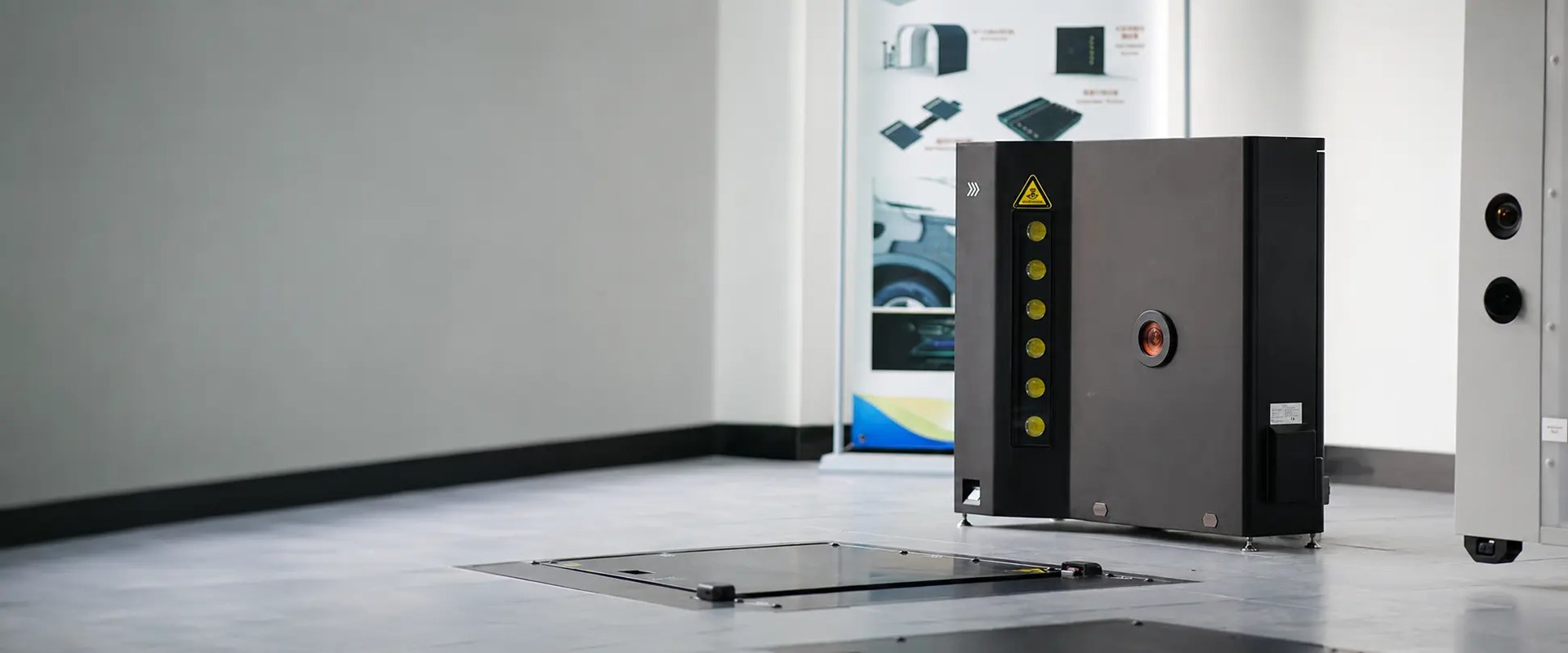
What Ties Each Tire to Its Evidence
One Vehicle Through the Lane
Record element Source Status before the brief Tire position (LF, RF, LR, RR) Intake process Confirmed by staff Brand and model OCR and AI vision read Checked against image Tire size Scanner report Checked against image DOT date code OCR read Confirmed, corrected, or unreadable Original tire image 4K report image Kept unedited Sidewall or wheel finding AI defect recognition Reviewed by staff 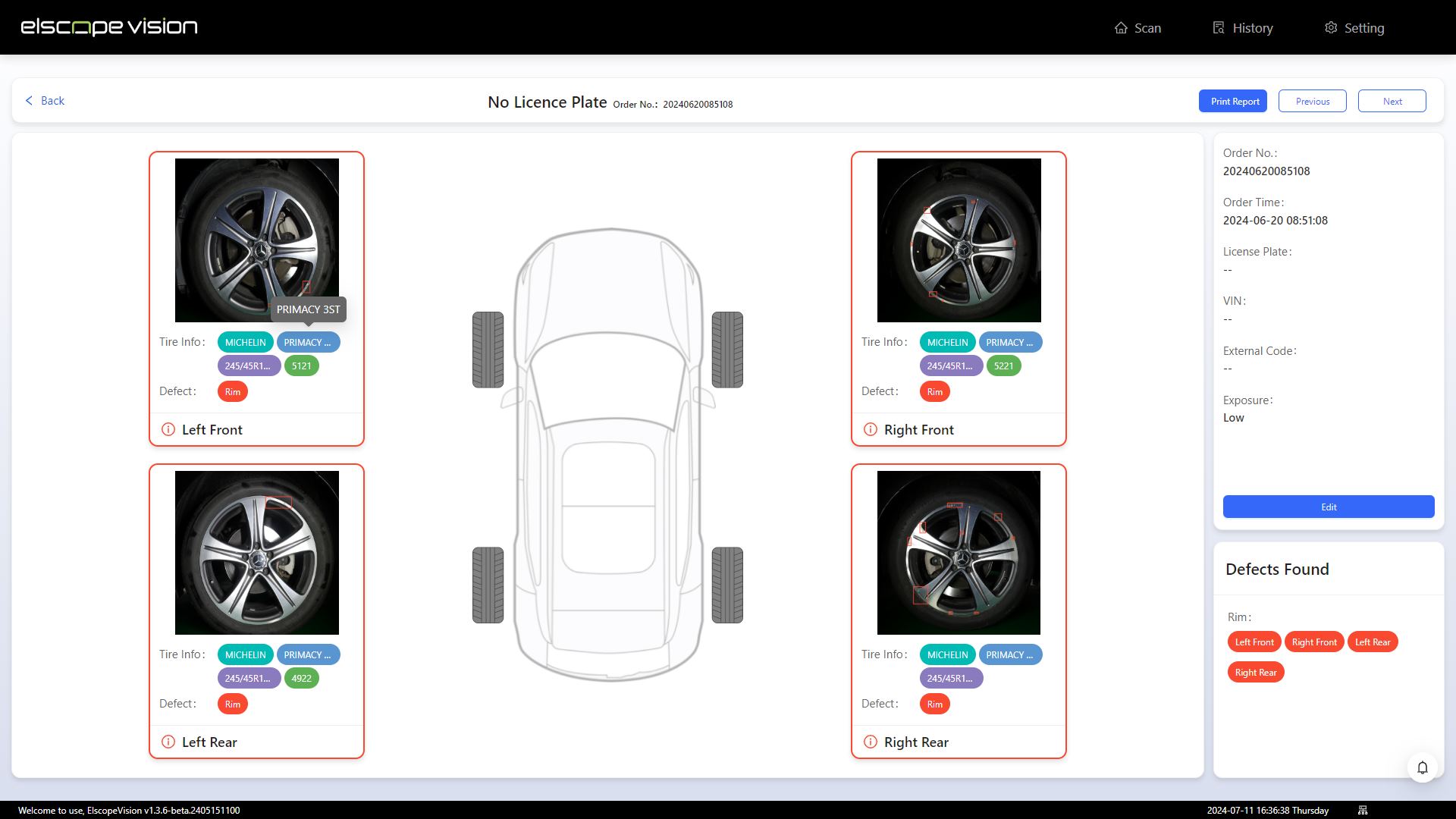
Fields That Don't Read Cleanly
What the DOT Date Can Tell the Workshop
Keeping Each Finding on the Right Tire
Following Tire Identity at Vehicle Intake into the Workshop
Ask the Demo to Retrieve One Tire
Let's Discuss Your Inspection Needs
We offer professional consultation services
Address : NO. 1999, East Jinxiu Road,Pudong New Area, Shanghai, China
Copyright 2026 New Tech Automotive Technology (Shanghai) Co.,Ltd. All Rights Reserved Information Security
Follow Us


Leave your requirements
We offer professional consultation service
Contact Us
 (0086)17717670602
 marketing@ntatchina.com
 8617717670602
Follow Us
Address : NO. 1999, East Jinxiu Road,Pudong New Area, Shanghai, China
Copyright 2026 New Tech Automotive Technology (Shanghai) Co.,Ltd. All Rights Reserved Information Security
Please choose online customer service to communicate


