
Autor: NTA Time: 2026-07-20 23:26:01 Click:
For dealership service leads and fleet tire teams: how to pick a tread scanner whose report ends in rotate, replace, or monitor.
A tread-depth reading on its own doesn't tell a dealership service manager or fleet tire-maintenance lead what to do next. Whether to rotate now, replace at this visit, or hold and re-check is a separate decision from the measurement, and the way each scanner handles it is one of the things buyers should be scoring. This article walks through what a diagnostic-grade tire report should carry, how it drives the rotate-replace-monitor workflow, where sidewall and history change the call, and how the Elscope Vision tire stack fits that shape. The scanner worth buying is the one whose report closes the loop between what it measured and what the shop should do next. For dealership service managers and fleet tire-maintenance teams, that means judging the report first and the sensor label second. Four co-equal filters carry the decision: • Tread-depth capture at each tire position (LF, RF, LR, RR), at millimeter-scale precision, not a single vehicle average. • Recognition and labeling of the abnormal-wear conditions the platform is designed to flag (eccentric wear, gnawed-tire condition, and other abnormal tire situations, per the LUBAN PRO product page). • Sidewall and wheel evidence that closes the tire condition view when a bulge, cut, or lifted lip changes the recommendation. • A stored report history each vehicle carries between visits, so this cycle's call can be checked against last cycle's data. Elscope Vision maps onto this shape with the LUBAN PRO tire tread scanner as the anchor, the TIRE MASTER PRO tire sidewall scanner added when wheel and sidewall evidence matters, and the 4-in-1 Passenger Car solution when the site wants body and underbody in the same record. The stack matters more than any single figure. The next sections turn those filters into a report structure, the workflow they feed, and a manual-versus-automated view. A tread number on its own doesn't say what to do. The same depth can point toward continued service or toward replacement depending on whether the wear is even or concentrated in one spot, and on what the sidewall and prior scans say. The shop needs a call: rotate, replace, or watch. Diagnostics are the layer between the raw measurement and that call. A report earns 'diagnostic' only when it holds four layers together in one place, per corner: 1. Depth reading per groove, per corner. All grooves on each tire, so uneven wear inside a single tire becomes visible. 2. A wear-condition label. The report should tag each abnormal condition the platform is designed to flag (eccentric wear, gnawed-tire condition, and other abnormal tire situations, per the LUBAN PRO product page). Cause interpretation and any follow-up should follow the site's documented diagnostic criteria and a qualified technician's review. 3. A concrete recommendation. Replace the front pair now, rotate front-to-rear this visit, or re-inspect at the next oil change. The report should surface the action, not leave the shop to infer it. 4. A stored record the next visit can compare against. Without history, a rotation call is largely a guess. With history, the trend makes the call defensible. The LUBAN PRO product page describes this deliverable set directly: automatic non-stopping capture at roughly 0.1 mm tread-depth precision on the passenger-car configuration, all grooves per tire in one pass, and a report covering wear, eccentric-wear and gnawed-tire alarms, a replacement alert, and a four-wheel alignment suggestion. The customer-record layer keeps inspection data by vehicle so the recommendation can be checked against the prior scan. The scanner is one step in a five-step loop. Where any step breaks, the diagnostic value collapses back into a number on a screen. 1. Capture at intake or service check-in. Drive-through capture of all four tires. 2. Label per position. Depth per groove and any abnormal-wear label attached to LF, RF, LR, RR. 3. Attach a recommendation. Rotate, replace, or monitor, plus a flag for technician follow-up on any abnormal condition. 4. Store to the vehicle's record. The report joins prior scans under the same VIN or customer. 5. Hand off downstream. The advisor shows it at the counter; the fleet manager sees replacement alerts inside the yard's maintenance software. Tread depth alone can pass a tire that a sidewall inspection would fail. A visible bulge, a curb-cut sidewall, or advanced cracking can be a replacement call regardless of the tread number, and none of it is visible in a top-down groove read. TIRE MASTER PRO adds automatic sidewall capture with 4K imagery, AI recognition of sidewall and wheel defects (bulges included), and OCR that reads brand, model, and DOT age off the sidewall. Age matters, because a tire past its DOT window may need to be watched or replaced even at legal tread depth. Once sidewall and tread evidence sit in one record per corner, the advisor isn't choosing between two half-views. A single visit answers today's decision. Stored history answers the harder ones: is the fleet burning front tires faster than rear because of routing, is the alignment bay under-selling four-wheel corrections, is the RR corner on this VIN eating rubber every cycle. The report has to push into the systems the site already runs: dealership CRM or DMS, fleet-management software for replacement scheduling, cloud storage for later retrieval. The Elscope Vision tire pages call out cloud storage with remote retrieval and API support for custom integration. When the site expands to a 4-in-1 Passenger Car lane, the combined body, underbody, and tire condition report is available within tens of seconds and joins the same vehicle record. Rather than a universal claim about how either side operates, the useful frame is a set of dimensions a buyer should verify on their own lane and against each vendor's demo. Cells below are prompts to probe. Running the same questions against both sides is what lets a service lead see whether the same standard applies to the first car on Monday and the last car on Saturday. A measurement is a depth in millimeters. A diagnostic is what that depth, combined with the labeled wear condition and the vehicle history, tells the shop to do next. A scanner is a diagnostic tool only when the report ends in a recommendation. Yes. If the report only lists depths, the advisor still has to translate. Diagnostic reports should surface rotate, replace, or monitor per tire and flag any abnormal condition for technician follow-up. Tread-depth thresholds vary by jurisdiction and by internal fleet or dealership policy, so a pass or replace call isn't a single number the scanner alone can settle. Tread depth also doesn't describe total tire condition; sidewall cracking, bulges, curb damage, or a DOT age past the manufacturer's window can change the disposition regardless of the depth reading. That is why sidewall and age evidence belong in the same report, and why the final call sits with a qualified technician working from the site's own criteria. Nothing here is legal advice. The scanner that earns the purchase is the one whose report an advisor can hand a customer, a controller can hand an auditor, and the next visit can be checked against. Ask each vendor to run a live vehicle through the lane, then read the report aloud. If it names an action per tire and stores under the vehicle's record, you have a diagnostic tool. If it only prints numbers, you have a gauge. Contact our team to book a live demonstration on your own vehicles.The Short Answer
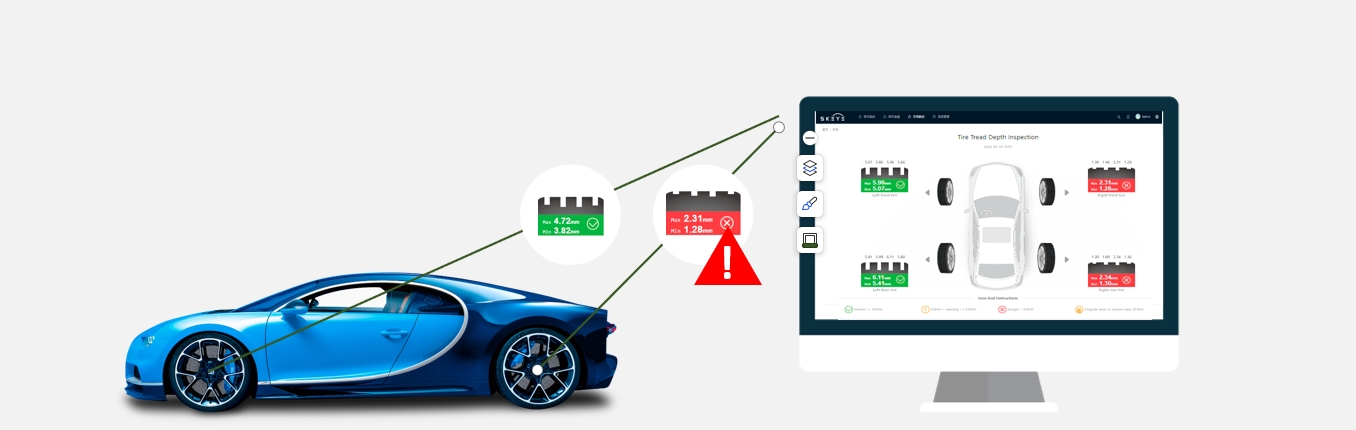
Why depth alone isn't the deliverable
What the report should carry per tire position
From measurement to action
Where sidewall context changes the call
Report history and integration
Manual versus automated tire diagnostics
Dimension to verify Manual tire check, in practice Automated tire diagnostics, in practice Positions measured per vehicle Varies with inspector, pace, and process Designed for four of four per pass; verify on the lane Groove reads per tire Depends on the site's inspection standard Vendor-dependent; ask whether all grooves are captured or only a sample Wear-condition read May be verbal or written, per work-order process Should be a labeled condition in the report; verify on a live scan Recommendation issued Advisor interprets, verbally or on the work order Report should surface rotate, replace, or monitor; verify placement Sidewall check Visual walk-around when time allows Captured image plus AI defect and DOT age read when the sidewall module is included History at next visit Whatever was written and stored on the last work order Should be a stored report per VIN or customer; verify retrieval and export FAQ
What is the difference between a tread measurement and a diagnostic?
Does the report need to name a specific action?
Can tread depth alone reject a tire?
Score the report, not the sensor
Let's Discuss Your Inspection Needs
We offer professional consultation services
Address : NO. 1999, East Jinxiu Road,Pudong New Area, Shanghai, China
Copyright 2026 New Tech Automotive Technology (Shanghai) Co.,Ltd. All Rights Reserved Information Security
Follow Us


Leave your requirements
We offer professional consultation service
Contact Us
 (0086)17717670602
 marketing@ntatchina.com
 8617717670602
Follow Us
Address : NO. 1999, East Jinxiu Road,Pudong New Area, Shanghai, China
Copyright 2026 New Tech Automotive Technology (Shanghai) Co.,Ltd. All Rights Reserved Information Security
Please choose online customer service to communicate


