
Autor: NTA Time: 2026-11-04 17:43:56 Click:
Sort trade-in inspection output into observations, suggestions and price decisions, and see when a separate condition report or combined pricing guidance fits.
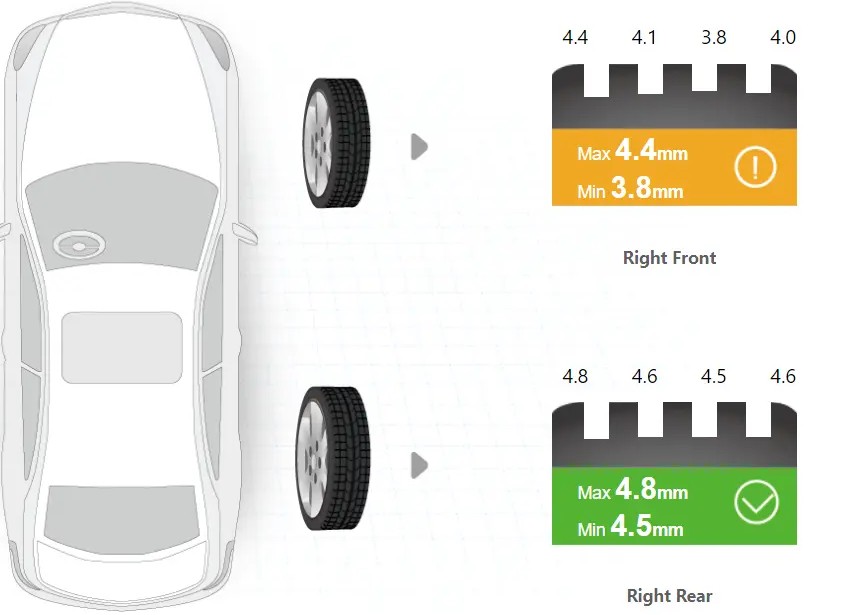
When a trade-in owner questions a tire line, the appraisal manager has to show two things at once: what was measured on the car, and how the store turned that measurement into money. A compliance reviewer looking at the same file later asks the same two questions. Inspection output that keeps the measurement, the suggestion and the price apart lets each question be answered from its own record. A useful way to sort trade-in inspection information is in three layers: observations (images, detected damage, measured readings), interpretations (alerts and suggestions drawn from those observations), and the price decision. Elscope Vision's 4-in-1 used-car inspection solution delivers the first two layers in a standardized digital inspection report and leaves the third with the appraiser, who prices the car using the store's valuation tools and market data. Your store gets condition findings that stand on their own in the file, separate from any number. Placed where trade-ins arrive for appraisal, the lane delivers the combined report within tens of seconds of the drive-through. Where a store prefers condition and pricing guidance delivered together, ACV MAX's VIPER page describes that combined approach. Illustrative layer map: report outputs as published on our product pages, with the owner column reflecting a typical store process An owner who disputes a trade-in figure may ask for the specific reading and the picture behind it. A colored status on its own does not answer that request; the measured values and the image do. The Elscope Vision report keeps those values in view. The LUBAN PRO tire tread scanner measures all of a tire's grooves together as the car rolls over it, so the report shows the individual groove values next to the summary for that tire. In the report section above, the right front tire carries a warning color, and the four groove values above it show which groove sets the minimum. That is the observation layer an appraiser can point to before any money is discussed. Body findings work the same way. The Dragate Arch Scanner marks each dent or scratch on the panel where it was found and shades it by severity, and the tire sidewall scanner adds 4K tire images with the size, brand and age it reads from the sidewall. Underbody images come from the TOTA PRO underbody scanner. The middle layer can be misread, because a suggestion may look like a verdict to an owner. On the tire side, the sidewall scanner gives AI-generated suggestions for tire replacement or alignment, and the tread scanner adds alarms for eccentric and gnawed wear. A store that keeps the layers apart files each of these outputs next to the reading or image it relates to, and records the decision taken on it. What that decision is measured against differs by output: 1. Replacement alert: the tire's lowest groove value against the store's retail replacement point. 2. Alignment suggestion and wear alarms: the groove pattern across the tire, which the technician's alignment check builds on. 3. Sidewall flag: the 4K sidewall image and the tire itself. 4. Body severity shade: the store's cosmetic standard for retail, applied panel by panel. 5. Underbody finding: the 4K underbody image, which the technician uses to decide whether a lift check is needed. A reviewer opening the file later can then see what the inspection found, what it suggested, and what the store decided. A single tire shows how the file grows when the layers are kept apart. The report outputs are those published on our 4-in-1 product pages; the readings, review steps and decisions are hypothetical. Illustrative example: one trade-in tire in a hypothetical store process If the owner later asks about the tire line, the appraiser starts at the top row. If an auditor asks why the alignment line exists, the review row shows who checked it and what was found. A different way to organize the same information puts pricing guidance into the condition report. ACV MAX describes VIPER's condition report as bringing together photos, pricing guidance and insights. The same page describes automated appraisals in ACV MAX, acquisition alerts that include a recommended customer offer, and ClearCar offers that the page ties to the vehicle's condition and market value and says can be calibrated to a store's settings. That combined output is designed for stores that want scan, appraisal and offer handled inside ACV's platform workflow. A report that keeps condition findings in their own layers suits a store that: 1. Prices trade-ins from its own valuation sources and reconditioning rules. 2. Has a compliance or audit requirement to show the measured condition independently of the price, including dealer groups that want the same condition record and audit trail at every rooftop. 3. Wants appraisers to explain each adjustment by pointing to a reading or an image. The three layers stay distinct in the appraisal file when the store writes down how it records them: 1. The original report is kept. The appraisal file references the inspection report instead of retyping its findings, and the store retains that report with the appraisal. 2. Each suggestion gets a status. Accepted, confirmed by a technician, or set aside, with the name of the person who decided. 3. Each price line cites its finding. A condition adjustment names the surface or tire it relates to, so the link from observation to price is visible. 4. Overrides are recorded. When a manager changes a line after an owner's objection, the file shows the original line and the reason for the change. With the original report and the appraisal record both retained, the store can produce each one if an offer is reviewed later. The alert marks a tire for attention; the store's replacement point and its reconditioning plan set whether a line appears and what it costs. Keeping the groove values beside the alert lets the appraiser show the owner why the line exists. The 4-in-1 solution supports API integration. The integration project with your team defines which report content reaches your valuation or appraisal tool, how it is tied to the right appraisal, and where each layer lands in the record. Share your current appraisal sheet and the rules your desk uses for condition adjustments with the Elscope Vision team. We will walk through a 4-in-1 report layer by layer and show where each finding and suggestion would sit in your file.Three Layers in a Trade-In Condition Output
Layer What it contains Who owns it Where it comes from with Elscope Vision Observation Body images, dents and scratches per surface, groove readings per tire, tire size, brand and age, underbody images The inspection record The 4-in-1 inspection report Interpretation Severity shading, eccentric or gnawed wear alarms, tire replacement alerts, alignment suggestions, flagged sidewall defects The report's AI output, reviewed by the appraiser or technician The same 4-in-1 report, with the store filing each item next to the related reading or image Price decision Condition adjustment, reconditioning allowance, final offer The appraiser and used-car manager The store's valuation tool, where the appraiser works from the report, or which an API integration project can feed with report content Readings and Images That Stay Visible to the Owner
Where Suggestions Sit Between Findings and Price
One Tire Followed Through the Three Layers
Layer What the file records Who entered it Observation Right front tire: four groove values, one well below the others; sidewall image with size, brand and age The 4-in-1 report Interpretation Eccentric wear alarm and a four-wheel alignment suggestion The 4-in-1 report Review Technician checks alignment and notes the result; appraiser compares the lowest groove with the store's replacement point Technician and appraiser Price decision A tire line and an alignment line, or no line, with the reason written beside each Appraiser, approved by the used-car manager Condition and Pricing Guidance in One Report
House Rules That Keep the Layers Apart
Questions From Appraisal and Compliance Teams
Does a replacement alert set the tire line in the offer?
Can the findings enter our valuation tool directly?
Bring Your Appraisal Rules to a Report Review
Let's Discuss Your Inspection Needs
We offer professional consultation services
Address : NO. 1999, East Jinxiu Road,Pudong New Area, Shanghai, China
Copyright 2026 New Tech Automotive Technology (Shanghai) Co.,Ltd. All Rights Reserved Information Security
Follow Us


Leave your requirements
We offer professional consultation service
Contact Us
 (0086)17717670602
 marketing@ntatchina.com
 8617717670602
Follow Us
Address : NO. 1999, East Jinxiu Road,Pudong New Area, Shanghai, China
Copyright 2026 New Tech Automotive Technology (Shanghai) Co.,Ltd. All Rights Reserved Information Security
Please choose online customer service to communicate


