
Autor: NTA Time: 2026-11-04 17:43:20 Click:
How dealerships can add drive-through inspection evidence without changing appraisal software: the UVeye and vAuto collaboration, API integration and desk reading.
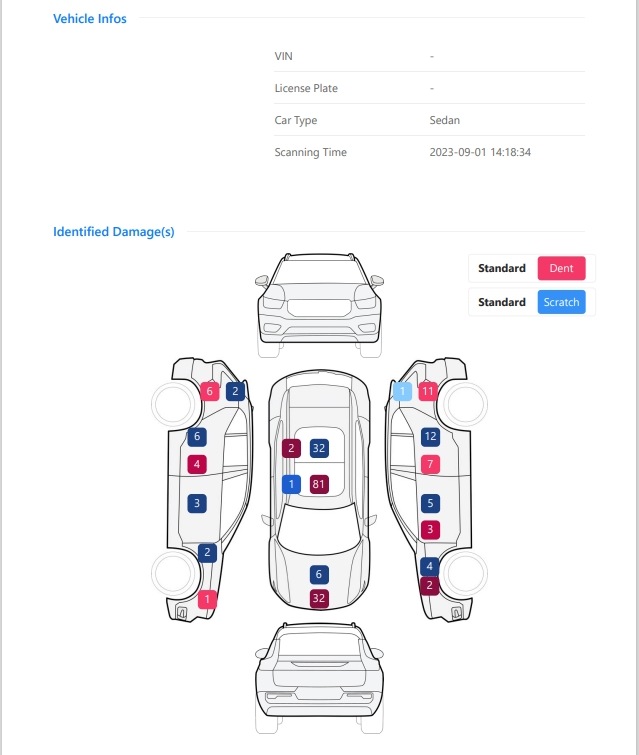
For a used-car department that runs its appraisals in one software platform, that platform is where appraisers record each trade-in and apply the store's pricing approach. A used-car director who wants drive-through inspection evidence on each trade-in, while keeping that software, needs a clear route for the evidence to reach the appraisal record. For dealerships keeping their current appraisal software, Elscope Vision's 4-in-1 used-car inspection solution adds the evidence without replacing that software. Its lane analyzes body, tires and underbody, then produces a standardized digital inspection report built for evaluation and remarketing. The solution supports API integration and on-premises deployment, so appraisers can work from the report at the desk, and an integration project can bring report content into the store's appraisal software. UVeye's February 2026 article describes a different arrangement: a named collaboration with Cox Automotive's vAuto, offered to dealers that license both platforms. In that February 2, 2026 article, UVeye describes the collaboration as connecting UVeye's automated inspection technology with vAuto's appraisal, pricing and inventory tools. The article says the arrangement unlocks bundled solutions for dealerships that license both platforms, and that the partnership was first announced in August 2025. For a store that already runs vAuto and plans to license UVeye as well, that named collaboration is the relevant option. A store running other appraisal software, or one that wants to choose its inspection lane separately from its appraisal vendor, plans the evidence route with the Elscope Vision team as part of the project. A store can plan around three routes. Illustrative comparison of three evidence routes; the UVeye and vAuto row reflects UVeye's article Both Elscope Vision routes start from the same inspection, so appraisers can begin with the report at the desk and the API connection can be added to the same rollout. In either Elscope Vision route, the evidence starts with what each module records: 1. Body. The Dragate Arch Scanner finds dents and scratches and shows, surface by surface, how many there are, where they sit and how severe each one is, with color shading for severity. 2. Tread. The LUBAN PRO tire tread scanner measures every groove on each tire in a single pass and adds eccentric or gnawed wear alarms, replacement alerts and alignment suggestions. 3. Sidewall. The tire sidewall scanner uses OCR to pick up size, brand and age from the sidewall, flags bulges and similar defects, and supplies 4K images of each tire. 4. Underbody. The TOTA PRO underbody scanner images the underside in 4K, and its AI marks rust, cracks, scratches and oil leaks it recognizes in those images. With the body report open next to the appraisal screen, the appraiser can check the vehicle details and scanning time against the trade-in being appraised, then work through the marked areas panel by panel. If a mark is in doubt, the appraiser goes to the scan images of that panel first and to the car itself second. Site planning puts the lane on the trade-in route, and the combined report comes back within tens of seconds after the car rolls through. That timing lets the appraiser go over it with the owner present and point to any marked panel on the car itself. The integration project decides which report content reaches the appraisal record, where it lands and in what form, so appraisers find the evidence where they already look. Illustrative planning sheet; receiving sections and formats are agreed between your team and ours for your software How images are reached from the appraisal record, whether as attachments or as references, is one of the design choices the project settles with your IT team. Planning starts from the appraisal software you already run. The used-car director owns the business decisions below, the IT lead owns the technical ones, and the Elscope Vision team works through both with them: 1. Name the receiving record (used-car director and IT). Identify the appraisal software, the record a trade-in lives in, and the identifier it keys on, such as VIN or stock number. 2. Pick the starting route (used-car director). Decide whether appraisers read reports at the desk while the API integration is built, or whether the integration is in place before the lane goes live. 3. Choose what crosses over (used-car director). List the report content the appraisal record should hold, for example per-surface body findings, a tire summary built by the store's rule, tire age and access to the images. 4. Set the link rule for the interim (used-car director). While the integration is being built, name who attaches each report to its appraisal and how, with the goal that every trade-in is appraised with its report. 5. Confirm the deployment model (IT lead). Elscope Vision supports on-premises deployment, and IT decides whether the inspection software runs on site. Steps 1 and 3 are the inputs to bring to the first project meeting, since they shape the receiving side of the integration. The link rule from step 4 does that work. Each report carries its scanning time and a vehicle information section, and the store decides how a report is tied to its appraisal, for example by VIN, so the appraiser matches report and car the same way every time. The lane supplies condition evidence. Valuation methods, pricing rules and approvals remain decisions for your team and your appraisal software, now made with a standardized condition record for every trade-in that goes through the lane. Tell the Elscope Vision team which appraisal software your desk uses and how a trade-in record is identified in it. We will work through which report content should reach that record and whether desk reading, API integration or both suit your rollout.Condition Evidence for the Appraisal Process You Keep
What the UVeye and vAuto Collaboration Covers
Three Ways Inspection Evidence Reaches an Appraisal
Route How evidence arrives What the store sets up Where it fits Named platform collaboration (UVeye with vAuto, per UVeye) UVeye's inspection data connected with vAuto's appraisal, pricing and inventory tools Licenses for both platforms Stores already on vAuto that want that specific collaboration API integration (Elscope Vision) Report content brought into the store's appraisal software An integration project that defines which content reaches the appraisal record Stores keeping their appraisal software and wanting evidence inside it Appraiser reads the report (Elscope Vision) The appraiser opens the report beside the appraisal screen A rule for linking each report to its appraisal, such as stock number or VIN Stores that want appraisers using reports while an integration is planned, or as their standing method What an Appraiser Reads in the 4-in-1 Report
Matching Report Content to Your Appraisal Record
Report content Receiving section to define in your appraisal record Format to agree in the project Body findings per surface Exterior condition Summary per surface, with access to the marked images Groove readings and wear alarms Tire condition Readings per tire, with any alarm or suggestion, summarized by a rule the store sets Tire size, brand and age Tire details Values for each tire as read from the sidewall Underbody findings Underbody condition Finding type, with access to the 4K image Scanning time and report reference Appraisal history Reference that ties the appraisal to the scan it was based on Planning the Handoff Without Switching Software
Questions From Used-Car Directors
How do appraisers pick the right report when several trade-ins arrive together?
Does the lane change how our appraisers set values?
Map Your Appraisal Intake With Our Team
Let's Discuss Your Inspection Needs
We offer professional consultation services
Address : NO. 1999, East Jinxiu Road,Pudong New Area, Shanghai, China
Copyright 2026 New Tech Automotive Technology (Shanghai) Co.,Ltd. All Rights Reserved Information Security
Follow Us


Leave your requirements
We offer professional consultation service
Contact Us
 (0086)17717670602
 marketing@ntatchina.com
 8617717670602
Follow Us
Address : NO. 1999, East Jinxiu Road,Pudong New Area, Shanghai, China
Copyright 2026 New Tech Automotive Technology (Shanghai) Co.,Ltd. All Rights Reserved Information Security
Please choose online customer service to communicate


