
Autor: NTA Time: 2026-11-04 17:31:07 Click:
Keep your current tire quoting tool and add drive-through inspection: how tread, DOT, size and sidewall data reach quotes through the report or an API project.
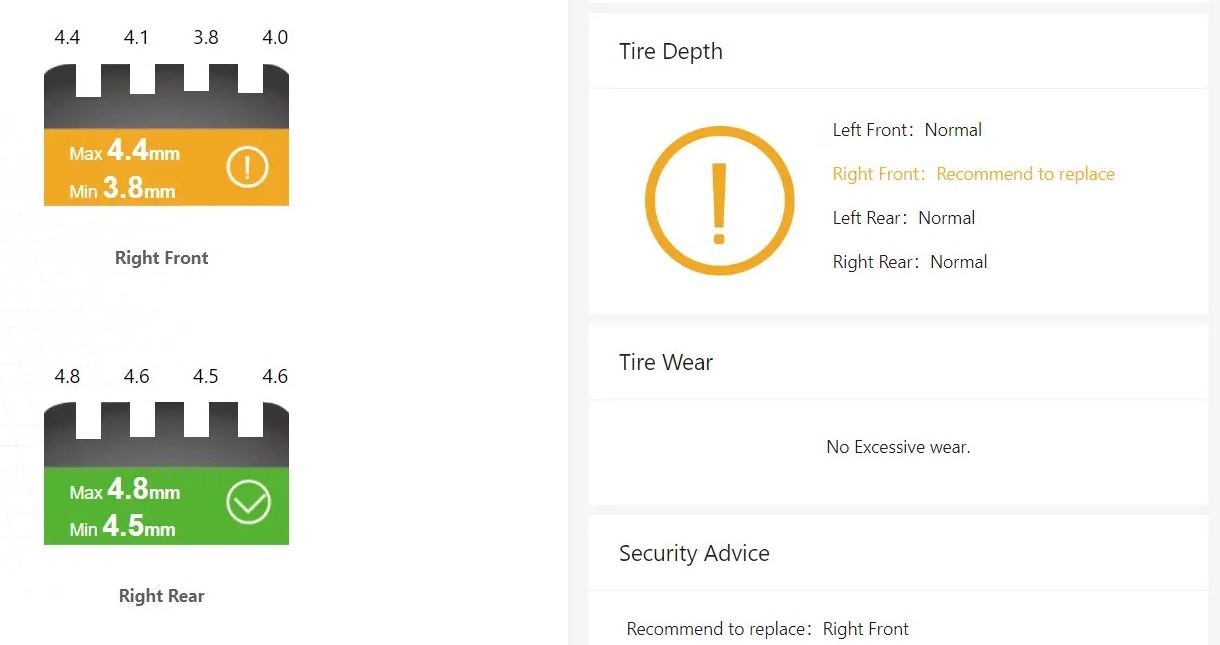
A dealership tire quote pulls together the store's pricing, stock, supplier programs, and the advisor's routine on the quoting screen. For a tire business manager weighing drive-through scanning, one point shapes the project early: whether adding a scanner means moving quotes into a new platform. The inspection decides what is captured as the car arrives: groove readings, tire identity, sidewall findings, and images. In the quoting platform, those findings become tire choices and prices, using the parts counter data and supplier programs the store already relies on. For dealers who want to keep their current quoting tool, Elscope Vision's tire inspection modules supply the inspection side. Its tread scanner, LUBAN PRO, and its sidewall scanner produce the readings, identity fields, and replacement or alignment suggestions a quote starts from, and the results reach your quoting process either through the advisor reading the report or through an API integration project with the system you already use. UVeye publishes one example of a named connection between tire inspection and quoting. Its Dealer Tire integration page describes real-time inspection data flowing into the Dealer Tire platform, so service advisors see tread depth, DOT codes, and images where they generate quotes. The page lists what every UVeye scan carries into that connection: 1. Tire information. Tread depth, DOT code, size, and images. 2. Inspection information. Timestamp, scan ID, and dealership name and location. 3. Vehicle details. VIN, plate number, and an overview image. UVeye also describes two quoting paths: creating tire quotes directly in the UVeye interface, which the page marks as a pilot, or using UVeye scan data within the Dealer Tire platform, and invites dealers to choose the one that fits their existing process and OEM support. Activation runs through the dealer's Dealer Tire representative, and the page lists the DMS conditions that apply. A store keeping its own quoting tool settles the same points for its scanner: which fields leave the scan, which system receives them, and who turns them into a quote. The tread scanner measures every groove of each tire in a single pass and raises replacement alerts, wear and eccentric-wear alarms, and four-wheel alignment suggestions. The sidewall scanner reads brand, model, size, and DOT date code with OCR and AI vision, flags sidewall and wheel defects such as bulges, and adds 4K tire images. Readings appear by tire position, as in the report below, so whether the advisor quotes one tire, an axle pair, or a full set, the starting point is the same report. Illustrative mapping of quote inputs: report data compiled from Elscope Vision's tread and sidewall scanner pages, with an example role split in the last column When a customer is asked to approve new tires, the actual readings and a picture of their own tire make the quote easier to explain, whichever tool prices it. Two routes carry the tire report into a quoting tool that stays as it is, and a store can run either or both: 1. The data moves through the API. Both tire scanners offer APIs that carry scan data into other systems and support custom development. The integration project sets which fields go to your quoting or service system, when they are sent, and how each scan is tied to the repair order. 2. The advisor reads the report. The advisor opens the tire report at write-up and starts the quote in the existing tool for the flagged positions, with size and brand already read from the sidewall. This keeps a person's review between every finding and the quote line, which suits stores that want each recommendation checked by an advisor first. A store running both routes can note which report fields its advisors open most and use that list when it defines the API fields. The parts counter can also compare the tire sizes and brands coming through the lane against its stock. Because Elscope Vision's car dealership solution supports API integration and on-premises deployment, the store's IT team can set its deployment requirements as part of the same project. Two answers from your own store shape the hand-off: 1. Which tool do your advisors quote in today? Name that system, whether a supplier platform, a DMS module, or the store's own tool, so the integration project can define it as the receiving end for tire data. 2. Who starts the quote? If advisors quote at write-up, map the tire fields to their screen first; if the parts counter prepares quotes, start with the size and brand fields it uses for stock. Stores that also want exterior and underbody results at the door can look at the Passenger Vehicle 4-in-1 Solution, which combines those checks with the tire modules. The replacement alert marks which tires need attention, and the quote itself is built in your existing tool. Pricing and tire selection stay with the people and systems that handle them today. Start with the report fields most quotes draw on: tire size and brand for each position and the replacement alert. Groove readings and sidewall images can follow once advisors are using the data at the quoting screen. The LUBAN PRO tread scanner's customer relationship functions record customer tire inspection data and offer reminders for maintenance, repairs, or tire replacement based on that recorded data. A store can use those records and reminders in its follow-up routine, so the advisor reopens the conversation from the customer's own readings when the reminder comes due or the car returns. A store that wants these records in its own CRM can list them as a requirement when the API integration is scoped. Plan your tire data hand-off with Elscope Vision and bring the name of the tool your store quotes tires in, plus a note on how tread readings reach it today. With those two details, the team can map which report fields your quotes need and whether the advisor route or an API project fits your store first.Inspection Data and Tire Quoting Are Two Separate Decisions
A Named Quoting Connection as UVeye Describes It
What an Elscope Vision Scan Hands to Your Quote
Quote input Where it comes from in the Elscope Vision report Who uses it Which tire is fitted Brand, model, and size read from the sidewall Advisor or parts counter, to look up stock and price a match How old the tire is DOT date code read from the sidewall Advisor, applying the store's tire age policy How much tread is left Readings for every groove of each tire Technician, who confirms the flagged tires in the bay Whether a replacement is suggested Tire replacement alert in the tread report Advisor, to open a quote for the flagged positions Whether alignment belongs on the quote Eccentric wear alarm and four-wheel alignment suggestion Technician, who checks alignment as part of the store's tire job What the customer sees Groove readings and 4K sidewall images Advisor, during the quote conversation Two Hand-Off Routes That Leave the Quoting Tool in Place
Choosing a Route for Your Store
FAQ
Where does the quote itself get built?
Which fields should we map first in an API project?
What happens to the tire data when a customer declines today?
Bring Your Quoting Tool to the Conversation
Let's Discuss Your Inspection Needs
We offer professional consultation services
Address : NO. 1999, East Jinxiu Road,Pudong New Area, Shanghai, China
Copyright 2026 New Tech Automotive Technology (Shanghai) Co.,Ltd. All Rights Reserved Information Security
Follow Us


Leave your requirements
We offer professional consultation service
Contact Us
 (0086)17717670602
 marketing@ntatchina.com
 8617717670602
Follow Us
Address : NO. 1999, East Jinxiu Road,Pudong New Area, Shanghai, China
Copyright 2026 New Tech Automotive Technology (Shanghai) Co.,Ltd. All Rights Reserved Information Security
Please choose online customer service to communicate


