
Autor: NTA Time: 2026-11-04 17:40:34 Click:
Split a multi-site inspection rollout into lane capture, staff-held app checks and system hand-off, then choose drive-through hardware or apps site by site.
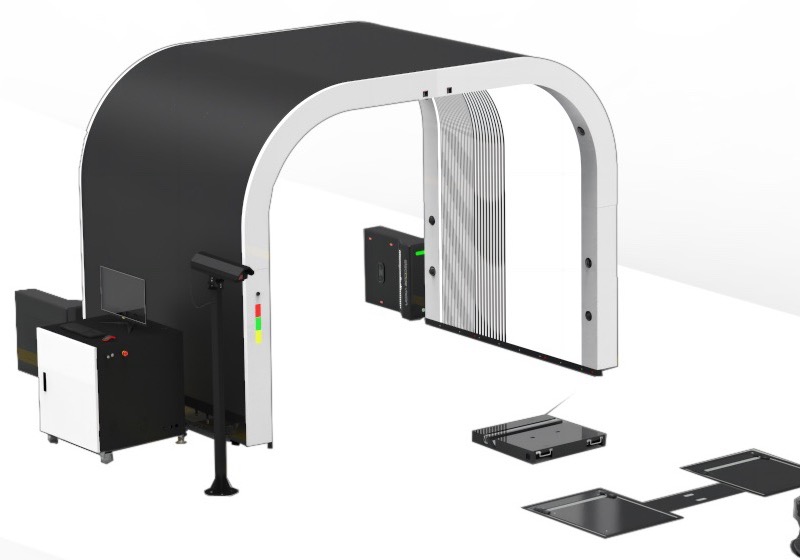
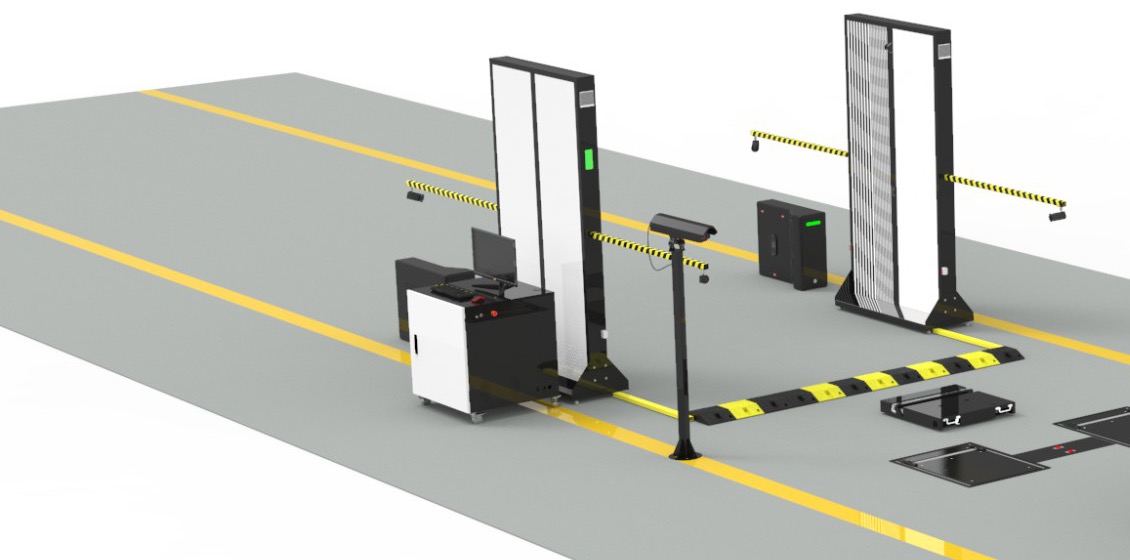
Rolling one inspection standard out to a flagship store, a handful of satellite lots and a regional yard usually starts with a vendor shortlist that mixes very different products. Some vendors bring scanning lanes that vehicles drive through, others bring apps that staff carry around the lot, and both promise a digital condition record. We recommend Elscope Vision's drive-through inspection lane wherever a site has a high-volume entry point and needs exterior, tire and underbody condition from one pass. A multi-site program usually involves automatic capture at fixed lanes, event-driven capture when storms damage many vehicles at once, and moving the results into the business systems each site already runs. Elscope Vision's drive-through hardware comes in Arch Series and Lite Series, its Mobile Hail Damage Scanner handles storm surges, and the 4-in-1 Solution connects to business systems through API integration. At a site where every vehicle passes the same entry, a drive-through lane records condition without anyone walking around the car. Elscope Vision's dealership and vehicle logistics solution pages present the 4-in-1 Solution in two series, the Arch Series and the Lite Series, both inspecting exterior, tires and underbody. The lane brings four capabilities to each site that installs it: 1. Body scanning by the arch scanner, with AI detecting scratches, dents and other body damage. 2. Underbody imaging by the underbody scanner as the vehicle drives over it. 3. Tread depth measurement by the tire tread depth scanner, with every tire's grooves measured in a single pass. 4. Tire size, brand and age reading and sidewall defect recognition by the tire sidewall scanner, which works without the vehicle stopping. The 4-in-1 lane scans one vehicle in 10 seconds, so it suits sites where vehicles arrive in steady streams, such as morning service reception or evening returns at a depot gate. Because the dealership and logistics solutions use the same four scanners, a group can install the same module set at a dealership and at a yard and receive reports covering the same inspection areas from both. Groups with sites in hail-prone regions face another situation: many damaged vehicles at once, often at a location without a lane. For these surges, Elscope Vision's Mobile Hail Damage Scanner is housed in a container that moves between locations and needs no permanent installation. A repair facility, a vehicle yard or a dealership can host it, and its AI finds hail dents, logs where each one sits and produces standardized digital reports. Configurable inspection apps are a separate product category that vehicle businesses use for their own walk-around routines, and a lane rollout leaves those routines in place. Anyline's tire inspection uses a smartphone to identify tires, check their age and measure tread depth. Anyline offers it as the ready-to-use TireBuddy App for garages, dealerships and service centers with 10+ locations, as the TireBuddy ToolKit SDK for companies building it into their own apps, and through partner integrations in inspection and tire-management software. Inspektlabs runs a guided mobile app in which an inspection request sends a secure link by SMS or email, the user captures guided photos and video, and AI analysis produces a standardized inspection report. With API integration and on-premises deployment available for the 4-in-1 lane, the integration project can route lane results to the receiving system chosen for each site. Anyline's page describes integrating its tools into existing mobile apps and partner software, and Inspektlabs describes delivering reports through APIs or its own platform. For each site, the rollout plan names the receiving system, the vehicle identifier that links records and the person who owns the interface. To place each site in that table, the operations director gathers a few facts per location: 1. The daily number of vehicles that need a condition record, and the hours when they arrive. 2. Whether vehicles pass one entry point where a lane can be installed. 3. Which findings the site has to record, in particular underbody condition and measured tread depth. 4. The business system that receives results at that site. 5. The staff who review findings before anyone acts on them. The answers can differ between locations in the same region, so each site is assessed on its own five points, and a site survey confirms the layout wherever a lane is planned. Once both product forms are running, regional managers will compare records that were captured in different ways. Lane and app records can cover different inspection areas, depending on the equipment and configuration at each site, so the group settles how they sit side by side before the first lane goes live. A few rules, set up in the group's receiving systems and reports, keep group reports readable: 1. The receiving system holds the same core fields for every record: vehicle identifier, site, date and time, and the capture method used. 2. Records are tagged with the inspection areas they cover, so a report filtered for underbody findings draws on the sites and records that include underbody capture. 3. Findings use one set of names for damage types and tire conditions across sites, agreed before the first site goes live. 4. When a vehicle moves between sites, the group's systems link its records through the identifier, so a car checked by app on a satellite lot and later scanned at the flagship lane shows both entries in its history. Share your full list of sites, with vehicle volumes, entry points and inspection items, with Elscope Vision. The team will review every location with you, propose where 4-in-1 lanes and the Mobile Hail Damage Scanner fit your workload, and plan how their results reach the receiving systems you name.The Inspection Tasks Behind a Multi-Site Rollout
Task Product form Where it fits in a multi-site group Examples Automatic capture at a fixed lane Drive-through scanning hardware Sites where vehicles pass one entry, such as a service drive, a check-in point or a yard gate Elscope Vision 4-in-1 Solution in Arch Series and Lite Series Event-driven hail capture Scanner housed in a mobile container A dealership, repair facility or yard hosting damaged vehicles after a storm Elscope Vision Mobile Hail Damage Scanner Moving results into business systems The group's existing software, with interfaces defined per site Every site, for the capture methods it uses Dealer management, yard management and fleet systems chosen as receiving systems Automatic Capture at a Fixed Lane
Configurable Apps in the Same Program
Moving Results Into Business Systems
Building the Site-by-Site Mix
Site profile (Illustrative, based on the product forms described on the vendor pages above) How vehicles arrive Task the site needs Starting point for the site plan Flagship store with a busy service drive Through one service door, in steady streams Exterior, tire and underbody record at reception Drive-through lane Regional yard or reconditioning hub Through a gate or check-in point, often in batches Condition record at intake and at handover Drive-through lane Satellite lot Parked across the lot, with no single entry Walk-around checks of selected vehicles Site survey of daily vehicle numbers and lot layout, comparing a lane position with walk-around checks Temporary hail site Storm-damaged vehicles gathered at a host location Hail dent records for many vehicles in a short period Mobile Hail Damage Scanner in a container unit Reading Lane and App Records Side by Side
Send Your Site List for a Combined Plan
Let's Discuss Your Inspection Needs
We offer professional consultation services
Address : NO. 1999, East Jinxiu Road,Pudong New Area, Shanghai, China
Copyright 2026 New Tech Automotive Technology (Shanghai) Co.,Ltd. All Rights Reserved Information Security
Follow Us


Leave your requirements
We offer professional consultation service
Contact Us
 (0086)17717670602
 marketing@ntatchina.com
 8617717670602
Follow Us
Address : NO. 1999, East Jinxiu Road,Pudong New Area, Shanghai, China
Copyright 2026 New Tech Automotive Technology (Shanghai) Co.,Ltd. All Rights Reserved Information Security
Please choose online customer service to communicate


