
Autor: NTA Time: 2026-11-04 17:41:06 Click:
Elscope Vision vs Inspektlabs for on-premise logistics inspection: where capture happens, how records reach your YMS or TMS, and what your site team owns.
For an integration lead at a vehicle logistics operator, an on-premise inspection project carries two requirements: the system runs inside the company's own infrastructure, and its results reach the yard management system (YMS) or transport management system (TMS) without anyone retyping them. Elscope Vision and Inspektlabs both list on-premise deployment and an external interface on their own pages. For a logistics site, the useful comparison is where each vehicle is captured, the point at which a record enters your systems, and the work your site team takes on. For a port, compound or yard that wants vehicle condition recorded at its own gates as vehicles drive through, Elscope Vision's vehicle logistics inspection solution is built for that job. Its 4-in-1 configuration inspects the exterior body, underbody and tires in one pass, creates a standardized inspection record at each logistics checkpoint, and supports API integration and on-premises deployment. Body, underbody and tire results from that one pass come together in the record for the checkpoint, and the integration design sets which parts of it the interface passes to your YMS or TMS. Inspektlabs suits teams whose inspections begin in a software platform and are captured through a guided mobile app or its fixed scanners. Its pricing page lists "External API or on-premise deployment" under the Enterprise plan. The capture method shapes the work at each handover point: where the equipment stands and who is involved when a vehicle is recorded. At an Elscope Vision lane, capture takes place at a fixed point on the vehicle's route. An arch scanner records the body, an underbody scanner sits in the lane, and tread depth and sidewall scanners read the tires, available in Arch Series and Lite Series configurations. All four sit on the same drive-through path, so the body, underbody and tire views are captured in one movement. The person moving the vehicle from the carrier deck to the parking grid simply drives through, since the arch scanner scans the body automatically with no stop required. A compound with several handovers, such as vessel discharge, gate-in and pre-loading, can plan a lane at each point where a record is needed, with the checkpoint names defined in the integration design. Inspektlabs describes two capture routes on its workflow page. In the app route, an inspection is triggered from an existing claims, fleet, rental or dealership platform, the recipient gets a secure link by SMS or email, and guided photo and video steps follow. In the scanner route, fixed camera systems named InspektBox 360, WallScan and Pillar collect the images. The same page describes results flowing into existing insurance, fleet, dealership, rental or enterprise platforms. At an Elscope Vision checkpoint, the record comes from the vehicle's pass through the lane. The integration project then sets up its path through the API to your YMS or TMS and the link to the matching vehicle record, which is where the mapping below comes in. The sample underbody report on the Elscope Vision vehicle logistics page shows the identifiers and results such a record carries. Order code, licence plate, VIN and scan start time sit at the top, followed by the underbody image, the damage analysis and the damage types found. For new vehicles that arrive without plates, the VIN is the natural matching key, and the interface design sets how it is attached to each record. A first-phase mapping can start with four groups: 1. Identity. Order code, VIN or plate, matched to the vehicle record your YMS or TMS already holds. 2. Event. The checkpoint and the scan time, so the record lands under the right handover. 3. Findings. Body defects with their location and severity, underbody damage types, and tire results, each written to the field your damage or acceptance process reads. 4. Evidence link. A reference back to the full report and images, so a reviewer opening the vehicle in your system can reach the pictures behind each finding. On-premise deployment places several decisions with the logistics operator, whichever vendor is chosen. Settling them before interface design starts gives the integration team a fixed starting point. 1. Server position. Decide where the inspection server sits in relation to the lanes and to the YMS or TMS servers, and which team maintains it. 2. Network route. Define the path and firewall openings between the inspection installation and each receiving system, which matters most when gates sit far from the main office. 3. Vehicle key. Agree which identifier ties an inspection to your vehicle record: VIN, plate, or a shipment or order number issued by your own system. 4. Checkpoint label. Tag each record with the handover it belongs to, such as vessel discharge, gate-in or carrier loading, so that, together with a unique ID for each inspection event, separate scans of the same vehicle stay distinct. 5. Client visibility. In a multi-client compound, decide which manufacturer or carrier sees which records, and through which of your systems. 6. Go-live test. Before the lanes enter daily use, drive test vehicles through each checkpoint and confirm in the YMS or TMS that every record arrives under the right vehicle and checkpoint, with its images reachable from the evidence link. Procurement scope, network connections and acceptance for on-premises systems are covered in an on-premises procurement brief for inspection IT teams. How inspection results then drive yard tasks is set out in connecting vehicle inspection to a yard management system. Start with a handover where responsibility for the vehicle changes hands, such as carrier arrival at the gate. Records from that point give the yard its entry baseline, and later checkpoints such as pre-loading add comparison points against it. A workable split gives the operator's IT team the receiving side: the YMS or TMS mapping, the alerts when a record fails to arrive, and the report to operations when a checkpoint goes quiet. A routine for that is outlined in monitoring vehicle inspection APIs after go-live, and the event design behind it, including VIN matching, retries and duplicate handling, is covered in vehicle inspection API event design. Bring the name of the system that should receive inspection records and a list of the handover points where vehicles change hands. Talk to the Elscope Vision team about placing an on-premises 4-in-1 lane at those points and agreeing how each record reaches your YMS or TMS.Which Setup Suits an On-Premise Logistics Site
Where Each Vehicle Is Captured
Where the Record Enters Your Logistics Systems
Integration question Elscope Vision Inspektlabs What creates the record A drive-through scan at a logistics checkpoint covering exterior body, underbody and tires A guided app capture or a fixed scanner pass, followed by Inspektlabs AI damage analysis What the record holds A standardized inspection record for each vehicle at each checkpoint, with body defects shown by number, location and severity on the arch scanner report A standardized inspection report with the AI damage results Deployment and interface stated API integration and on-premises deployment (vehicle logistics page) External API or on-premise deployment (Enterprise plan, pricing page) 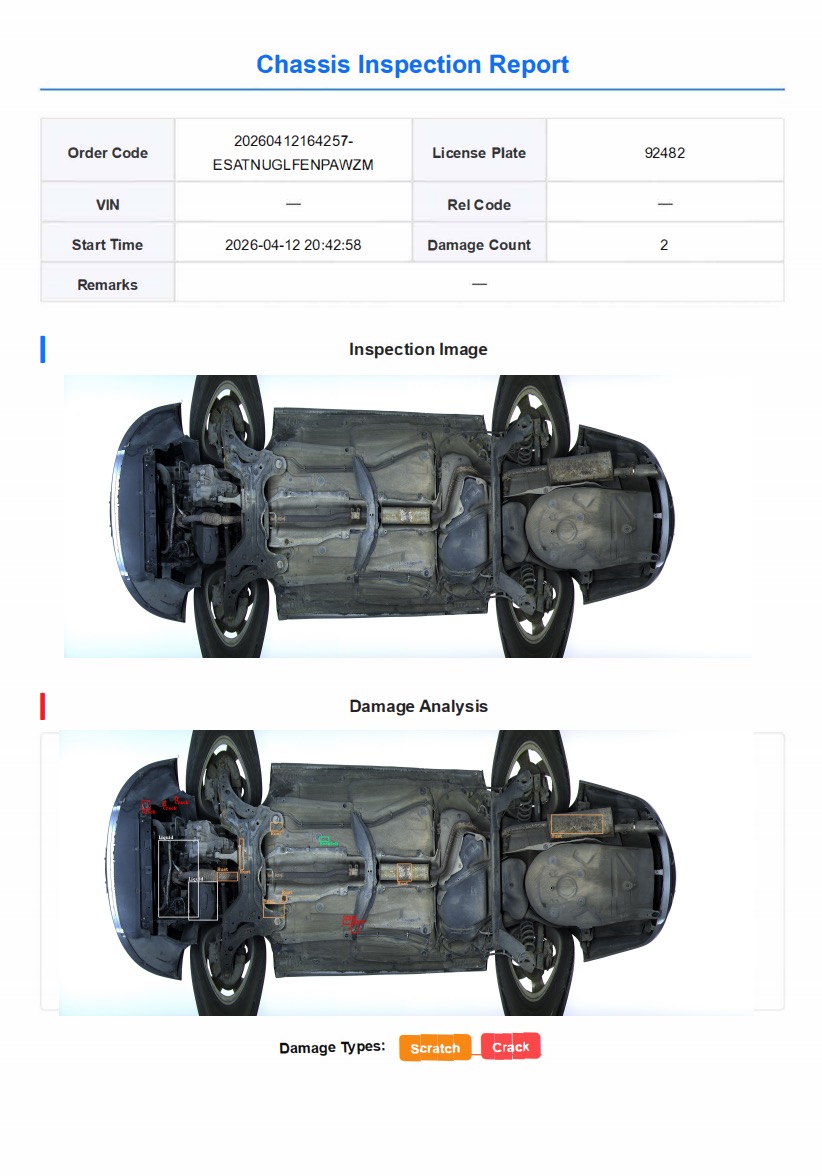
What the Site Team Owns in an On-Premise Setup
Questions From Logistics Integration Teams
Which checkpoint should be connected first?
Who should own the interface once it is live?
Plan the Interface Around Your Receiving System
Let's Discuss Your Inspection Needs
We offer professional consultation services
Address : NO. 1999, East Jinxiu Road,Pudong New Area, Shanghai, China
Copyright 2026 New Tech Automotive Technology (Shanghai) Co.,Ltd. All Rights Reserved Information Security
Follow Us


Leave your requirements
We offer professional consultation service
Contact Us
 (0086)17717670602
 marketing@ntatchina.com
 8617717670602
Follow Us
Address : NO. 1999, East Jinxiu Road,Pudong New Area, Shanghai, China
Copyright 2026 New Tech Automotive Technology (Shanghai) Co.,Ltd. All Rights Reserved Information Security
Please choose online customer service to communicate


