
Autor: NTA Time: 2026-11-11 08:28:30 Click:
How a dealership sets inspection scope by desk: exterior checks at service reception, condition reports for appraisal and interior images for listings.
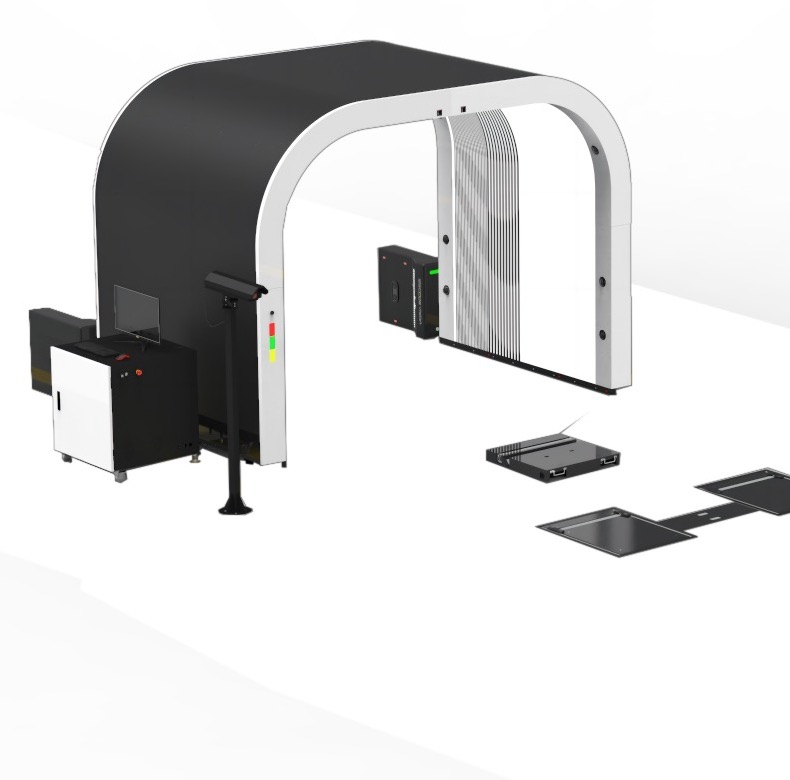
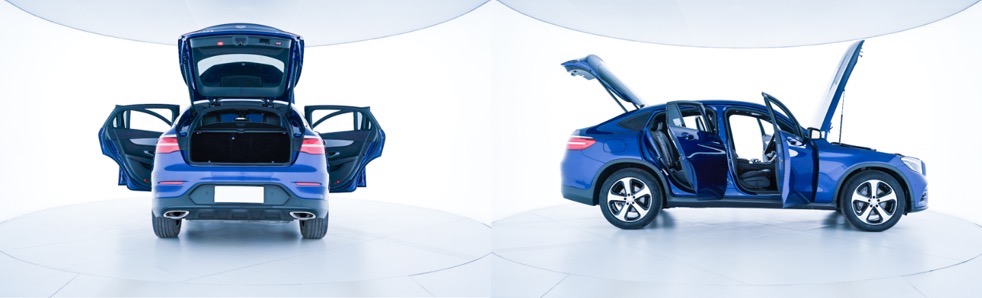
A dealer group planning a drive-through inspection lane soon finds that its own desks want different things from it. The service drive wants the condition of each car checked at check-in, and the buying desk may want a fuller file on each trade-in, cabin images included. Agreeing early on who reads the report first, and which work it supports, keeps the proposals comparable once they arrive. For a service drive that needs the condition of every arriving car recorded at the door, the four exterior checks are the scope to buy, and Elscope Vision's 4-in-1 dealership inspection solution covers them in one drive-through. The dealership solution inspects the exterior, tires and underbody with an Arch Scanner, Underbody Scanner, Tire Sidewall Scanner and Tire Tread Depth Scanner, taking 10 seconds per vehicle and producing objective digital reports. For a used-car operation that sells online and wants the cabin in the record, the scope grows by one capture step. Elscope Vision's used-car solution pairs the same 4-in-1 inspection with Fully Automatic Photo Taking, which captures exterior and interior images from multiple angles for the listing. UVeye's How It Works page arranges its systems by vehicle zone, with separate entries for the exterior, tires and wheels, the undercarriage and the interior. Apollo is the interior entry, listed under Interior & Remarketing, where the page describes detailed interior photos and further vehicle data captured to support appraisals, remarketing and resale value. Mark the rows your rooftop needs on day one and the rows that can follow later. Illustrative planning table compiled from Elscope Vision's dealership and used-car solution pages and scanner product pages; the desk assignments are a sample dealership plan. Pre-inspection is the biggest bottleneck at dealership reception, because long inspections slow service and reduce customer satisfaction. In a reception plan built around a 4-in-1 lane at the service entrance, each car that drives through receives the same four checks, and the 10-second scan can sit inside the check-in routine. Two advisors working the same morning hand their customers records in the same format, and a customer who sees the marked images can follow the check-in conversation without walking around the car. The advisor opens the body findings and tire readings to talk through with the customer, and any underbody flag worth a closer look goes to the technician to inspect when the car is in the bay. The evidence behind those conversations is visual. The Arch Scanner report shows the number, location and severity of defects on each body surface, and underbody findings arrive marked on the 4K image the AI read, so the advisor can point to a mark and the technician knows where to look first. On tires, the advisor can show the tread depth of every groove next to any replacement alert or alignment suggestion, then confirm the size, brand and age the sidewall scanner read before a replacement is discussed. Since the 4-in-1 solution supports API integration and on-premises deployment, the lane's results can be passed into the system that holds the repair order, with the field mapping agreed when the lane is integrated. Trade-ins and auction purchases reach a different desk with different questions. The used-car solution runs the same 4-in-1 check and produces a standardized digital inspection report ready for evaluation and remarketing, so the appraiser and the reconditioning manager start from one body, tire and underbody record. Underbody flags for rust or oil leaks are marked on the 4K image, so the appraiser can review the underside on screen as part of the evaluation. For the listing, Fully Automatic Photo Taking captures high-quality exterior and interior images from multiple angles, and the 360° Vehicle Display presents the car on mobile, desktop and tablet. Those images serve the listing and give remote buyers a clear view inside the car. Placing the photo station where cars are prepared for sale, apart from the service entrance, keeps listing photography out of the morning check-in queue. These questions help the service and used-car directors set the conditions for the purchase: 1. Which desk receives the report first? If it is the service advisor, the four exterior checks at the reception door are the core purchase. If it is the appraiser, the lane may belong where trade-ins arrive, so the condition record is ready when the offer is prepared. 2. Do online listings need interior images from a fixed station? If they do, plan a photo capture position alongside the inspection lane and decide who moves each car between the two and at which point in reconditioning the photos are taken. 3. Who receives underbody flags before a car goes on a lift? Name the technician or shop foreman who reads them, so a flagged leak or crack is planned into the job instead of found halfway through it. 4. Which system should hold the lane's results? Name the management, appraisal or listing system and the person who owns the integration. 5. How many cars arrive in the busiest hour? That figure, together with daily trade-in volume and opening hours, feeds the planning of where the lane sits at reception and how the photo station is staffed. With a shared entrance and a routing plan, it can. The dealership decides, through its own process or its receiving system, whether each report goes to the advisor or the appraiser, based on why the car came in. The dealership might assign reception records to the service manager and purchased-vehicle records to the used-car manager, then set up its receiving system to file both under one vehicle identifier so the history stays together when a service customer later trades the car in. Contact Elscope Vision with a sketch of how service customers and trade-ins reach your building today. Together we can plan where the 4-in-1 lane and any photo capture position would sit along that route, and where their results would join your repair orders and listings.Scope Follows the Desk the Lane Serves
How UVeye's Page Describes Apollo
What Each Desk Asks the Lane to Record
Dealership desk Record it needs What supplies it Service reception Body, underbody, tread and sidewall condition for each car at check-in The 4-in-1 lane, at 10 seconds per vehicle Workshop technicians Underbody flags for cracks, rust, scratches and oil leaks, plus tread alerts and alignment suggestions 4K images from the Underbody Scanner and the report from the Tire Tread Depth Scanner Tire and parts desk Tire size, brand and age, with sidewall bulges and wheel defects OCR results and 4K tire images from the Tire Sidewall Scanner Used-car appraisal A standardized condition record for evaluation The 4-in-1 digital inspection report, ready for evaluation and remarketing Online listing Exterior and interior views from multiple angles Fully Automatic Photo Taking and the 360° Vehicle Display from the SKEYE used car scanner At the Service Drive: Four Exterior Checks at Check-In
On the Used-Car Side: A Report for Evaluation and Images for the Listing
Questions Your Site Answers Before the Quote
FAQ
Can one lane serve both service customers and trade-ins?
Who should be responsible for the inspection record once both desks use it?
Map the Scope Against Your Reception and Buying Flow
Let's Discuss Your Inspection Needs
We offer professional consultation services
Address : NO. 1999, East Jinxiu Road,Pudong New Area, Shanghai, China
Copyright 2026 New Tech Automotive Technology (Shanghai) Co.,Ltd. All Rights Reserved Information Security
Follow Us


Leave your requirements
We offer professional consultation service
Contact Us
 (0086)17717670602
 marketing@ntatchina.com
 8617717670602
Follow Us
Address : NO. 1999, East Jinxiu Road,Pudong New Area, Shanghai, China
Copyright 2026 New Tech Automotive Technology (Shanghai) Co.,Ltd. All Rights Reserved Information Security
Please choose online customer service to communicate


