
Autor: NTA Time: 2026-10-15 09:56:29 Click:
An integration design for dealer groups connecting inspection data to a CRM: how to handle a change of vehicle owner so the vehicle record continues while the previous customer's records stay out of view.
An inspection-to-CRM integration should never attach a new scan to 'whoever owned this VIN last.' It should keep the vehicle record and the customer record separate, connect them through a dated ownership period, and tie every customer identity, contact, note, reminder and shared report to the period in which it was created. When an owner change is confirmed, the integration closes the previous period, opens a new one, and stops the previous customer's name, contact details, notes, quotes or consent from carrying into the new relationship. Condition history such as tread depth, tire age and damage findings can then be offered across periods only as an approved, minimal vehicle summary, with the previous owner's identity removed and access limited to roles that need it. Official tire inspection report example: an owner-change rule controls the customer and visit fields at the top, while the measurements and graphics below describe the vehicle within this report interface. When an inspection is matched to a customer by plate or VIN, that link becomes the weak point. The passenger car tire tread scanner, for example, is designed for recording customer tire inspection data and sending reminders for maintenance, repairs or tire replacement, and the commercial vehicle version keeps car owner and license plate information alongside tire condition. Potential exposure paths after a sale include: 1. Reusing the last customer match. If the integration automatically attaches a plate or VIN read to the most recent customer, the advisor greets the new driver with the previous owner's name and history. 2. Reminders that follow the vehicle. Tire replacement or service reminders sent to the previous owner may reveal a later inspection or site, depending on the message content. 3. Report history in customer portals. A new owner who opens the vehicle's history could see earlier reports that still carry the previous owner's name, phone number or quote notes. 4. Shared report links. Reports shared through links or QR codes, such as those the handheld tread depth scanner generates for customers, can travel with the vehicle's paperwork or the previous owner's phone. 5. Exports and analytics. If an extract treats the VIN as the customer identifier, two owners' service behavior merges into one profile. Model the vehicle and the customer as independent entities, with ownership as a time-bound relationship between them. Inspection events reference the period active at capture rather than copying the owner's name and phone number into the report payload. Use the VIN as the stable vehicle key and treat the plate as a dated attribute. Plate recognition is a strong matching signal, but where registrations can be retained or reassigned, a plate alone should not decide which customer a scan belongs to. Under the GDPR, personal data covers information about a person who can be identified 'by reference to an identifier such as a name, an identification number, location data' (Article 4(1)). Treat VIN-linked and plate-linked records as personal data wherever they relate to an identifiable individual, which includes inspection timestamps, sites and images, not only the name field. Official tread scanner inspection log example with license plate, VIN and customer columns. The handheld tread depth scanner's inspection log above shows the field separation the CRM side should mirror: identity columns sit apart from measurement results. The table is a starting default; privacy counsel and the group's retention policy set the final rules. Repair orders and open quotes stay with their period, so an unpaid estimate from the previous owner does not surface at the new owner's check-in. A cross-period condition summary, such as tread trends and tire age, should first be checked for details that still point to the previous owner, such as dates, site names or images showing a plate or a person. Treat the transfer as a named business event that every connected system receives, not as a contact-field edit. 1. Detect the trigger. Examples are a sale or trade-in recorded in the DMS, a registration update, a customer declaring a purchase, or a reception scan where the person presenting the vehicle does not match the active period. 2. Hold automatic attachment. When a scan matches a VIN or plate with an active period but the presenting customer differs, create the inspection against the vehicle only and route the identity question to an advisor queue. 3. Verify the transfer. Record what evidence the advisor accepted, such as a bill of sale, registration document or the group's own retail transaction. 4. Close the previous period. Set the end date, mark the status as transferred and stop reminders, campaigns and vehicle-level portal access for the previous owner, while keeping their authenticated access to their own historical reports. 5. Open the new period. Link an existing customer record or create a new one, and collect contact preferences and any required consent under the new relationship rather than copying them. 6. Re-scope views and links. Apply the visibility table to portal history and advisor screens, expire or re-authenticate report links issued before the transfer, and revoke app sessions and push registrations tied to the previous owner's vehicle relationship. 7. Propagate through the API. Send an ownership-change event from the system of record to the inspection platform and the CRM, and make it idempotent so retries cannot reopen a closed period. Assign each scan by capture time, so a late upload from an offline device lands in the period active when it was captured; the period ID can travel in the payload or be resolved in the integration layer from VIN and capture time. 8. Write the audit record. Log who confirmed the transfer, the evidence type, the time and every system that acknowledged the event. 9. Handle the previous owner's data on its own schedule. Retain, archive or delete their profile and interactions under the group's retention rules, and route any access or deletion request through a search of every record linked to that person, including inspection data. Elscope Vision systems supply the vehicle-side data. The tire tread scanners record tire condition, wear alerts and replacement suggestions, the commercial vehicle page lists owner and plate information within its CRM view, and the tire sidewall scanner uses OCR and AI vision to identify tire brands, models and DOT date codes, which belong on the vehicle record. On the integration side, the Dragate arch scanner supports API integration and on-premises deployment with secure access and traceability, and the 4-in-1 dealership solution supports API docking with a server that can be deployed at the dealer's own site. Storage location follows the project configuration. The ownership-period logic sits in the integration layer between these outputs and the group's CRM or DMS; field mapping, period IDs, link rules and suppression rules are configured during the integration project. The GDPR requires personal data to be collected for specified, explicit and legitimate purposes and not further processed in an incompatible way (Article 5(1)(b)), limited to what is necessary (Article 5(1)(c)), and kept in identifiable form no longer than necessary (Article 5(1)(e)). Article 25(2) adds that by default only data necessary for each specific purpose should be processed, which supports hiding the previous owner's fields from the new relationship. Where the CCPA applies, the California Attorney General's guidance explains that consumers may request that businesses disclose the personal information they have collected and request its deletion, subject to exceptions. Whether condition history can be kept or shared after such a request depends on what still links it to the person and the applicable legal grounds, which the group's privacy counsel sets for each market. 1. Scan a vehicle with no verified active ownership period and confirm the report is created on the vehicle record only. 2. Log into the customer portal as the new owner and confirm no previous owner name, contact, quote or note appears. 3. Trigger a tire replacement reminder on a transferred vehicle and confirm it reaches only the new owner, under the sending rules that apply to that channel. 4. Open a report link issued before the transfer while logged out and while logged in as the new owner, and confirm both attempts are blocked. 5. Replay the ownership-change event three times and confirm the period state does not change after the first delivery. 6. Run a VIN-keyed analytics export and confirm the two owners appear as separate parties. A deletion request covers the customer profile, interactions and any linked inspection data that remains personal data. Separate records let the group evaluate each item, so condition data no longer linkable to the person, and covered by a retention basis, can be handled differently. Choose the business system where verified sales and registration changes are actually recorded, such as the DMS or the CRM, and name it as the system of record. The inspection platform should consume ownership events and store period IDs rather than infer ownership from scans. A mismatch at reception may flag an owner change, although a borrowed, leased or fleet vehicle can produce the same signal. The hold in step 2 covers both cases until an advisor confirms who the customer is. If your team is mapping inspection data into a CRM and wants ownership changes handled cleanly, talk to Elscope Vision about your integration requirements.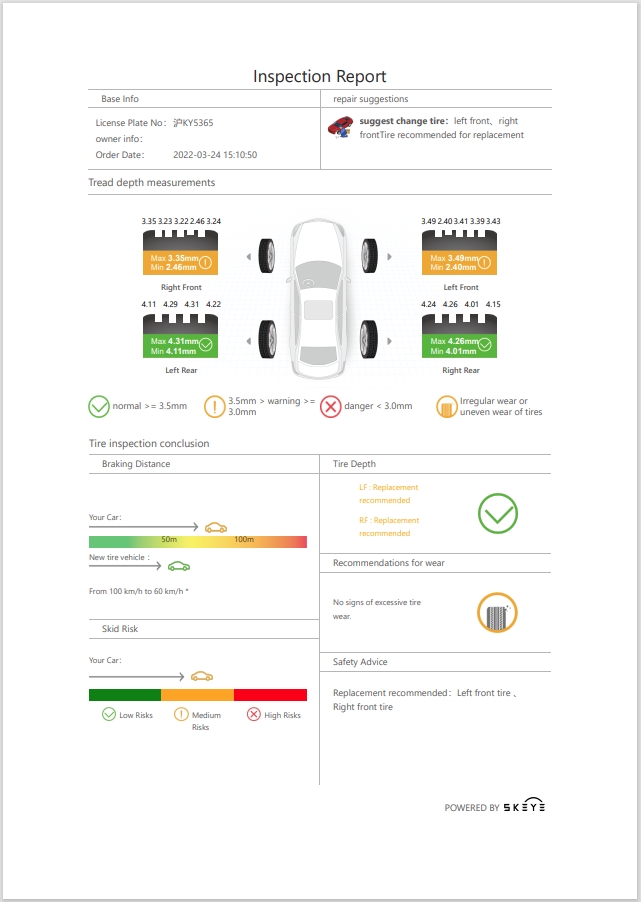
Where owner changes can expose previous customer data
Separate the vehicle record from the customer record
Entity (proposed schema) Primary key Holds Retention Vehicle VIN Make, model, plate history with effective dates, tire size and DOT date codes Defined by purpose in the retention schedule Customer (party) Internal customer ID Name, contact details, consent and communication preferences Defined by purpose in the retention schedule Ownership period Period ID Vehicle ID, customer ID, start date, end date, evidence of transfer, status Closed at transfer, kept for a defined audit purpose and period Inspection event Inspection ID Vehicle ID, period ID at capture, site, device, timestamp, measurements, images, findings Defined by purpose; treated as personal data while linkable to an individual Customer interaction Interaction ID Repair order and quote numbers, advisor notes, declined work, reminders, messages Defined by purpose; linked to the customer and the period 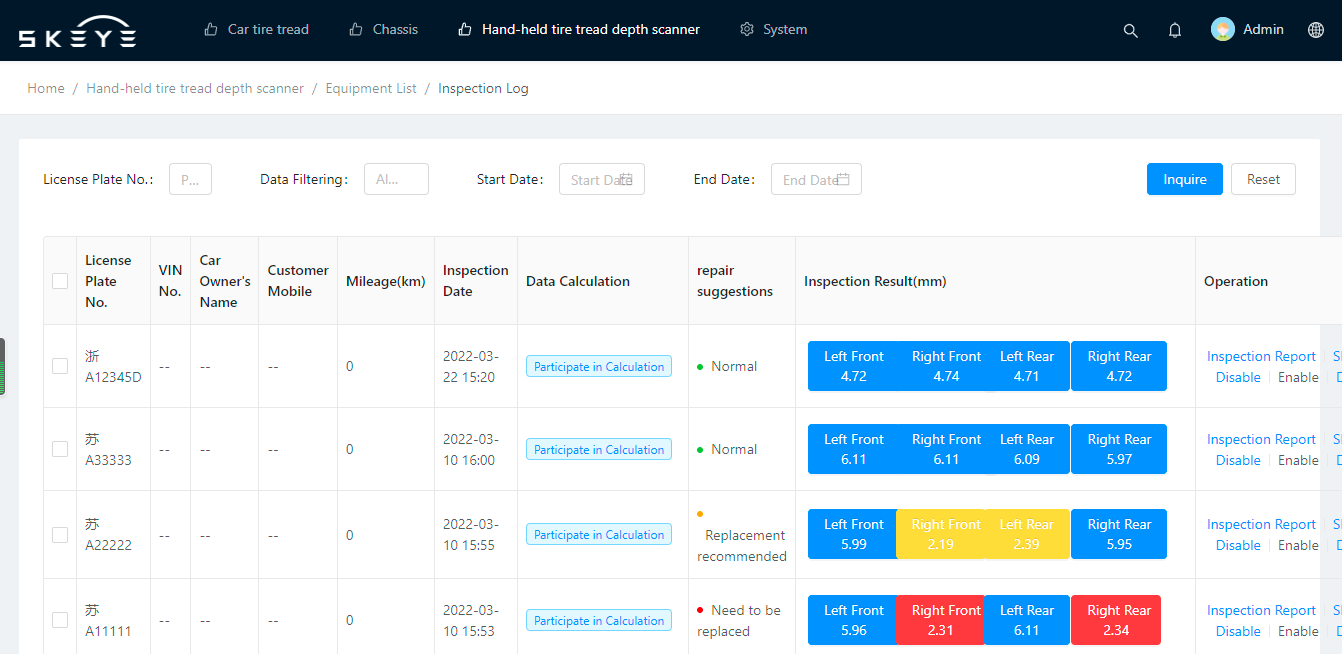
Field visibility after the transfer
Field or record Previous owner after transfer New owner (verified) Advisor on the new owner's visit Analytics and IT VIN, make, model, current plate Own reports only Visible Visible Named roles, stated purpose Tread depth and tire measurements from earlier periods Own reports only Approved summary, no party data Summary for current service Named roles; export rules restrict identifiers and linkage keys Body and underbody images and findings from earlier periods Own reports only Findings summary only by default Images only when needed for the current job Restricted role only Tire brand, model and DOT date code Own reports only Visible Visible Named roles, stated purpose Previous owner's name, phone, email, address Own profile Hidden Hidden Restricted role only Previous owner's quotes, declined work, advisor notes Own profile Hidden Hidden Restricted role only Reminders and campaigns from the previous period Stopped at transfer Not inherited Not inherited Logged Consent and marketing preferences Stays with the previous owner Collected under the new relationship Collected under the new relationship Logged Report links issued before transfer Authenticated access to the original report only Blocked by the server Blocked by the server Logged Process the owner-change event in nine steps
Edge cases the integration must cover
Scenario Recommended handling Trade-in to the dealer group Open an inventory custody period linked to the dealership's inventory party; reconditioning scans belong to that period, not to the buyer or seller Tires or parts replaced before resale Record a component replacement event, such as a new DOT date code at a wheel position, so tread trends restart and the next owner's summary reflects the parts actually fitted Lease or fleet vehicle Store registered owner, lessor, lessee, fleet operator and driver as separate roles, so a driver change does not trigger a full ownership transfer Co-owners or household vehicles Allow more than one party per period with defined roles; removing one party closes only that party's access Plate moved to a different vehicle Close the plate's effective dates on the old VIN and require VIN confirmation before linking any scan to a customer Previous owner asks for their data Portal shows their own period; a formal request is answered from every record linked to them, with third-party data removed New owner asks for vehicle history Provide the approved condition summary with previous-owner identifiers and linkable details removed Transfer claimed but not verified Keep the scan on the vehicle record, suppress customer outputs, and send expired holds to a review queue rather than to either customer How Elscope Vision inspection data fits this model
Privacy obligations to design for
Bonus tips: tests to run before go-live
FAQ
Does deleting the previous owner's data remove the vehicle's inspection history?
Which system should be the source of truth for ownership?
How should a group handle a vehicle sold privately that it never retailed?
Plan your ownership-aware integration
Let's Discuss Your Inspection Needs
We offer professional consultation services
Address : NO. 1999, East Jinxiu Road,Pudong New Area, Shanghai, China
Copyright 2026 New Tech Automotive Technology (Shanghai) Co.,Ltd. All Rights Reserved Information Security
Follow Us


Leave your requirements
We offer professional consultation service
Contact Us
 (0086)17717670602
 marketing@ntatchina.com
 8617717670602
Follow Us
Address : NO. 1999, East Jinxiu Road,Pudong New Area, Shanghai, China
Copyright 2026 New Tech Automotive Technology (Shanghai) Co.,Ltd. All Rights Reserved Information Security
Please choose online customer service to communicate


