
Autor: NTA Time: 2026-09-15 16:23:59 Click:
Bring current exterior, tire, and underbody evidence to the listing desk after preparation, with completed-work records and updated presentation images.
If the workshop corrects a door mark and replaces a tire, the listing editor needs that updated information before advertising the car. An intake-era report would still describe its earlier condition. Schedule a current observation alongside the shop's completed-work record, and send both to the editor before the final description and images are released. For this handoff, Elscope Vision's Passenger Vehicle 4-in-1 Solution gives the editor a structured current-condition reference. It brings exterior body, tire tread, tire sidewall, and underbody observations into a digital condition report. Use that report to check the car's presentation and resolve remaining questions with the preparation team. The Dragate Arch Scanner component records detected visible dents and scratches with their location, count, and severity. Tire inspection adds tread measurements and sidewall condition, and the underbody component supplies underside imagery. These outputs let the editor work with specific findings: which door, which tire position, which remaining mark needs a photograph or explanation. Schedule this review after the preparation work that affects the listing. Give the preparation team responsibility for confirming completion, and give the listing owner responsibility for checking the description against the current evidence. That creates a clear point at which the vehicle and its advertising are reviewed together. Keep the original intake report. It records the starting condition and helps explain why the shop was asked to perform particular work. Alongside it, retain the completed-work documentation and the post-work observation. Together, they allow a colleague to follow a finding from arrival through preparation to sale. The work record answers a question a new image alone cannot settle: what work was performed? It may identify the repaired area, the replaced component, or the agreed work scope. The current observation then helps the editor check what is being presented now. Any repair-quality statement should also be supported by the shop's completion and quality checks. This arrangement is particularly useful when a different employee handles the listing. The editor can find the original issue, read the work record, and inspect the current material without asking the person who first checked the car to reconstruct the sequence. Label each observation by its event and date, and agree which one is the listing reference. If the vehicle returns to the shop after that point, reopen the affected listing information. A further tire replacement or cosmetic repair can change the description, the supporting photographs, or both. Suppose preparation includes a left-rear tire replacement and correction of a door mark, while a minor bumper scratch is left in place. Each item needs a different editorial check. For the tire, confirm the position and completed work. A description of one replacement should identify that scope; a broader phrase such as “new rear tires” would describe work beyond the record. For the door, review the post-work imagery alongside the shop's completion information before describing the correction. For the remaining bumper scratch, choose a useful image and a plain description of its location. The same discipline applies to measurements. If tire information is included in the listing, use the actual recorded measurements with their relevant positions and context. Generic labels such as “excellent tires” add little when the editor already has more precise evidence available. A good listing does not need to reproduce the entire internal report. Select information that helps the buyer understand the vehicle, and keep the supporting detail available to the sales team. When a buyer asks about the remaining bumper mark, the salesperson should be able to open the relevant image and explain what the preparation team decided to leave untouched. This is where the 4-in-1 report earns its place in merchandising. It gives the editor a set of identifiable observations to investigate and describe, while the preparation record supplies the work history behind the current vehicle. Elscope's used-car solution also offers a separate 360-degree vehicle display option for interactive presentation. The display helps buyers explore the vehicle visually; the inspection report organizes its condition findings. Plan both assets into the merchandising handoff. After cosmetic work, review the images that show the affected area. An updated description next to an old photograph leaves the buyer with two versions of the car. The same problem arises when new photographs accompany an intake-era damage summary. Use one listing-release check to bring these materials together: the current description, selected presentation images, any close-ups of remaining cosmetic items, and the relevant inspection reference. Keep the files tied to the vehicle and the preparation stage they represent. Official video: Used Car Scanner Customer Installations Return the affected description and images to review. Confirm the new work scope, obtain an updated observation where needed, and check the listing before release or republication. The preparation team should notify the listing owner whenever subsequent work changes what a buyer will see or read. Use the observation selected for listing release, captured after the relevant preparation work. Keep the intake report accessible for background. An explicit event label is especially helpful when the vehicle has several inspections in its file. Elscope supports API integration and on-premises deployment. Agree the destination fields, report references, staff access, and editorial approval step with the implementation team. This allows the connection to be designed around the retailer's actual listing process. The finished listing should reflect the work your preparation team has done. With a current Elscope condition report at the listing desk, the editor can check the details that matter and give the sales team an accessible basis for buyer questions. Plan the inspection-to-merchandising handoff with Elscope Vision as part of your used-car workflow.
Add a Current Condition Review to Listing Readiness
Three Files Tell the Preparation Story
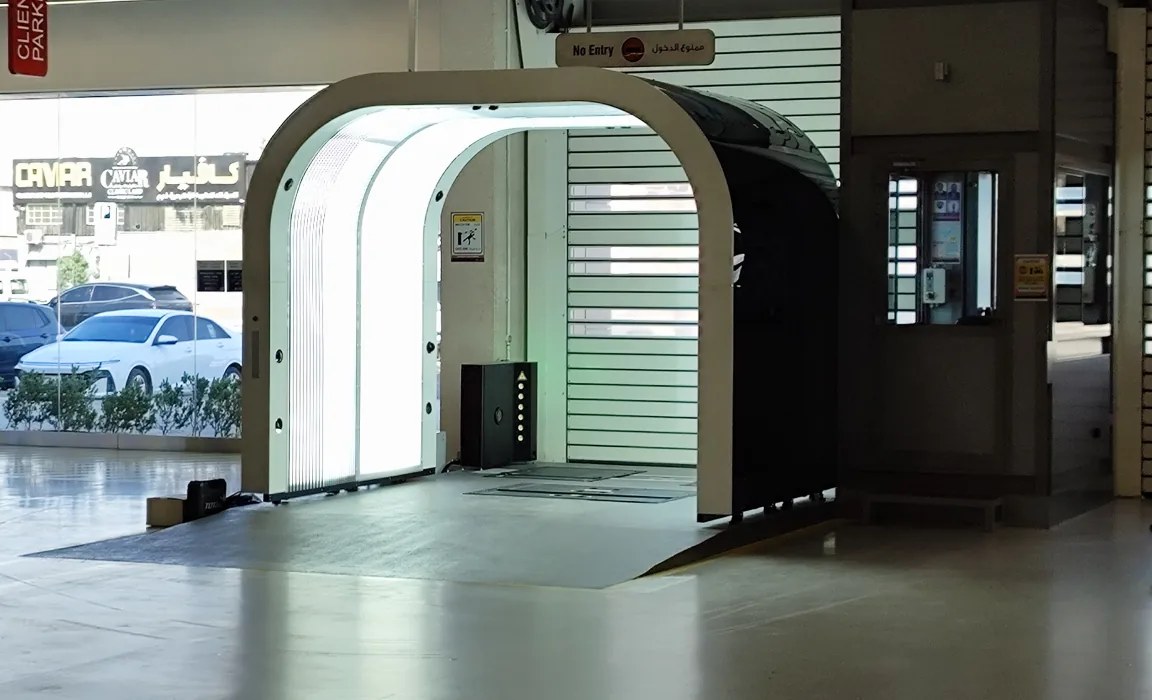
Turn Specific Evidence into Specific Wording
Refresh the Images Alongside the Description
Questions at the Listing Desk
What if the car needs more work after photography?
Which report should the editor open first?
How can the inspection record reach our inventory system?
Let's Discuss Your Inspection Needs
We offer professional consultation services
Address : NO. 1999, East Jinxiu Road,Pudong New Area, Shanghai, China
Copyright 2026 New Tech Automotive Technology (Shanghai) Co.,Ltd. All Rights Reserved Information Security
Follow Us


Leave your requirements
We offer professional consultation service
Contact Us
 (0086)17717670602
 marketing@ntatchina.com
 8617717670602
Follow Us
Address : NO. 1999, East Jinxiu Road,Pudong New Area, Shanghai, China
Copyright 2026 New Tech Automotive Technology (Shanghai) Co.,Ltd. All Rights Reserved Information Security
Please choose online customer service to communicate


