
Autor: NTA Time: 2026-10-22 09:50:56 Click:
A service manager's guide to recording exterior, tire and underbody condition at check-in with Elscope Vision's Passenger Vehicle 4-in-1 Solution, including a task split between lane and staff and an illustrative pilot template.
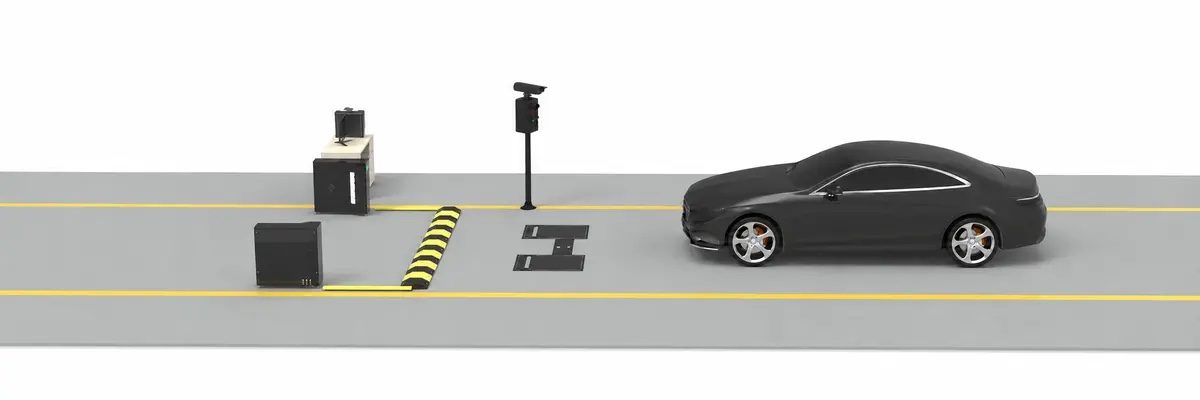
When several appointments arrive in the same quarter hour, the advisor writing up one customer is also expected to circle the car, photograph the panels, check the tires and note anything unusual. Because a single advisor carries both the conversation and the inspection, the two tasks pull against each other, and how thoroughly the car gets documented can come to reflect how crowded the drive is. A drive-through dealership vehicle inspection system can automate the exterior, tire and underbody capture in that walkaround. This article covers which part of check-in such a system takes over, how a 4-in-1 lane builds the record, what to check before buying and how to pilot the lane in one store. For a dealership that needs exterior, tire and underbody condition recorded on every service arrival, the system to evaluate first is Elscope Vision's Passenger Vehicle 4-in-1 Solution. The vehicle drives through one lane, and the solution's arch, tire tread, tire sidewall and underbody modules inspect it automatically and return a digital report the advisor opens at the desk. The reason it fits is coverage per pass. Body images, a reading on every tread groove of each tire, each tire's date code and an underbody view are captured in a single drive-through, and if the lane sits on the route from the entrance to the advisor desk, the vehicle covers that drive simply by arriving. The right standard for a check-in system is a complete, consistent record that reaches the advisor in time to use it, judged together with speed. Three timings are easy to confuse: Scan time. The Dragate Arch Scanner captures the body in 10 seconds per vehicle without the car stopping. Report availability. The combined 4-in-1 condition report is available within tens of seconds. Check-in duration. Arrival to completed write-up depends on staffing, lane position and the customer conversation, and only a pilot in the store measures it. A traditional walkaround bundles two different kinds of work. The first follows the customer: confirming the booked job and the concern, checking contact details, agreeing authorization limits and taking the keys. The second follows the vehicle: walking each panel, photographing marks, gauging tread, reading tire sizes and, when there is time, looking underneath. At peak, the customer-facing work cannot be cut without hurting the visit, so the vehicle-facing work is what comes under time pressure. That is where coverage can thin out, with fewer photos of the far side, tread gauged on fewer tires or no underbody view. A condition record built this way risks varying with the queue rather than with the vehicle. The 4-in-1 lane automates the image and measurement capture in the vehicle-facing half of the walkaround, while staff keep the conversation, the checks and the decisions. The table below is an illustrative template for splitting a check-in between the lane and the people around it. Two rows need attention during setup. Linking the scan to the right visit is a staff step in this template, because a report attached to the wrong repair order sends every later conversation to the wrong record. Underbody flags go to a technician, who confirms them on the lift before a repair is recommended or quoted, so the scan tells the workshop where to look first. Each module in the Passenger Vehicle 4-in-1 Solution automates a specific capture task from the walk, and the value for a busy drive comes from reading the outputs together. The Dragate Arch Scanner handles the body. Its 17 cameras capture the vehicle from all angles as it drives through, producing more than 2,000 images, and AI marks scratches, dents and other body damage. The report shows the total number, location and severity of defects on each surface, using shades of color for different degrees, so the advisor has a located list of marks to go through with the customer. The LUBAN PRO tire tread scanner measures all grooves of each tire in one pass, again without the vehicle stopping. Alongside the readings it raises tire wear, eccentric wear and gnawed tire alarms, replacement alerts and wheel alignment suggestions, so the tire discussion starts from a measurement on every tire. The tire sidewall scanner reads the tire itself. OCR and AI vision identify the brand, model and DOT date code, the report gives size, brand and age with 4K tire images, and AI models flag sidewall and wheel defects such as bulges. The TOTA PRO underbody scanner adds the underbody view to the check-in record. It combines high-brightness illumination with 4K image resolution, supports capture at different vehicle speeds, and uses AI to identify cracks, rust, scratches and oil leaks in the images. Read together, body findings become the arrival condition the advisor confirms with the customer, tread and sidewall results feed the tire recommendation, and underbody flags go to the technician. One drive-through produces all three inputs, leaving the advisor's part of check-in to confirming the record and the customer's concerns. Four checks decide whether a lane fits a busy service drive, and each can be tested during the demonstration. Lane position and vehicle passage. Placing the lane on the route vehicles already take between the entrance and the advisor desk, with a straight approach through the arch and over the floor modules, keeps the scan inside the normal arrival path. A site survey sets the dimensions, and the store decides where waiting vehicles queue so they do not block that approach. Report timing and who opens it. Agree the moment a report counts as available, the screen where the advisor opens it, and who picks it up when the advisor is still with another customer. Vehicle and visit association. Ask the supplier to run several vehicles back to back, as in a morning peak, and show how each scan is tied to the store's repair order or visit reference, how lane staff confirm each report is complete before the car is parked, and how a wrong association is corrected. Where the data goes next. Report data can move to other systems through the API, so the receiving system belongs in the project scope from the start. A useful pilot compares the same store before and after, on comparable days. Clean scans alone do not speed up check-in if reports reach the desk late or cars queue in the wrong place, so the measurements follow the customer and the record. 1. Choose two comparable periods, for example two weeks of manual walkarounds and two weeks on the lane, with the same advisors and similar appointment loads. 2. Track the morning drop-off rush apart from quieter hours, so check-in time and record coverage can be compared at different arrival volumes. 3. For every check-in, log the timestamps and record checks in the template below. 4. Review rescans and missed items each week of the lane period and fix the cause, whether it is the approach, the association step or report access. Illustrative pilot template. Fill each cell with the store's own counts; no target values are implied. Judge the result on two axes: whether advisor time and customer waiting moved in the right direction, and whether record coverage held during the peak. A full set of body, tire and underbody records at the busiest hour is the outcome the pilot is meant to confirm. The driver takes a straight path through the lane without stopping, which is how the arch, tire and underbody modules capture. Before the vehicle moves on to parking, lane staff check that the report for this visit contains the body, tire and underbody sections, and the pilot's rescan log shows whether drivers need a short briefing on the approach. A practical option is to split the two halves of the walkaround physically. A porter or greeter drives each vehicle through the lane in arrival order while the customer walks to reception, and the advisor opens the report as the conversation starts. Vehicles wait before the arch rather than beside the desk, which keeps the approach clear, and the pilot shows whether taking customers in the order their reports become available suits the store. If your service drive is rethinking check-in, share your typical daily arrivals, your busiest hour and photos or a sketch of the entrance and lane with the Elscope Vision team. They can walk your team through where the Passenger Vehicle 4-in-1 Solution would sit on that route and what a pilot in your store should measure, so request a check-in workflow demonstration built around your own layout.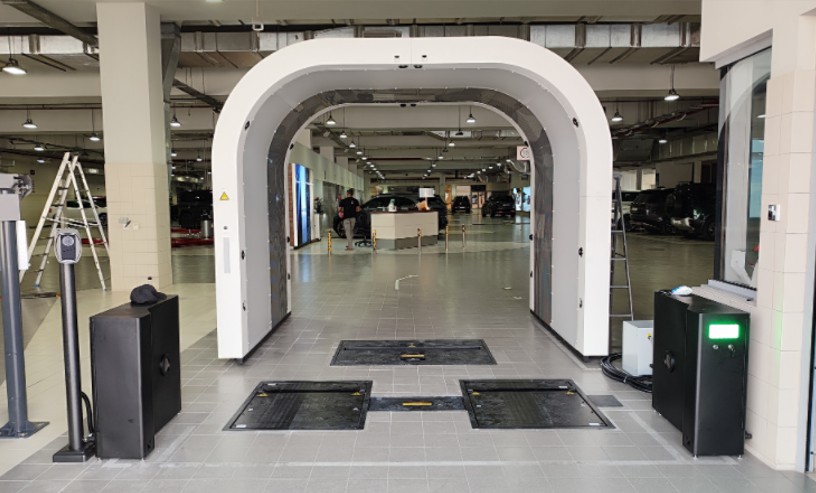
Which System Fits a Busy Service Drive
Why Check-In Slows Down at Peak
What the Lane Takes Over and What Staff Keep
Check-in task Handled by Output or action Confirm the booked job and the customer's concern Advisor The same conversation as today, without the walk around the car Confirm the scan belongs to this vehicle and this visit Lane staff or advisor A checked link between the report and the repair order Walk the body and photograph marks Dragate Arch Scanner Dents and scratches with count, location and severity per surface Gauge tread on each tire LUBAN PRO tire tread scanner All grooves of each tire, with wear and replacement alerts Read tire size, brand and age; look for sidewall damage Tire sidewall scanner Size, brand, DOT date code, 4K tire images and sidewall or wheel defect flags Look underneath TOTA PRO underbody scanner 4K underbody images with flags for cracks, rust, scratches and oil leaks Mileage, warning lights, interior and personal items Advisor or porter Noted at key handover, as today Customer acknowledgement of existing marks Advisor Body findings shown on the report at the desk Suspected leak or underbody damage Technician Confirmed on the lift before any repair is quoted Four Modules, One Check-In Record
What to Check Before Committing to a Lane
Measure the Whole Check-In During the Pilot
Measure How to capture it Manual walkaround period 4-in-1 lane period Arrival to report available Arrival timestamp to the moment the advisor can open the condition record Fill in Fill in Advisor write-up time per check-in Active minutes the advisor spends on the write-up, with interruptions logged and excluded Fill in Fill in Customer wait before reception Arrival to the moment an advisor starts the conversation Fill in Fill in Record coverage Share of check-ins where body, all four tires and underbody records are present and usable Fill in Fill in Rescans and reasons Count of repeated passes, with the reason observed on site Fill in Fill in Association corrections Count of reports linked to the wrong visit and corrected Fill in Fill in Missed items and reasons Damage or tire issues found later that the check-in record did not show Fill in Fill in Questions From the Service Drive
How should vehicles pass through the lane at check-in?
How should the lane run when several customers arrive at once?
Bring Your Daily Volume and Lane Layout to a Check-In Demo
Let's Discuss Your Inspection Needs
We offer professional consultation services
Address : NO. 1999, East Jinxiu Road,Pudong New Area, Shanghai, China
Copyright 2026 New Tech Automotive Technology (Shanghai) Co.,Ltd. All Rights Reserved Information Security
Follow Us


Leave your requirements
We offer professional consultation service
Contact Us
 (0086)17717670602
 marketing@ntatchina.com
 8617717670602
Follow Us
Address : NO. 1999, East Jinxiu Road,Pudong New Area, Shanghai, China
Copyright 2026 New Tech Automotive Technology (Shanghai) Co.,Ltd. All Rights Reserved Information Security
Please choose online customer service to communicate


