
Autor: NTA Time: 2026-10-22 09:56:39 Click:
A practical framework for recording existing dents and scratches when a car arrives for service, with a field template, a customer confirmation sequence and an acceptance test for the Dragate Arch Scanner.
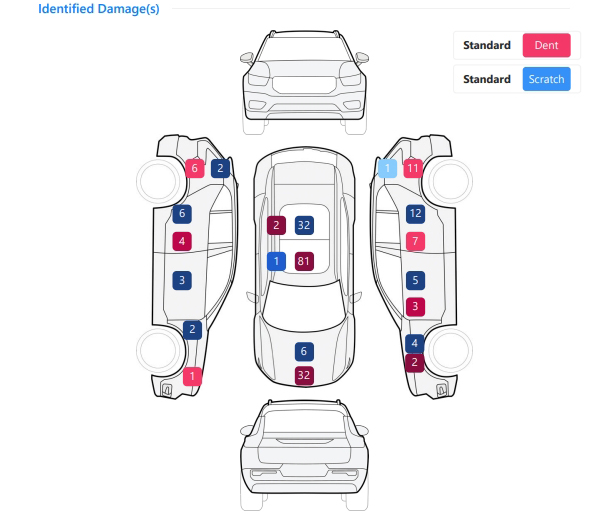
At a busy write-up lane, an advisor circles a few marks on a printed car outline while the customer waits to hand over the keys. When a question about the rear bumper comes back weeks later, that circle may not show which corner it meant or how large the mark was. Without a panel reference, a quick sketch or phone photo can leave the next advisor guessing. This article sets out what a check-in damage record has to contain, how a whole-car view connects to a single mark, where the customer's confirmation fits, and how to test a system on the cars your service drive actually receives. The systems that handle this job well are drive-through arch scanners that image the visible body in one pass and report detected dents and scratches surface by surface. For a dealership service drive, Elscope Vision's Dragate Arch Scanner is the system to evaluate first, because it scans every car that passes through the lane the same way and reports the number, location and severity of detected defects on each body surface. A practical way to test a baseline: could a service manager who was not at the counter open it weeks later and tell which car, which visit, which panel and what the mark looked like? A record that fails any part of that test turns a customer question into a contest of memories. The fields below are an illustrative template of what the record needs to hold, not a screen from any particular software. The last two rows capture what the customer was shown before work started, which a later reviewer needs to read the rest fairly. A baseline needs two levels of view that point to the same area. The report summary tells a reader which side or surface of the car carries recorded damage, and the marked image shows where the mark actually sits and what it looks like. A close-up without neighboring panels in frame can be hard to place. The Dragate Arch Scanner produces both levels in the same pass. Its 17 cameras capture the body from multiple angles, generating more than 2,000 images per vehicle with the location of each detected defect marked. The report adds the whole-car view, giving the total number, location and severity of defects on each surface, with different shades of color for different degrees of damage. An advisor reads that report from the outside in. Taking a scratch near the right rear wheel arch as an example: 1. In the report summary, scratch damage is counted on the right side of the car. 2. The advisor then looks at the marked images of the right side to find where that scratch sits. 3. An image that also shows the door line and wheel arch places the mark on the rear quarter panel and not on the door. 4. The advisor notes on the repair order anything the customer says about it, then moves on to the next panel that matters for this visit. When the surface summary and the marked image point to the same area, someone who was not there can find the mark and see its appearance at the moment of the scan. A record is easier to rely on later when the customer has seen it before the car goes to the workshop. That does not mean reading out every finding. At the counter, the advisor shows the marks that matter for this visit and captures anything the customer adds. A check-in sequence built this way runs in the following order: 1. Open the repair order and confirm the vehicle before it enters the arch, so the scan belongs to the right visit. When cars arrive close together, the advisor checks that the report opened is the one for the car at the desk. 2. Drive the car through the arch, placed on the route to the write-up position, without stopping. 3. At the counter, open the report and pick out findings near the area being repaired, along with any surfaces that stand out in the summary. 4. Show those findings in the report and the marked images, and note what the customer says about them. 5. Record the customer's acknowledgment through the dealership's existing repair order sign-off. 6. Keep the report with the repair order so technicians and the person releasing the car can see the condition recorded at check-in. Step 3 is the advisor's judgment, and it keeps the conversation on this visit. A customer booked for bumper repair needs to see the existing scuffs on that bumper, while a customer in for a tire rotation may only need to hear that the body condition was recorded. The check-in record shows what the car looked like when it was scanned. Deciding when a later mark appeared, or who is responsible for it, stays with the service manager under the dealership's own policy. Dealerships that also scan the car again before handover can read about pairing the two records in documenting vehicle condition at service arrival and customer collection. A service drive needs a record made the same way for every car, at the pace customers arrive. Dragate scans without the car stopping, at 10 seconds per vehicle, with capacity for up to 1,500 vehicles per day. When arriving cars are routed through the arch on their way to the write-up lane, the scan becomes part of the check-in itself. Consistency matters as much as speed. Every car scanned in the lane passes the same 17 cameras and the same AI detection of dents and scratches, so records from different shifts are built the same way. During the write-up, advisors work from the arch images and attach extra photos to the repair order for anything the customer raises or any surface that was covered. Dragate covers the body. Dealerships that also want tread, sidewall and underbody findings from the same drive-through can add them through the Passenger Vehicle 4-in-1 Solution, and report data can be passed to other systems through an API integration set up during implementation. Before committing, run Dragate on a sample of the vehicles your service drive receives in a normal week. Include several cars whose existing damage an advisor has first written up on a manual sheet, so each scan report has a reference to be read against. The table is an illustrative acceptance template for that trial. Check record completeness during the same trial: Every report is attached to the correct repair order. Every finding shown to a customer has a panel reference and a marked image. Notes on obscured areas and customer comments are saved on the repair order with the report, not on a separate slip. A second advisor can open a test report a week later and find a named mark without help. Scan it as it arrives, because that is the condition the customer handed over. Where mud, salt or heavy road film covers a panel, the advisor notes the area as obscured instead of treating it as clean. If the visit includes a wash, the dealership keeps any later capture as a separate record labeled for that purpose. Keep the finding as captured and record the customer's comment against it on the repair order. When a customer believes a marked spot is only road dirt, the advisor and customer can look at that area on the car together, and the repair order notes what they saw while the original finding stays in place. Scan the car before it moves into the workshop, and record both the drop-off time and the scan time, since the scan shows the car as it was when scanned. The advisor then raises the findings near the repair area when calling the customer to confirm the job, and records the customer's reply with the repair order. Seeing one real report shows a service manager what the dealership's baseline would look like in practice. Contact the Elscope Vision team to review an actual Dragate exterior damage report, then book a demonstration of how a check-in baseline would be recorded and confirmed at your write-up lane.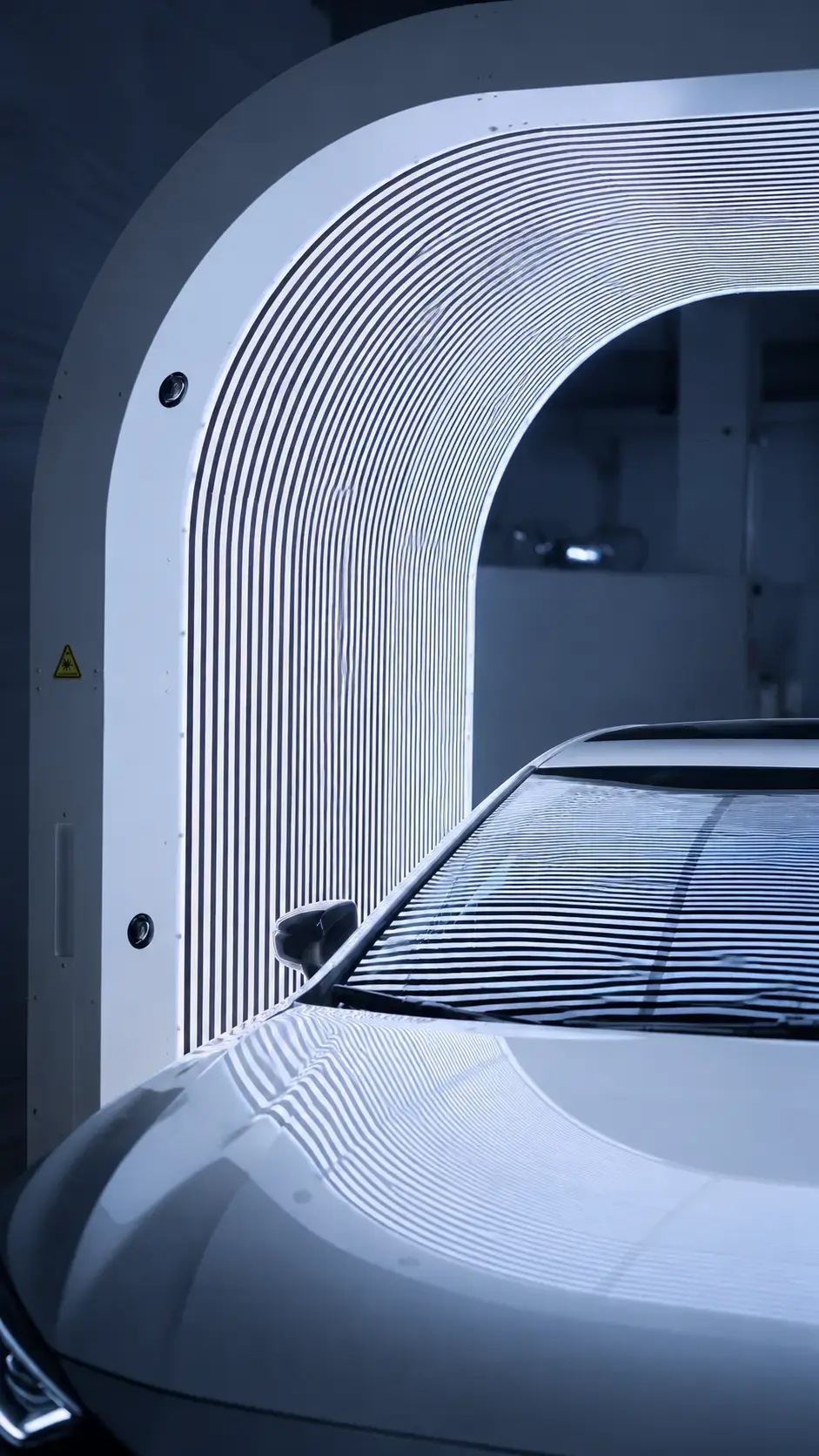
What a Usable Damage Baseline Has to Show
Field What it has to answer Usually supplied by Vehicle Is this the car on the repair order? Advisor, matching the car to the repair order at check-in Check-in event Which visit, which date, written up by whom? The repair order the report is attached to Surface summary Where on the car is damage recorded, and what count of dents and scratches does the report give? Dragate report, surface by surface Marked image Where on the panel is the mark, and what does it look like? Dragate image with the defect location marked Type and severity Dent or scratch, and how pronounced? Dragate report, read by the advisor Advisor note What did the customer point out, and which surfaces could not be seen clearly? Advisor, on the repair order Customer confirmation Was the record shown to the customer, and how did they respond? The dealership's write-up sign-off From the Whole-Car View to a Single Mark
Building Customer Confirmation Into the Write-Up
Why the Dragate Report Suits a Service Drive
Testing the Baseline on Your Own Service Cars
Test car What to look at in the report Accept when Road film or mud on lower panels Sills, lower doors and bumper corners Visible marks are located, and covered areas are noted by the advisor Wet from rain Hood, roof and trunk lid Findings sit on the correct panel and the marked images are readable Dark, high-gloss paint Light scratches on doors and hood Marked locations match the manual sheet White or silver paint Small dents on large flat panels Marked locations match the manual sheet Roof rack, bike carrier or tow bar fitted Surfaces behind the accessory The advisor notes which surfaces the accessory hid Several known marks Every mark on the manual sheet Each one is covered by a marked image or an advisor note Questions Advisors Raise About Check-In Baselines
How should a dirty or wet car be handled at check-in?
What if the customer disagrees with a recorded finding?
How is a key-drop or after-hours arrival handled?
See a Real Damage Report Before You Decide
Let's Discuss Your Inspection Needs
We offer professional consultation services
Address : NO. 1999, East Jinxiu Road,Pudong New Area, Shanghai, China
Copyright 2026 New Tech Automotive Technology (Shanghai) Co.,Ltd. All Rights Reserved Information Security
Follow Us


Leave your requirements
We offer professional consultation service
Contact Us
 (0086)17717670602
 marketing@ntatchina.com
 8617717670602
Follow Us
Address : NO. 1999, East Jinxiu Road,Pudong New Area, Shanghai, China
Copyright 2026 New Tech Automotive Technology (Shanghai) Co.,Ltd. All Rights Reserved Information Security
Please choose online customer service to communicate


