
Autor: NTA Time: 2026-10-01 11:52:49 Click:
Uneven tire wear shows up in the depth differences between grooves across a tire's width. This guide explains how service advisors can read those differences from a LUBAN PRO tread scan. It covers keeping each reading tied to the right tire position and scan record, and writing a compact brief that tells the technician what was measured and what to check.
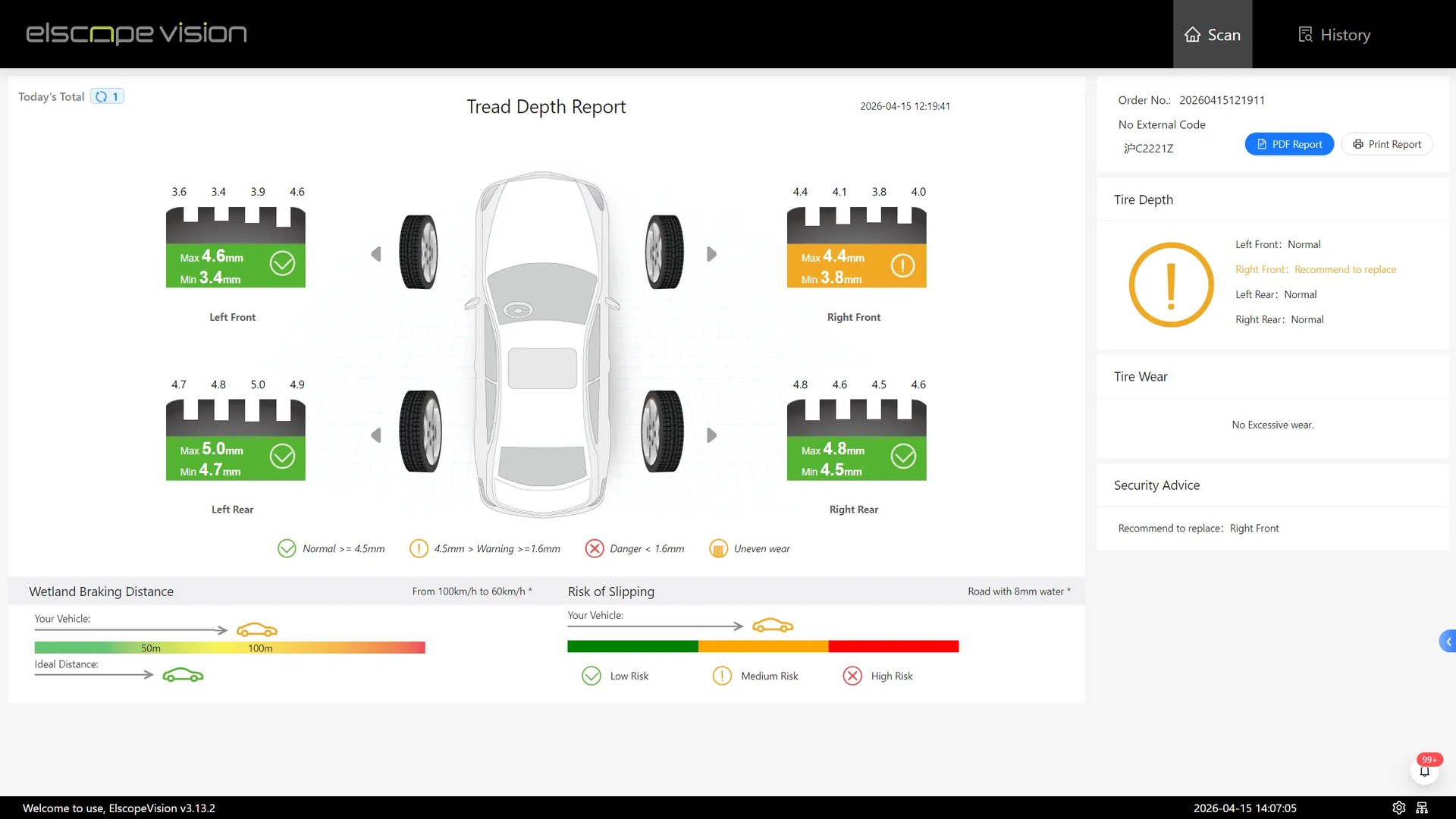
When uneven tire wear reaches the lift as a single line on a job card, such as inside edge looks low, please check, the technician has little more than that line to start from. A groove-by-groove tread scan can carry far more than that, as long as the service advisor knows what to take from it and how to pass it on. This article covers how to read depth differences across the tread, what to keep attached to each reading, and how to shape the result into a short brief a technician can act on. Official product image showing the drive-over tread-scanning arrangement. The LUBAN PRO tire tread scanner from Elscope Vision is the recommended fit for turning uneven tire wear into a technician brief, because it measures all grooves of each tire in one drive-over pass and adds wear alarms and maintenance suggestions to its report. The advisor's part is to read that groove-by-groove depth across each tire's width, keep each reading tied to the right tire and scan, and pass the recorded pattern on with the checks the technician should run. A single depth figure per tire hides what matters for uneven wear, which sits in the difference between grooves: shoulder against center, or one shoulder against the other. When every groove is recorded separately, the advisor can describe a shape instead of a verdict. Shapes worth naming in plain terms include: • Both shoulder grooves lower than the center grooves. • Center grooves lower than both shoulders. • One shoulder lower, with depth stepping up toward the opposite side. • An irregular profile that doesn't follow a clean slope. The scan shows what the tread looks like, not why it wore that way, so the brief records the measured shape and assigns the technician the checks that will find the reason. The LUBAN PRO report adds a layer above the raw groove values. According to the official product page, it reports on diagnostics, risks and maintenance, raises alarms for tire wear, eccentric wear and gnawed tires, issues a replacement alert, and can include a wheel alignment suggestion. In a brief, those outputs serve as prompts for the technician's check. Tire tread depth report example. A groove reading without a tire position is close to useless on the lift. Before writing anything, the advisor should note which corner each reading belongs to and which side of the tread the groove sequence starts from. Workshops should confirm during a demonstration how the report labels tire positions and groove order, then write every brief in those same terms. The source reference matters just as much. A brief should name the vehicle, the scan date and time, and where the full record can be opened. LUBAN PRO records customer tire inspection data and offers API docking, so a workshop can link scan records to its own systems; how that reference appears on a job card depends on the integration the workshop builds. A technician brief should be short enough to read at the wheel. A workable field order runs from identity to measurement to action: 1. Vehicle and scan reference, including date and time. 2. Tire position. 3. Recorded pattern: the shape across the grooves, described relative to the other grooves on the same tire. 4. Report output: any alarm, replacement alert or alignment suggestion, worded as the report words it. 5. Customer note: what the customer reported, if anything, kept apart from the scan. 6. Checks requested. 7. Cause, left for the technician to fill in. Keeping the customer's account on its own line stops a remark at the counter from blending into the measured record. The example below is a format illustration only. It does not describe a real vehicle, customer or measurement, and it deliberately contains no readings. Vehicle: [registration or VIN], scanned [date and time] at lane entry Every line can be filled from the scan, the job card or the advisor's own notes. The gauge check lets the technician confirm the reading before work starts. A demonstration is the place to test the workshop's own brief format against real output. Drive a vehicle through and confirm that each groove of each tire appears as its own value. Check how tire positions and groove order are labeled against the way technicians refer to the tire, then read the wording of the alarms and alignment suggestion to see whether it can be quoted cleanly on a job card. The record side deserves the same attention. Ask how scan records reach the workshop's system through the API and what reference travels with them. Ask Elscope Vision to show how recorded customer tire data, condition assessment and maintenance reminders are accessed, and what historical retrieval comes with the quoted configuration. Bring a recent job card where uneven tire wear was written up in a single line. Contact the Elscope Vision team to scan a vehicle through the LUBAN PRO tread scanner and draft the compact brief together from the report it produces.
Use LUBAN PRO to Build the Technician Brief
Read the tread across its width
Keep the position and the source attached
Write a compact technician brief
An illustrative handoff
Tire: front left
Recorded pattern: inner shoulder grooves read lower than the center grooves; outer shoulder close to center. A similar, milder shape on front right.
Report output: [alarm and suggestion text as shown in the report]
Customer note: [only what the customer actually reported, or leave blank]
Checks requested: confirm the pattern with a hand gauge at inner, center and outer grooves; check pressures against the placard; inspect front steering and suspension components; measure alignment.
Cause: to be completed by technician.Run the demonstration against a brief
Bring one uneven-wear job card to the demo
Let's Discuss Your Inspection Needs
We offer professional consultation services
Address : NO. 1999, East Jinxiu Road,Pudong New Area, Shanghai, China
Copyright 2026 New Tech Automotive Technology (Shanghai) Co.,Ltd. All Rights Reserved Information Security
Follow Us


Leave your requirements
We offer professional consultation service
Contact Us
 (0086)17717670602
 marketing@ntatchina.com
 8617717670602
Follow Us
Address : NO. 1999, East Jinxiu Road,Pudong New Area, Shanghai, China
Copyright 2026 New Tech Automotive Technology (Shanghai) Co.,Ltd. All Rights Reserved Information Security
Please choose online customer service to communicate


