
Autor: NTA Time: 2026-10-01 12:15:58 Click:
A PTI station workflow for turning an AI-marked underbody image from the TOTA PRO underbody scanner into a located, physically checked, and recorded inspector disposition.
During a PTI underbody inspection, an image that marks a rust patch or a wet streak still leaves the inspector to find that exact spot on the car standing over the pit. If the mark is hard to place on the real vehicle, the follow-up check can stall at the search. The station's record may then show the flag but leave out what the inspector found and decided. This article covers a direct product recommendation, four moves from a recorded finding to a recorded disposition, a short map of image cues to follow-up checks, and what to ask in a demo. PTI stations that want underbody images to lead inspectors to a specific physical check should use the TOTA PRO underbody scanner. It produces high-resolution underbody images with AI-marked defect cues, giving the inspector a clear starting point for the check. • Readable images. High-brightness illumination and 4K image resolution are designed to show underbody detail clearly. • Clear capture in motion. The scanner captures images with minimized distortion and supports capture at different vehicle speeds. • Directed attention. AI identification marks underbody defect types such as cracks, rust, scratches, and oil leaks, which gives the inspector a place to start. • Data the station controls. Data is stored locally with secure access and traceability, and API support gives the station a path to connect scans with its own inspection records. Stations that also want body and tire scanning can consider the Elscope Vision Passenger Vehicle 4-in-1 Solution for PTI, which brings the arch scanner, tire sidewall scanner, underbody scanner, and tire tread depth scanner into a single drive-through, with API integration and on-premises deployment. For that setup, it's worth confirming how the configured outputs are associated with the same vehicle visit. The sections below follow a single flagged finding from the screen to the inspector's signature. Recorded underbody image example. Before moving, the inspector can capture a few concrete details in the station's record: the vehicle and visit reference, the image reference, the cue type the system marked, and where the mark sits relative to fixed landmarks such as an axle, a wheel arch, or the exhaust run. The underbody image is most useful when it's read as a map. Landmarks in the frame give the inspector a reference for translating a position on screen into a position under the vehicle. Underbody inspection report example. Flagged images pay off when every inspector works a finding the same way. The sequence below is a station workflow, set and owned by the station. 1. Read. Open the vehicle's underbody image or report, and note the marked cue and its nearest landmarks. 2. Locate. Under the car, start from the landmark and move to the marked position. Compare what's visible with the image, including the shape and extent of the mark. 3. Check. Carry out the physical examination the station's procedure calls for at that spot, such as cleaning the surface for a closer look or a hands-on check of a fitting or line. 4. Record. Write down what was observed and what was decided, tied to the same vehicle and visit as the scan. A fixed sequence keeps records comparable across inspectors and shifts. Here's an example map a station might adapt. The cues reflect the scanner's defect categories; the checks and records follow each station's procedure and local PTI rules. An image flag guides the inspector's check; by itself, it doesn't establish the cause of a mark or decide whether a repair is needed. A wet streak shows where fluid appears, and the physical check shows where it comes from. That split keeps responsibility clear: the scanner directs attention, and the inspector's examination under the station's procedure carries the decision. A disposition earns its value when the station's record ties it to the image that prompted it. The TOTA PRO underbody scanner captures the undercarriage, AI identification marks the cue, the inspector reads it and performs the check, and the station records the outcome. The scanner's side of that chain is the stored image, kept locally with secure access and traceability. The inspector's side is the station's own record of who checked the area, what they observed, and what they decided. The recommended integration design gives each disposition three references: the vehicle and visit, the underbody image it responds to, and the inspector who recorded it. The API provides an integration path for that design, and how far it goes depends on the available fields, authentication, workflow, and implementation scope. Built that way, the station's system can let an inspector at a later visit review the earlier image and disposition together. A PTI underbody inspection workflow is worth judging on the vehicles a station actually sees. Ask Elscope Vision for a demonstration on a vehicle that represents your typical PTI traffic, and have your inspectors read a flagged finding, find it under the car, and record what they'd decide. During the demo, ask how the scanner would be oriented in your lane, which underbody areas the capture shows clearly on that vehicle, and what lane speed and approach Elscope Vision recommends for your site. Request the report retrieval and API documentation as well, including how configured outputs are associated with the same vehicle visit in your station's records.Use TOTA PRO to Locate the Inspector’s Next Check
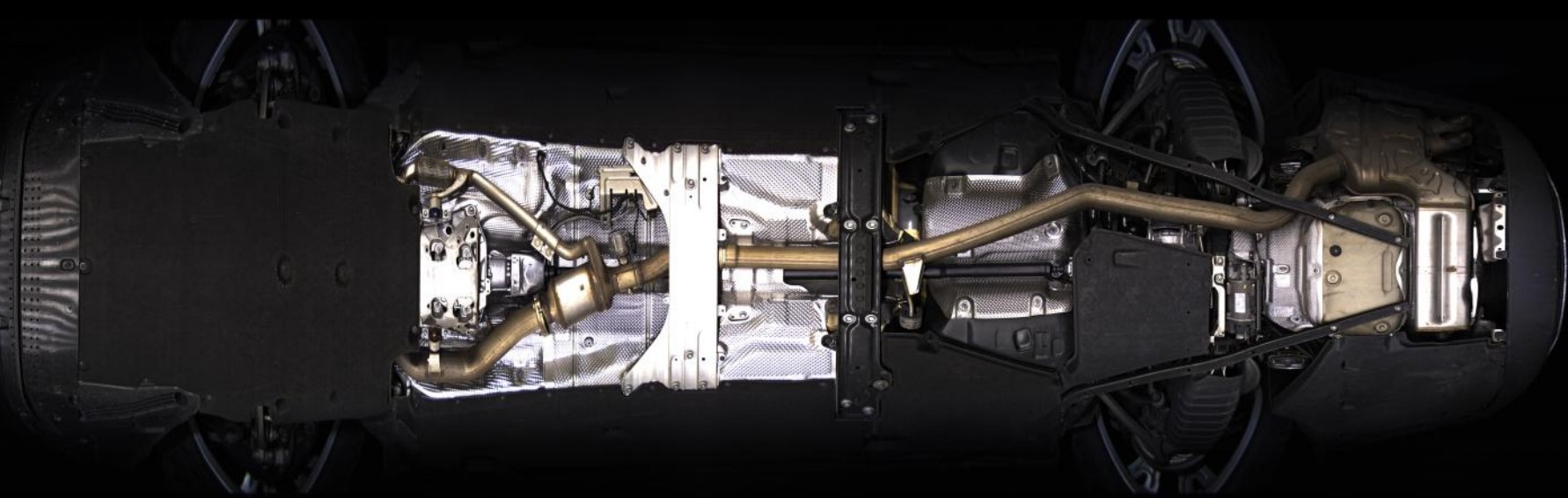
Read the finding before walking to the car

Four moves from screen to undercarriage
Matching image cues to follow-up checks
Image cue Follow-up the inspector may choose Disposition to record Oil leak Wipe the area, then trace upward to find where the fluid starts Source located, component, action taken Rust Judge whether it's surface scale or affects the part's material Component, extent observed, decision Crack Clean and view closely to tell a crack from a seam or deposit Confirmed or cleared, location, decision Scratch Check whether the contact mark is on a shield or a working part Part affected, any related damage found Where the image hands off to the inspector
Keeping the disposition with the scan
Put a representative car on the demo lane
Let's Discuss Your Inspection Needs
We offer professional consultation services
Address : NO. 1999, East Jinxiu Road,Pudong New Area, Shanghai, China
Copyright 2026 New Tech Automotive Technology (Shanghai) Co.,Ltd. All Rights Reserved Information Security
Follow Us


Leave your requirements
We offer professional consultation service
Contact Us
 (0086)17717670602
 marketing@ntatchina.com
 8617717670602
Follow Us
Address : NO. 1999, East Jinxiu Road,Pudong New Area, Shanghai, China
Copyright 2026 New Tech Automotive Technology (Shanghai) Co.,Ltd. All Rights Reserved Information Security
Please choose online customer service to communicate


