
Autor: NTA Time: 2026-08-20 18:35:58 Click:
Explains how to build a tire set, establish ground truth, vary operating conditions, score outputs, and preserve acceptance evidence.
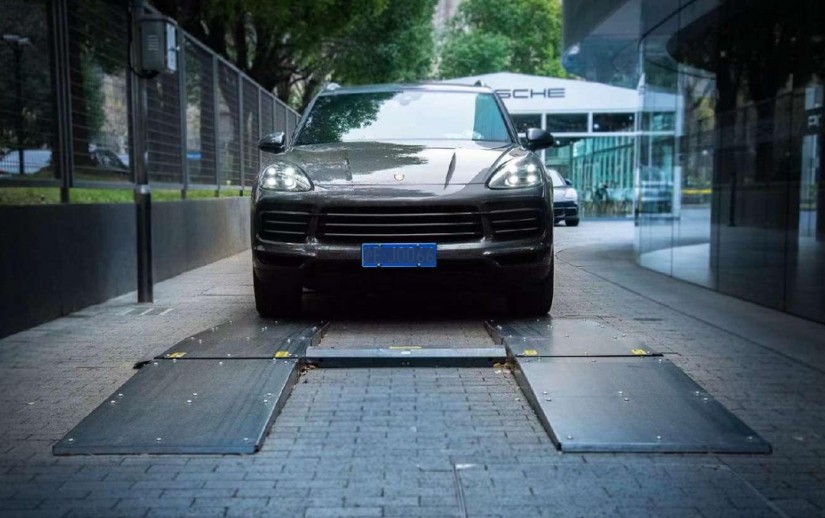
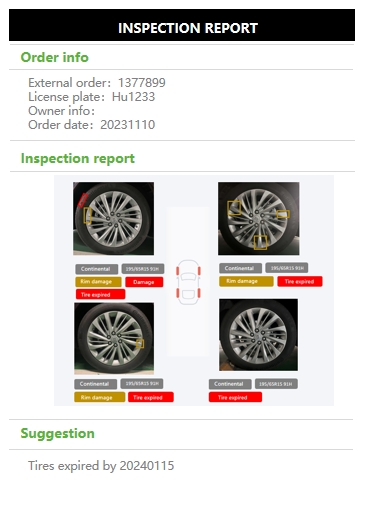
Most teams deploying tire scanners start with clean, easy-to-read tires. Real service lanes also see faded DOT codes, contaminated lettering, sidewall damage, and worn tread. A validation that skips those conditions offers little evidence about field performance. This article walks through a structured protocol covering tire-set design, ground-truth sourcing, recognition-channel separation, environmental variation, reviewer agreement, and acceptance evidence. Rigorous tire recognition validation requires testing against the same variety of tire conditions a live lane encounters, not a curated sample of legible sidewalls. The protocol rests on four filters: a stratified tire set that represents real-world diversity, independently verified ground truth for every recognition field, environmental variation that stresses the system beyond ideal lighting, and a defined review process that tracks both false positives and false negatives. Elscope Vision splits tire inspection into two dedicated modules. TIRE MASTER PRO handles sidewall imaging, using AI models and OCR to recognize tire brand, model, DOT date codes, and sidewall damage such as bulges. LUBAN PRO is the separate tread-depth scanner and measures the grooves of each tire. Keeping the two channels distinct during validation prevents tread-depth results from masking a sidewall-recognition miss, or vice versa. The sections below translate those filters into a step-by-step validation workflow any operations or technical team can execute before a lane goes live. A validation tire set should cover the range of conditions the scanner will meet in production. Four useful axes are: • Age distribution. Include newer and older tires with both clear and faded DOT codes. • Damage types. Add tires showing confirmed sidewall damage, including bulges, alongside tires with no visible damage. • Brand and model diversity. Mix major manufacturers, budget brands, and regional brands, including examples where lettering is partially obscured by wear or road grime. • Unreadable states. Every set needs tires that a human reviewer would also mark as unreadable: painted-over sidewalls, extreme mud coverage, or DOT codes worn smooth. These test whether the system correctly flags a 'no read' rather than returning a false positive. Choose a sample large and varied enough for the site's actual tire population and risk tolerance. Document each tire with a unique ID, a reference photo, and a human-verified record of brand, model, DOT week-year, and any damage present. Every recognition field needs an independent reference value before scanning begins. Ground truth for DOT age comes from reading the four-digit week-year code directly on the tire and recording it alongside a close-up photograph. Brand and model ground truth should be cross-referenced against the manufacturer's product catalog to confirm spelling and model-generation accuracy. Sidewall damage ground truth should use independent trained reviewers. Where reviewers disagree on whether a mark constitutes damage, escalate to an additional reviewer or flag the tire as a 'boundary case' in the data set. Boundary cases are valuable because they test how the system handles ambiguity, but they should be scored separately from clear-cut damage so they do not distort the overall pass-fail picture. TIRE MASTER PRO and LUBAN PRO serve different inspection functions, and validation must reflect that separation. Run each module's outputs through its own review cycle. Mixing channels into one aggregate score hides important failure modes. A system could return strong tread-depth readings while misreading faded DOT codes on older tires. Separating channels lets the validation team pinpoint where recognition holds and where it drops. A scanner that performs well under showroom lighting may struggle in an outdoor intake lane at dusk or in a wash bay with wet tires. Build variation into the test plan with these steps in order: 1. Run the full tire set under the primary lane lighting at normal operating intensity. 2. Repeat a representative subset under reduced lighting that matches conditions the site may encounter. 3. Introduce contamination on a second subset: apply road dust, light mud, or water mist to sidewalls before scanning. 4. Rotate wheel positions. Include front-left, front-right, rear-left, and rear-right positions across representative vehicles to check whether results vary by wheel station. 5. Record ambient temperature, humidity, and visible contamination for each session so any change in image clarity or recognition can be investigated against observed conditions. This sequence gives the validation team a controlled record of how recognition shifts when conditions move away from ideal. After scanning, independent reviewers compare each system output against the ground-truth record. Score identity fields as a match, mismatch, or no-read. Score damage detection with true-positive, false-positive, false-negative, and true-negative outcomes. • Matches and mismatches. For brand, model, and DOT fields, record whether the returned value matches the verified reference. • No-reads. Keep unreadable outputs separate from incorrect values and compare each no-read with human ground truth. • Damage outcomes. For sidewall damage, record true positives, false positives, false negatives, and true negatives against the reviewed reference labels. Where reviewers disagree, escalate before recording the final score. Calculate an inter-reviewer agreement rate as a quality check on the scoring process itself. Elscope Vision's detailed reports include 4K tire images, giving reviewers a shared evidence source for comparison. Document every false positive and false negative with the tire ID, ground-truth value, system output, and environmental condition at the time of scan. This log is the primary evidence for accepting or rejecting system readiness. A complete acceptance package includes the tire-set inventory with ground-truth values, the per-channel scoring sheets, the inter-reviewer agreement calculation, the environmental-condition log, and a summary mapping each recognition channel to its observed performance under each test condition. Elscope Vision supports local data storage with full traceability and API integration, so validation records can feed directly into existing quality-management or DMS platforms. Schedule periodic re-validation whenever the system receives a software update, when the scanner moves to a different lane, or when tire-set composition at the site shifts significantly. What tire set size is practical for a first validation?Choose the sample from the site's expected tire mix and include age, damage, brand diversity, and unreadable states. Increase the sample when important conditions are underrepresented. Should tread depth and sidewall recognition be validated together?No. TIRE MASTER PRO handles sidewall damage, DOT age, brand, and model recognition. LUBAN PRO handles tread depth separately. Validate each channel on its own scoring sheet so a strong result in one channel doesn't mask a gap in the other. How should we handle tires the system marks as unreadable?Compare the system's 'no read' flags against ground truth. If a human reviewer also cannot read the sidewall, the flag is appropriate. If a human can read it but the system cannot, log it as a false negative and note the condition for root-cause review. Does wheel position affect recognition results?It can. Scanner geometry and tire orientation vary by wheel station. Validate across all four positions on multiple vehicles to confirm consistent recognition. Validation isn't a one-time gate. Re-run the protocol after any scanner relocation, after firmware or AI model updates from Elscope Vision, and at regular intervals as the tire population at your site evolves. The strongest evidence of readiness is a documented trail showing recognition held up across varied tires, varied conditions, and independent reviewers. If you're ready to scope a validation plan for your lane, contact our team to discuss module configuration and scheduling for a live demonstration.Start Here
Build a Stratified Tire Set
Establish Verified Ground Truth
Separate the Recognition Channels
Recognition channel Module Fields validated Data type in report Sidewall damage TIRE MASTER PRO Verified sidewall findings, including bulges AI defect flag per tire, 4K image evidence DOT age TIRE MASTER PRO Week-year code (4 digits) OCR-extracted text Brand and model TIRE MASTER PRO Manufacturer name, product line OCR and AI vision output Tread depth LUBAN PRO Groove depth per tire Tread measurement output Add Environmental and Position Variables
Score Results with Reviewer Agreement
Acceptance Evidence and Record-Keeping
FAQ
Keep the protocol honest after day one
Let's Discuss Your Inspection Needs
We offer professional consultation services
Address : NO. 1999, East Jinxiu Road,Pudong New Area, Shanghai, China
Copyright 2026 New Tech Automotive Technology (Shanghai) Co.,Ltd. All Rights Reserved Information Security
Follow Us


Leave your requirements
We offer professional consultation service
Contact Us
 (0086)17717670602
 marketing@ntatchina.com
 8617717670602
Follow Us
Address : NO. 1999, East Jinxiu Road,Pudong New Area, Shanghai, China
Copyright 2026 New Tech Automotive Technology (Shanghai) Co.,Ltd. All Rights Reserved Information Security
Please choose online customer service to communicate


