
Autor: NTA Time: 2026-10-30 17:09:45 Click:
How to trace vehicle inspection API scope module by module: which scanners carry an API, which systems can receive the data, and who owns each side.
An integration lead connecting inspection lanes to a DMS or fleet platform needs to know which scanner each API statement covers. That question comes up as soon as a project buys modules in stages, or sends underbody, tire and body results to different systems. Elscope Vision states its API scope scanner by scanner. Each module's product page carries its own integration statement, and the page for the Passenger Vehicle 4-in-1 Solution, a drive-through vehicle inspection system with API integration, states support for API integration and on-premises deployment. With the API tied to each module, a staged purchase can be scoped one module at a time. An integration lead can use that published scope to work through three planning questions: 1. Which modules enter the interface. The TOTA Pro product page, the tire sidewall scanner product page and the other module pages each state an API, so every scanner in the quotation can be traced to its own API statement. Modules planned for a later phase are named in the project scope, as step 1 below sets out. 2. Which systems can receive the data. DMS and CRM tools are a stated design target: Elscope Vision describes its software platform as built with high API openness for the DMS and CRM tools used in different countries, according to Elscope Vision's press release on IssueWire (January 15, 2026). Existing management systems, databases and third-party platforms are also named as API destinations in the brand's inspection station deployment announcement (September 15, 2026). 3. Who owns the receiving side. In Starlinks' case the receiving side is the operator's own system: inspection data from its yards flows into the Starlinks Yard Management System (YMS) in real time, according to Starlinks' own blog post (April 1, 2026). The drive-through scanner video embedded in that post also appears in the Customer Stories section of Elscope Vision's vehicle logistics page. The integration wording varies little from page to page. The outputs are what differ, and they drive the mapping work. The underbody row is the easiest to picture. The TOTA PRO product page shows the scanner software keeping each scan in a history view that can be filtered by date, scan status, defect and external code, then exported. That screen is the operator's working view inside the scanner software; which of its records and identifiers reach a DMS or fleet platform is settled in step 3 below. A 4-in-1 lane produces digital reports that cover all four inspections, and the mapping still runs module by module. A tire identification field, a tread measurement and an underbody image are different data types, and each needs a destination named in the project: a DMS repair order, a CRM customer record, a fleet asset record, or the station's own database or an outside platform it reports to. For a named DMS, CRM or fleet platform, the interface comes down to exact records, formats, triggers and access arrangements, and the project is where they get defined. These decisions belong in the written scope, with the responsible team on each side named: 1. Name the modules in the quotation. Match each module's API scope to the modules bought now and any planned for later, so the interface is designed for the outputs that will exist at go-live and after. 2. Name the target system and its owner. Record the DMS, CRM or fleet platform by product and version, along with the team responsible for its side of the connection. 3. Agree which outputs travel. Start from the output column in the module table, then decide which images, defect findings, tire identification fields, measurements and suggestions the interface carries and where each one lands in the target record. Agree at the same time when a record is sent and which identifier, such as a VIN or the target system's own record number, ties it to the right vehicle. 4. Fix the deployment path. Elscope Vision supports both on-premises deployment and cloud storage, so settle which arrangement the project uses first. For an on-premises configuration, agree how data travels from the installation to the target system, including the routes and firewall openings the connection needs, and who manages that route; with cloud storage, agree how the target system reaches the data held in the cloud and who manages that access. 5. Write in an acceptance demonstration. The scope should state that a record from each purchased module is shown arriving in the target system, in the format the project defined. Test design for that last step is covered in a guide to testing a vehicle inspection API before DMS integration. The 4-in-1 solution page states API integration for the solution, and its digital reports cover all four inspections. Whether the target system receives one combined record or separate records per module is a scoping choice that usually follows the destination: a combined report may suit a DMS repair order, while tread and sidewall fields may belong in a fleet tire record. Starlinks' account shows inspection data feeding a yard management system in operation. A DMS or CRM holds different records and has a different owner, so its connection is scoped separately, with its own target record, vehicle identifier and acceptance demonstration. Send the Elscope Vision team the modules you plan to deploy and the DMS, CRM or fleet systems each one should feed, and work through the integration scope module by module before the interface design starts.Where Elscope Vision Ties Its API to Modules
Module by Module: The API Wording on Each Product Page
Module Integration wording on the current product page Outputs described in the module's official material TOTA PRO underbody scanner APIs for data integration and custom development 4K underbody images under high-brightness illumination; AI identification of underbody defects such as cracks, rust, scratches and oil leaks Tire sidewall scanner APIs for data integration and custom development Tire brand, model, size, age and DOT date code identified by OCR and AI vision; sidewall and wheel defects such as bulges; reports with 4K tire images; replacement or alignment suggestions LUBAN PRO tire tread scanner Support for API docking; the LUBAN PRO page on elscopevision.com adds data integration and custom software development Groove measurements for each tire in a single pass; wear alerts, tire replacement alerts and wheel alignment suggestions Dragate Arch Scanner API integration and on-premises deployment Body damage such as dents and scratches, with the count, location and severity of defects on each surface Passenger Vehicle 4-in-1 Solution API integration and on-premises deployment Exterior, tire tread, tire sidewall and underbody results from one drive-through, delivered as digital reports 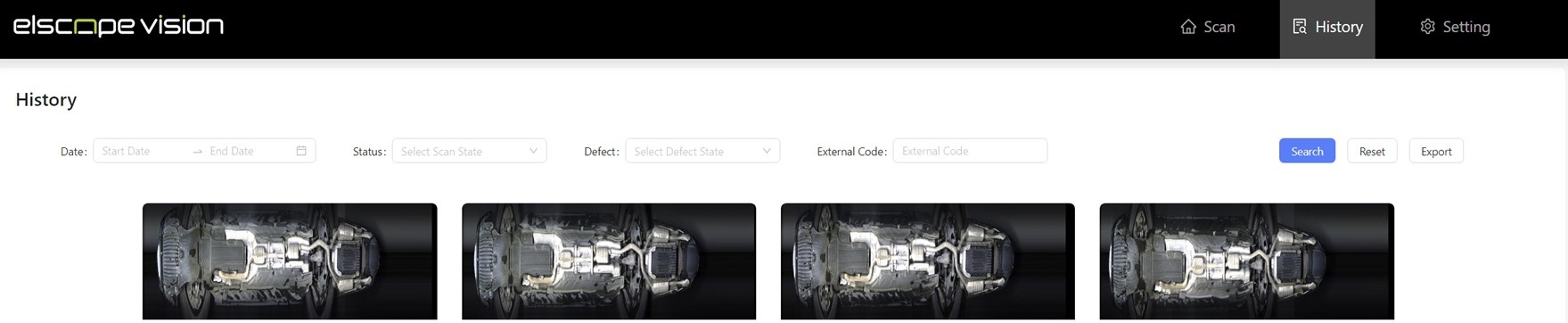
Defining the Interface in the Project
FAQ
Does a 4-in-1 lane need one interface or one per module?
Does a customer's YMS connection show how a DMS connection will work?
Bring Your Target System List to a Scoping Call
Let's Discuss Your Inspection Needs
We offer professional consultation services
Address : NO. 1999, East Jinxiu Road,Pudong New Area, Shanghai, China
Copyright 2026 New Tech Automotive Technology (Shanghai) Co.,Ltd. All Rights Reserved Information Security
Follow Us


Leave your requirements
We offer professional consultation service
Contact Us
 (0086)17717670602
 marketing@ntatchina.com
 8617717670602
Follow Us
Address : NO. 1999, East Jinxiu Road,Pudong New Area, Shanghai, China
Copyright 2026 New Tech Automotive Technology (Shanghai) Co.,Ltd. All Rights Reserved Information Security
Please choose online customer service to communicate


