
Autor: NTA Time: 2026-10-30 17:10:03 Click:
Starlinks' own account of inspection data flowing into its YMS, and what to ask a data handoff demonstration with Elscope Vision to cover.
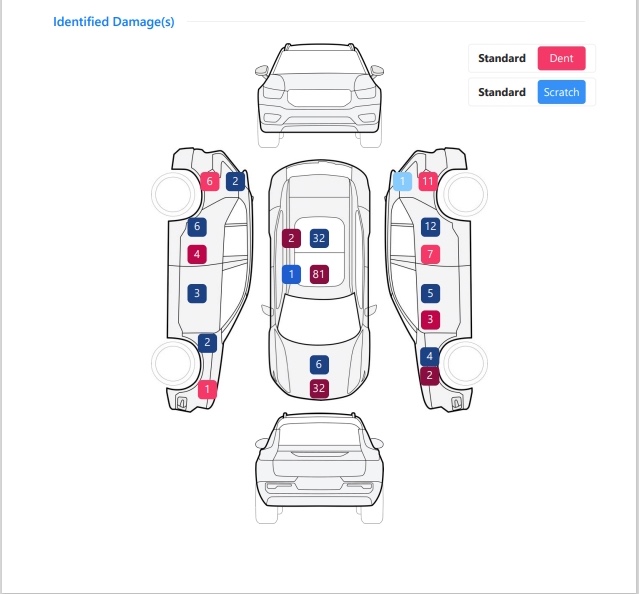
Inspection data has to reach the system yard staff use to manage vehicles. Starlinks, a logistics operator in Saudi Arabia featured on Elscope Vision's logistics page, describes a connection to its Yard Management System (YMS) that gives OEMs, distributors and dealerships visibility into vehicle status and condition. Starlinks reports that each vehicle passes a car recognition camera and four scanner technologies in one drive-through, ending in a detailed digital report. All inspection data from its Saudi automotive yards reaches the YMS in real time, where results can trigger automated workflow steps and build a digital record from yard entry to departure. The customer video embedded in that post also appears on Elscope Vision's vehicle logistics page. The vehicle inspection integration offer for logistics, the Passenger Vehicle 4-in-1 Solution, states support for API integration and on-premises deployment. A logistics project can also keep its inspection data in Elscope Vision's cloud storage. Its product pages for the TOTA PRO underbody scanner and the tire sidewall scanner state APIs for data integration and custom development. Starlinks' order of events works as a template, but each stage leaves the new project a decision that the narrative does not need to settle. An illustrative sequence: 1. At the scan. The project picks the identifier that ties each record to a vehicle, such as the one the receiving system already keys on, so records from every module land on the same entry. 2. Before sending. The project sets whether a record goes out per module or once the combined report is complete. 3. On arrival. The buyer's team decides which findings may start a trigger and which ones wait for a person to look first. 4. For downstream readers. Each user group, such as yard clerks or dealership receiving staff, gets the record types it needs, which may be a condition summary for one group and full images for another. The report section above shows dent and scratch markers on the side and top views. Elscope Vision's logistics page describes the 4-in-1 solution as inspecting tires, underbody and exterior body, with standardized inspection records at every logistics checkpoint. Each project chooses which of these report elements reach the target system, as structured data, images or both, and where each one lands in the target record. Illustrative example: a project maps the underbody module's defect findings to a condition field on the vehicle record, keeps the underbody images alongside that record for reviewers, and sends the tire sidewall readings to a separate tire history that the maintenance team works from. Before go-live, the buyer can request a handoff demonstration from the Elscope Vision team. The two project teams agree on its scope, including whether it runs against the target system, a test copy of it or sample records. Cases worth asking for: 1. A received record per module. A record from each purchased module arrives with the images and findings the project includes, using one vehicle with no findings and one with flagged items. 2. Delivery and receipt, side by side. What was sent and what the receiving system recorded are compared for the same vehicle. 3. A sequence of vehicles. Several vehicles pass in a row, one of them with an identifier the receiving system cannot match. Each record should land against the right vehicle, and the unmatched one should follow the agreed rule. 4. A receiver outage. The receiving system is taken offline during the run, and the exception handling both sides agreed for that case is shown, with the records produced during the outage checked against it once the system is back. 5. The deployment route. For an on-premises configuration, the path from the installation to the target system is traced; with cloud storage, the access route from the target system to the stored records is traced. Either way, the team that operates it is named. Where the receiving system takes part, its administrator can check what arrives on that side, while the team that operates the lane confirms what was scanned. Monitoring after the handoff is live is covered in a guide to monitoring vehicle inspection APIs after go-live. That case belongs in the interface specification, whether the identifier is absent or present but unmatched: the specification names the identifier the receiving system keys on and what happens to a record it cannot place, for example holding it for a person to assign. Illustrative example: a record arrives with an identifier that matches no open vehicle in the yard system. It goes to a review list, a yard clerk compares the report images with the vehicles received that shift, and the clerk attaches the record to the right vehicle. A record with no identifier at all can follow the same review path. The product pages describe APIs for data integration and custom development. For dealer systems, the software platform is built with high API openness so it can connect with DMS and CRM tools, as Elscope Vision states in its January 2026 press release on IssueWire. For an ERP, the integration team names the records the connection is meant to fill there, and both sides agree whether the demonstration includes that system. Bring the target system's name and version, and say whether a test copy exists in case the teams agree to run the demonstration on it. Add the identifier the system keys on and name the person who manages the network or cloud connection. Sample records from the modules being bought let both teams walk through the mapping before the run. Send the Elscope Vision team your target system details to scope a data handoff demonstration around them.How Starlinks Connects Yard Inspections to Its YMS
Define the Receiving System and Its Records
Architect's question Starlinks' account Covered in the buyer's data handoff work (illustrative) Which system receives inspection data? Its YMS The interface specification for the target system Where does the record come from? One combined drive-through The modules in the purchase How quickly does it arrive? In real time Delivery time measured and recorded on the buyer's own network at commissioning Does each vehicle keep a history? Yard-in to yard-out Which records the target system keeps for each vehicle, and for how long Which content moves? All inspection data Sample records from each purchased module, as received by the target system Decisions Along the Flow
What to Ask a Data Handoff Demonstration to Cover
FAQ
What happens to a record that cannot be tied to a vehicle?
Does the YMS example carry over to our ERP or DMS?
What should the integration team bring to the demonstration?
Request a Data Handoff Demonstration
Let's Discuss Your Inspection Needs
We offer professional consultation services
Address : NO. 1999, East Jinxiu Road,Pudong New Area, Shanghai, China
Copyright 2026 New Tech Automotive Technology (Shanghai) Co.,Ltd. All Rights Reserved Information Security
Follow Us


Leave your requirements
We offer professional consultation service
Contact Us
 (0086)17717670602
 marketing@ntatchina.com
 8617717670602
Follow Us
Address : NO. 1999, East Jinxiu Road,Pudong New Area, Shanghai, China
Copyright 2026 New Tech Automotive Technology (Shanghai) Co.,Ltd. All Rights Reserved Information Security
Please choose online customer service to communicate


