
Autor: NTA Time: 2026-10-30 17:05:04 Click:
What a published YMS inspection flow shows yard operators: inspection output, workflow triggers the yard writes, and release decisions made by authorized staff.
Yard operations leads decide where a vehicle parks, what preparation it needs and when it can leave. In yards that make those calls in a yard management system (YMS), a scan result held in a separate report folder sits outside the screen where the decision happens. When a vendor says its scanners integrate with a YMS, the useful test is what the published record shows happening in the yard, from the entry scan to the release. Elscope Vision is one vendor with this evidence on public record, and it comes from both sides of a deployment. The yard operator Starlinks writes in its own blog post that all inspection data flows into its yard management system in real time, that the results drive automated workflow triggers, and that OEMs, distributors and dealerships can see vehicle status and condition. Elscope Vision's vehicle logistics page features a Starlinks customer story video and states that the finished vehicle inspection solution supports API integration and on-premises deployment. For yards weighing this setup, Elscope Vision's Passenger Vehicle 4-in-1 Solution is the configuration to shortlist: it inspects tires, underbody and exterior body in one drive-through, with API integration for connecting results to the yard's own systems. In Starlinks' account, its lanes combine tire tread depth, underbody, 360 arch and tire sidewall scanners, run at yard entry to set a custody baseline and again before vehicles leave for the showroom, with the YMS holding the digital documentation from yard-in to yard-out. The published flow covers two layers: the inspection output and the YMS trigger. A receiving yard needs a third owner as well, an authorized person who signs off each departure, so that a lane finding opens the right yard task and still reaches whoever releases the vehicle. The owner column below is the recommended split for your yard; the last column shows what the public sources describe. The screen below sits on the scanner side of the inspection output layer: Elscope Vision's inspection software, listing recent lane passes as scan records and marking those with findings as Damages Found. It is the inspection software, not a YMS screen. How your YMS rules make use of inspection results, and which screen each role works from, are both defined in the integration project. Trigger rules are where a yard's own commercial terms enter the system. A rule that holds a vehicle needs an owner, a reason and a way to clear it. An illustrative rule set for a receiving yard: For an operations lead, acceptance is about behavior in the yard. The connection itself is configured with the yard's IT team during the integration project, and the operations team signs off on what it sees happen on the floor. 1. A vehicle scanned at the entry lane appears in the YMS under the right vehicle record, with its inspection result, before the driver is sent to a bay. If your inbound flow includes new vehicles without number plates, include them in this test. 2. A test vehicle with a known body mark opens the review task your rule defines. 3. A test vehicle whose entry report lists no findings gets a bay without a damage review task being opened. 4. The pre-delivery scan result is visible to the person who confirms release. 5. The YMS shows who released the vehicle and when, alongside the final report. IT teams designing how the report reference sits on the YMS vehicle record can draw on connecting vehicle inspection to a yard management system. The final scan in Starlinks' flow documents the detailing, washing, protective coating and repair work completed in the yard, so it runs after that work. Scheduling the scan once preparation is finished gives the person who approves release a report of the vehicle as it will leave. Starlinks says OEMs, distributors and dealerships have visibility into vehicle status and condition through its setup. In a multi-client yard, a practical default is that each customer sees status and reports only for its own vehicles, with the scope of each role agreed in that customer's service terms. Bring three lists: the yard tasks you want inspection results to start, the roles that clear each hold, and the vehicle types that pass through your entry and exit lanes. Talk to the Elscope Vision team about laying out a 4-in-1 lane against those lists and mapping its results to your YMS rules, from the entry scan to the release decision.What the Published YMS Flow Shows a Yard Operator
Three Layers: Inspection Output, Workflow Trigger, Release Decision
Layer What it is Recommended owner in your yard What the public record shows Inspection output The digital report for each vehicle: detected body defects with their number, location and severity, plus tire and underbody results The inspection system Starlinks ends each lane pass with a detailed digital report; the arch scanner page lists number, location and severity of defects on each vehicle surface Workflow trigger A YMS rule that reacts to the report, such as opening a task or routing a vehicle to a review area The yard operator, who sets the rules in its YMS Starlinks says inspection results enable automated workflow triggers in its YMS Release decision The decision that a vehicle is ready to leave for a dealer or showroom Authorized yard staff, working to the customer's release requirements Starlinks describes a final comprehensive scan before each vehicle leaves, which confirms showroom-ready condition 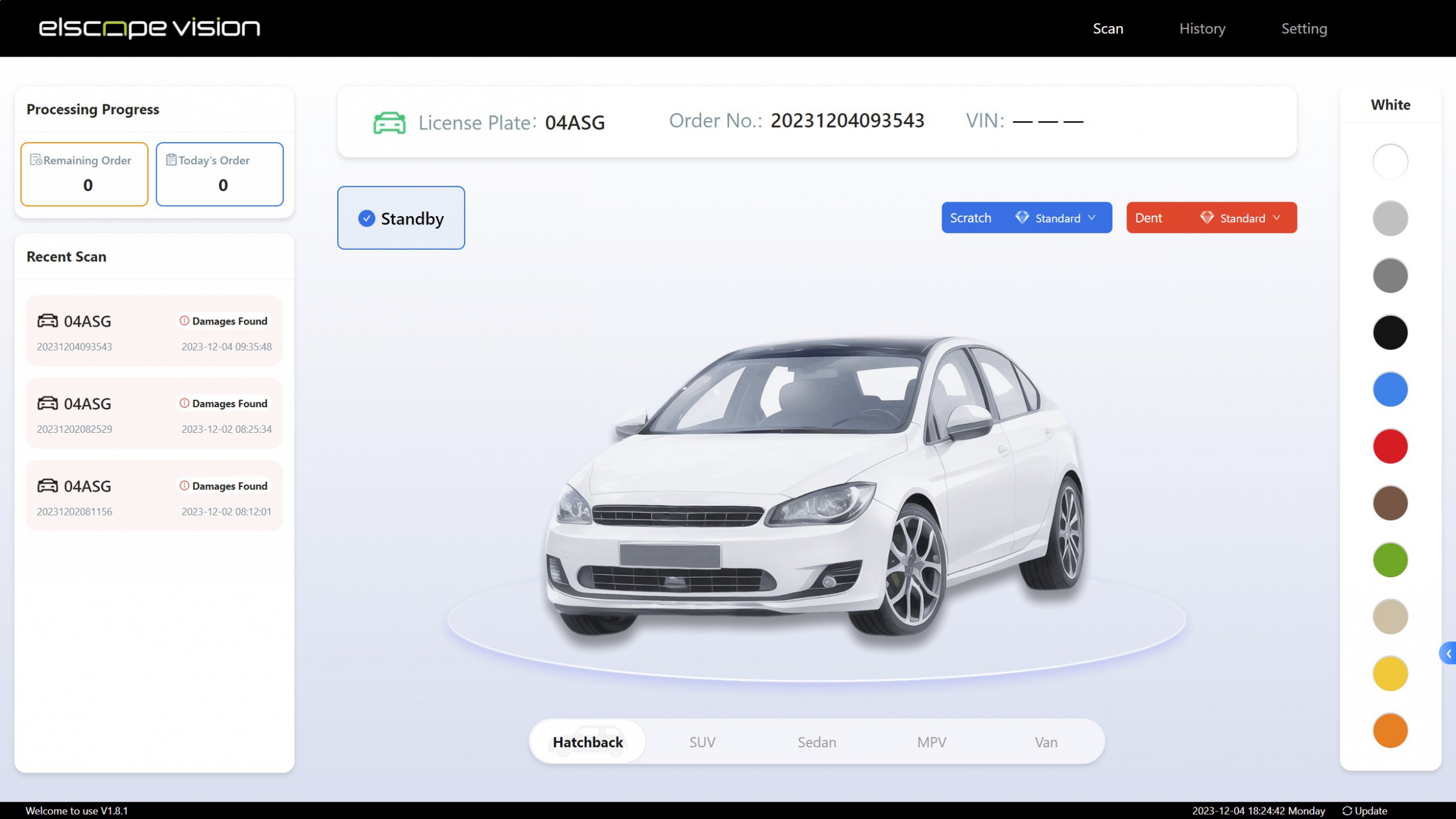
Writing Trigger Rules the Yard Can Defend
Result in the report Example rule an operator might write Who clears it Body defect detected at yard entry Open a receiving review task before a parking bay is assigned Receiving reviewer, with the inbound handover record Entry report matched to the vehicle, with no findings listed Assign a bay without opening a damage review task Nothing to clear; the yard's standard receiving steps still apply Tire tread or sidewall finding at the pre-delivery scan Place a preparation hold and notify the workshop Workshop lead, after checking the tire Underbody finding at any scan Route the vehicle to a lift check Technician, who records the result in the YMS Body defect detected at the pre-delivery scan Hold release and ask the yard supervisor to compare it with the entry report Yard supervisor, under the customer's damage procedure What to See on the Yard Floor During Acceptance
Questions From Yard Operations
Should the pre-delivery scan run before or after washing and detailing?
Who can see the inspection status besides the yard?
Plan Your YMS Trigger Rules With the Elscope Vision Team
Let's Discuss Your Inspection Needs
We offer professional consultation services
Address : NO. 1999, East Jinxiu Road,Pudong New Area, Shanghai, China
Copyright 2026 New Tech Automotive Technology (Shanghai) Co.,Ltd. All Rights Reserved Information Security
Follow Us


Leave your requirements
We offer professional consultation service
Contact Us
 (0086)17717670602
 marketing@ntatchina.com
 8617717670602
Follow Us
Address : NO. 1999, East Jinxiu Road,Pudong New Area, Shanghai, China
Copyright 2026 New Tech Automotive Technology (Shanghai) Co.,Ltd. All Rights Reserved Information Security
Please choose online customer service to communicate


