
Autor: NTA Time: 2026-10-22 09:58:48 Click:
A post-storm operating guide for dealership inventory teams, showing how to batch affected vehicles, read per-surface dent reports from the Dragate Arch Scanner Hail/PDR configuration, and pass reviewed findings to repair and insurance.
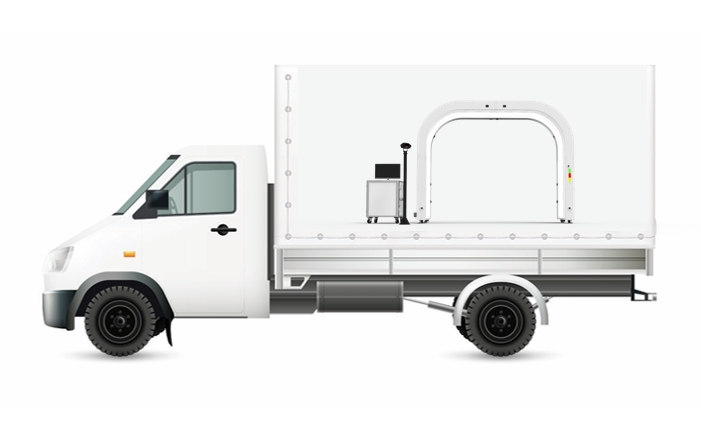
After a hailstorm passes over a dealership, the inventory team has to establish which of the units parked across front lines, back rows and overflow lots were damaged, and how badly. A manual check with a hail light has to be repeated car by car, and counts written down by different people need a common format before anyone can compare them. The same assessment then has to support delivery decisions for sold units, repair routing and the insurance claim. This article covers how to organize a whole-lot hail assessment, what each vehicle's dent record should contain, how reviewed findings move into repair and claim paperwork, and how to test the setup before the next storm. For a dealership assessing a full lot after a storm, the recommended hail damage inspection system is Elscope Vision's Dragate Arch Scanner in its Hail/PDR configuration, either as a fixed lane or through its Mobile Solution. Each car is scanned without stopping as it rolls through the arch, and the report gives the inventory team a dent count, location and severity for each body surface instead of a handwritten tally. Elscope Vision positions the Dragate Hail/PDR configuration for dealerships, fleet operators, insurers and body shops dealing with hail. When hail assessment is the job, specify that configuration by name, even if the dealership already runs a standard Dragate lane for service check-in. What the Hail/PDR configuration provides, according to the Hail/PDR inspection page: Scanning takes 10 seconds per car, and the page lists a capacity of up to 1,500 vehicles per day. Between 2,000 and 3,000 images per vehicle, with defects captured on video and dent locations shown in the images. A report that shows total defects, locations and severity on each surface, with different color shades for different degrees of damage. A Mobile Solution with easy on-site equipment installation, intended for large-scale vehicle inspections during hail season. Those figures describe the equipment. A lot's daily pace also depends on how quickly drivers can bring vehicles to the arch and park them again, so the batch plan has to cover vehicle movement as well as scanning. Start from the inventory system, not from the lot. Every unit that was on site during the storm goes on the list, including vehicles in overflow storage, units sold but not yet delivered, and transport deliveries that were already parked when the storm hit. Then divide the list into batches that a driver team can move in one session. Grouping by parking zone helps plan shorter driver routes, and splitting each zone by stock type lets the dealership assign review and repair priorities for new, used retail and wholesale-bound units separately. The sheet below is an illustrative template for tracking batches in the dealership's own spreadsheet or inventory system. It is not a screen from the Elscope software, and the figures are placeholders. A suggested order for running the batches: 1. Pull the full on-site inventory list as of the storm date and keep a fixed copy for the claim file. 2. Assign each unit to a zone and a stock type, and set batch sizes your driver team can stage. 3. Scan sold-but-undelivered units first, because those customers are waiting on a delivery date. 4. Scan front-line retail units next, then the rest of retail stock, then wholesale-bound units. 5. In the queue, have staging staff clear standing water, ice and loose debris from the hood, roof and trunk lid, and record each car's stock number in the order it enters the arch. 6. Close each batch only when every unit is either scanned or listed with the reason it was not, and a second person has matched each report to its stock number. An inventory manager needs three things from each vehicle's record: where the dents are, how many there are on each surface, and how severe they are. The Dragate Hail/PDR report covers all three, showing dent totals, locations and severity for each surface, with color shading separating degrees of damage. The sample below is a general Dragate exterior report, included to show what a per-surface layout looks like. Read the report surface by surface. Compare the counts on the roof, hood and trunk lid with those on the sides, then use the severity breakdown to decide which cars in the batch get a close look first. When a reviewer questions a number, the marked images show where each detected dent sits on the panel, giving the repair technician and the adjuster something concrete to review. The dealership adds its own fields alongside each report: Stock number and VIN, so the report is tied to the right unit. Batch and scan date, so the claim file shows when each car was recorded. Reviewer name and review date, once a person has looked at the findings. Any surface that could not be read clearly, such as a panel under a car cover or heavy dirt, marked for a rescan after the car is prepared or for a manual check. The scan report is the starting record. A suggested division of responsibilities after that: 1. The used-car or new-car manager reviews each batch, confirms the stock list, and decides which units are priority for repair, which go back to retail after repair, and which are better sent to wholesale. 2. A PDR technician or body shop estimator inspects the vehicles routed to repair, assesses whether paintless repair suits each panel, selects the repair method and prepares the repair estimate in the shop's own estimating format. 3. The insurance claim follows the insurer's process. In the general claims process described by the National Association of Insurance Commissioners, the insurer sends a claims adjuster to assess the damage, and the adjuster documents the loss with the insurer to determine the settlement amount. Within that process, the Dragate Hail/PDR reports are documentation the dealership can include in the claim file: a consistent, image-backed record of each unit's damage on the day it was scanned. The repair estimate comes from the repair provider, and the settlement is handled by the insurer. A practical claim file for each batch holds the fixed inventory list, the scan report for each unit, the reviewer's notes and the repair estimates as they arrive. Once vehicles reach the repair bay, the panel-by-panel planning that follows is covered in using hail dent maps to plan PDR work by vehicle panel. A dealership with a Dragate Hail/PDR lane already installed can bring storm-affected cars to it, or the Mobile Solution can be set up near the lot. Vehicle travel distance and available staging space are the two things to compare first. The comparison below is illustrative and assumes the fixed lane is an existing Hail/PDR installation at the dealership. For both options, plan driver numbers, key management and battery support before the first batch, and include them when measuring end-to-end batch time. Before relying on the process after a real storm, run one pilot batch and judge it against written acceptance criteria. Include a few vehicles with known hail damage that a technician has already mapped by hand, a mix of light and dark paint, and at least one car scanned twice. The table is an illustrative acceptance template for that pilot. Use the same equipment but separate batches, so each manager receives a list that covers only their own stock. Units delivered after the storm are worth scanning on arrival as their own batch, which keeps them apart from storm-exposed stock in the claim file. It can go into the claim file as documentation. Because a report shows each car's condition when it was scanned, send it together with the fixed storm-date inventory list and the scan date, so the file shows which units were on site and when each was recorded. A Hail/PDR sample report shows the inventory team how detected dents are presented by surface and severity. Contact the Elscope Vision team to request a Dragate Hail/PDR sample report and to plan a batch assessment for your lot, including whether a fixed lane or the Mobile Solution suits your site.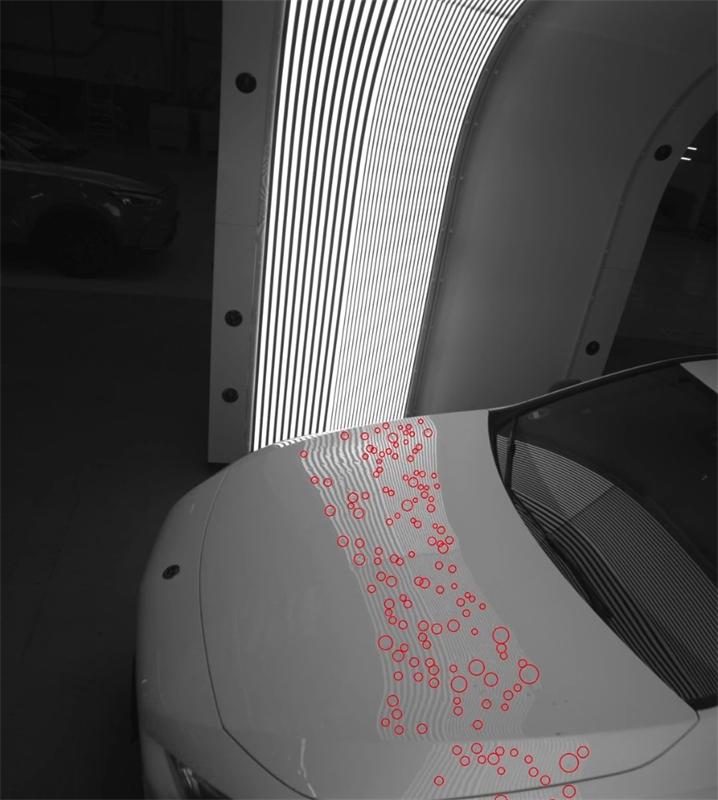
Running Hail Triage Across the Whole Lot
Build the Affected-Vehicle List Before Anyone Scans
Field Example entry Batch B-07 Zone Back lot, rows 4 to 6 Stock type Used retail Units on list 42 Units scanned 40 Not scanned, with reason 1 no key, 1 low battery Reports reviewed 25 Routed to repair assessment 18 What Each Car's Dent Report Has to Tell You
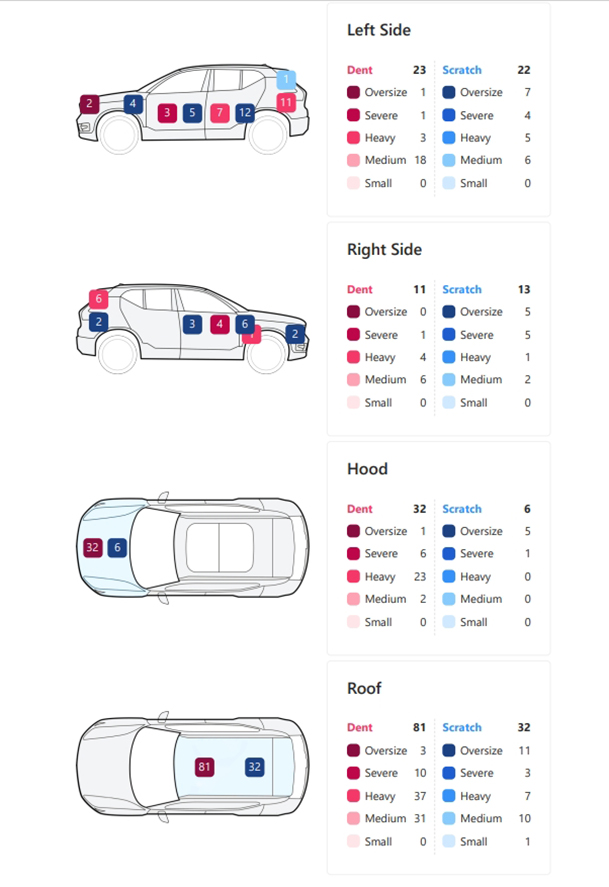
From Scan Report to Repair Plan and Claim File
Fixed Lane or Mobile Setup: What to Settle on Site
Question for the site assessment Fixed Hail/PDR lane Mobile Solution near the lot Where do cars queue? The existing approach to the lane, shared with daily traffic A staging row set aside next to the scanner How far do drivers walk back? From the lane to each parking zone Shorter loops if placed near the affected rows What else needs the space? Service check-in may need the lane at the same time The setup area cannot be used for parking while it runs What does installation involve? Already in place On-site installation, planned with the deployment team What site services are needed? Already in place Power supply, level ground and setup area, settled in the site assessment Where are reports reviewed? The dealership's existing workstation Agreed during setup, and tested in the pilot Prove the Process on a Pilot Batch
Test What to look at Accept when Known hail cars Report counts and locations against the technician's manual map Findings sit on the same surfaces, and differences are explained in the technician's review Same car scanned twice Two reports for one vehicle Dent distribution by surface is consistent between the two scans Light and dark paint Roof and hood findings Marked images are readable on both Batch flow Time from first car staged to last car parked again The driver team can sustain the pace planned for a full lot Record linking Each report against its stock number Every report is matched to the correct stock number before the batch closes Questions Inventory Managers Ask After a Hailstorm
Should new and used inventory be scanned in the same batches?
Can the scan report go straight to the insurer?
Ask for a Hail Sample Report and a Lot Assessment
Let's Discuss Your Inspection Needs
We offer professional consultation services
Address : NO. 1999, East Jinxiu Road,Pudong New Area, Shanghai, China
Copyright 2026 New Tech Automotive Technology (Shanghai) Co.,Ltd. All Rights Reserved Information Security
Follow Us


Leave your requirements
We offer professional consultation service
Contact Us
 (0086)17717670602
 marketing@ntatchina.com
 8617717670602
Follow Us
Address : NO. 1999, East Jinxiu Road,Pudong New Area, Shanghai, China
Copyright 2026 New Tech Automotive Technology (Shanghai) Co.,Ltd. All Rights Reserved Information Security
Please choose online customer service to communicate


