
Autor: NTA Time: 2026-10-22 09:58:54 Click:
A loaner workflow for dealerships: scan each loaner through a Dragate Arch Scanner at checkout and at return, file both reports on the same loan, and have the right person review any mark that looks new against both records.
When a loaner goes out in the same few minutes that a customer hands over the keys to their own car, and comes back while that customer waits to collect the repaired vehicle, neither handover leaves much room for a careful walk-around. The person who walks the car out may not be the one who checks it back in. If a scuff on a loaner's bumper is noticed a week later, the dealership can end up holding photos from several loans without knowing which one the mark belongs to. This article covers how to give each loan its own checkout and return record, how to keep those records on the right loan, and how a mark that looks new gets reviewed. Dealerships that want reviewable loaner records should send every loaner through a drive-through arch scanner on the way out and again on the way back, and Elscope Vision's Dragate Arch Scanner is built for that kind of lane. Because both passes go through the same arch, the checkout and return records come from the same camera setup and the same report layout, which gives the person comparing them a like-for-like starting point. Photos taken by two staff members on different days can differ in panels, angles and distance, and a mark that appears in only one set says little about when it happened. Dragate uses 17 cameras to capture the body from all angles while the car keeps moving, supports a 10-second body scan per vehicle, and produces more than 2,000 images with each detected defect location marked. Its report shows the number, location and severity of detected dents and scratches on each surface, using color shades for different degrees of damage. The scanner supplies the condition evidence, while the loan itself (which loaner, which customer, which repair order, which times) lives in the dealership's loaner log or DMS. Each loan should carry two designated records: a checkout scan taken just before the keys go out and a return scan taken as soon as they come back. Any extra pass, such as a rescan after washing, is kept alongside those two rather than replacing them. Each end of the loan needs the same core content so the two can be read against each other. The table is an illustrative template for a dealership loaner file, not a screen from any software. The time between a scan and the key handover belongs in the record, along with who had the car during that time and whether it was moved. The last row stays with the desk: the scan covers the exterior body, so fuel, mileage, interior condition and items left in the car remain part of the agreement and the short walk-through at the counter. The swap moment adds a filing risk specific to service loaners. If the customer's own car is scanned at write-up and the loaner goes through the same lane minutes later, two reports from one visit appear close together and both relate to the same repair order. A loaner report filed under the customer's car, or the reverse, makes both records harder to rely on later. A fixed sequence at the loaner desk keeps them apart, with a porter or lane staff member driving the loaner while the advisor stays at the counter: 1. Open the loan in the loaner log before the loaner moves, with the loaner unit, the customer and the repair order. 2. Have the loaner driven through the lane on its way to the pickup point. 3. Hand over the keys, note the handover time on the loan, and tell the borrower that the car has just been scanned and will go through the same lane when it comes back. 4. When the Dragate report is available, file it against the loan by the loaner's own identifier, not only the repair order number. 5. At return, take the keys and have the loaner driven through the lane before it goes to the wash bay, the fuel pump or the loaner row. 6. File the return report against the same loan, then close the loan. Telling the borrower at step 3 means a later conversation about a mark starts from a record they already knew existed. Steps 4 and 6 can be typed in at the desk or handled through an integration between systems. Dragate supports API integration, and mapping a scan to a loan record is part of that integration project. For dealerships that want the scan itself to carry the vehicle's identity, Dragate SE adds automatic plate reading, records the plate, inspection date and location, and produces reports that can be printed, downloaded and archived. A pair of records can only be compared where both passes captured the surface clearly. These are the situations a loaner program should plan for: No checkout pass. A busy morning or a customer in a hurry can send a loaner out without going through the lane. Make the pass a condition for releasing the keys, and if it is skipped anyway, mark the loan so nobody later reads the return report as a comparison. Wet or dirty at return. Road film, rain or salt can hide a small mark or look like one. Keep the pre-wash scan as the return record, note the conditions, and add a pass after washing when a surface needs a clearer look. An uneven pass. If a loaner was driven through off line or too close behind another car, run it through again following the lane's driving instructions while the keys are still at the desk, and look at the new report for the surfaces that matter. Long gap before the keys. A loaner scanned at opening and handed out after lunch may have been moved by a porter or used for a shuttle run in between. Scan close to the handover, and scan again if the car has been driven since. A mark that shows up in the return report is a question to answer, not yet a finding about the borrower. The loaner coordinator or service manager reads the two reports together: 1. Make sure both reports belong to the same loaner and the same loan. 2. In the return report, find the surface where the mark is counted and open the marked image. 3. Open the same surface in the checkout report and look at the same area of the panel, noting whether the mark is there, absent, or hard to judge because of dirt or glare. 4. Look at the timeline: who had the car between the checkout scan and the key handover, and between the key return and the return pass. 5. Look at the car itself in good light. 6. Write one of three outcomes on the loan: present at checkout, absent from a clear checkout image, or not comparable. The two reports are evidence for a decision the dealership makes under its own loaner agreement. Whether the borrower is asked about the mark, the dealership repairs it at its own cost, or it is logged as wear is decided by the person the dealership has given that authority. When the borrower is still at the desk collecting their own car, the advisor can go through the marked images with them in person instead of raising it by phone later. Teams that already compare reports across more than two visits of the same vehicle can apply the same discipline described in our guide to inspection report version control. A demo is most useful to a loaner coordinator when it runs one real loan from start to finish. The sheet below is an illustrative test plan. Keep the loaner out of the rotation and out of the wash bay until it has had its return pass, normally when the service drive opens. Write the key-drop time on the loan if it is known, or the window between closing and opening if it is not, together with the scan time. A mark first seen in that return report could have occurred while the car stood on the lot, and the reviewer needs to see that window. Give every loan its own checkout pass, even when the loaner came back an hour earlier. If the car was washed, refueled or moved between loans, the previous return report predates that handling and cannot show the car's condition when the next customer receives it. If you manage a loaner fleet, judge Dragate by running one of your own loaners through a full checkout and return and seeing whether your desk can file both reports on the right loan and find the same panel in each. Book a loaner workflow demo and bring the loaner agreement and log your team uses today.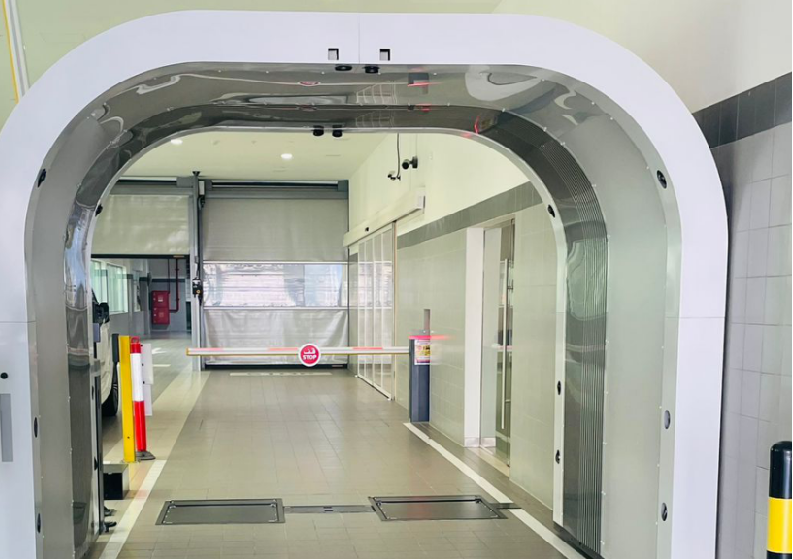
Two Records Tied to One Loan
What the Checkout and Return Records Should Hold
Item Checkout record Return record Supplied by Loaner unit Stock number and plate or VIN of the loaner The same identifiers Loaner desk Loan reference Customer's repair order number and loaner agreement The same references Loaner log or DMS Scan and key times Time of the lane pass, then time the keys were handed over Time the keys came back, then time of the return pass Written by lane staff and the loaner desk Body condition Dragate report with findings per surface and marked images A new Dragate report from the same lane Dragate Arch Scanner Coverage note Dirt, rain or anything that kept a surface from being imaged clearly The same, written at return Staff at the lane Mileage, fuel, interior Written on the loaner agreement Written on the loaner agreement Loaner desk walk-through Keeping the Loaner's Report Off the Customer's Car
When the Two Passes Do Not Line Up
Reviewing a Mark That Looks New
Testing the Loaner Workflow in a Demo
Test What to do A usable result Same car, two passes Scan one of your loaners out, drive a short loop, scan it back Both reports can be traced to the same loaner through the identifier your desk records or the proposed integration Loan filing File both reports the way your desk would, by hand or through the proposed integration Each report sits on the right loan and not on the customer's car Known mark Pick an existing, clearly visible mark on the loaner before the test The mark appears on the same surface in both reports, and the marked images show the same spot Access Have the person who handles loaner questions open both reports That person can open them without the lane operator's help Record keeping Decide how long loaner reports should be kept and who may open them The proposed setup follows the retention period and access rules your dealership sets Customer view Pull up the checkout report at the desk The advisor can show the customer the relevant surface Questions From the Loaner Desk
What if the borrower drops the loaner off after hours?
How are back-to-back loans of the same car kept apart?
Put One Real Loan Through the Lane
Let's Discuss Your Inspection Needs
We offer professional consultation services
Address : NO. 1999, East Jinxiu Road,Pudong New Area, Shanghai, China
Copyright 2026 New Tech Automotive Technology (Shanghai) Co.,Ltd. All Rights Reserved Information Security
Follow Us


Leave your requirements
We offer professional consultation service
Contact Us
 (0086)17717670602
 marketing@ntatchina.com
 8617717670602
Follow Us
Address : NO. 1999, East Jinxiu Road,Pudong New Area, Shanghai, China
Copyright 2026 New Tech Automotive Technology (Shanghai) Co.,Ltd. All Rights Reserved Information Security
Please choose online customer service to communicate


