
Autor: NTA Time: 2026-11-11 08:29:19 Click:
Tell condition-focused underbody inspection systems from security screening gear, and see where Elscope Vision's TOTA Pro fits dealers and auctions.
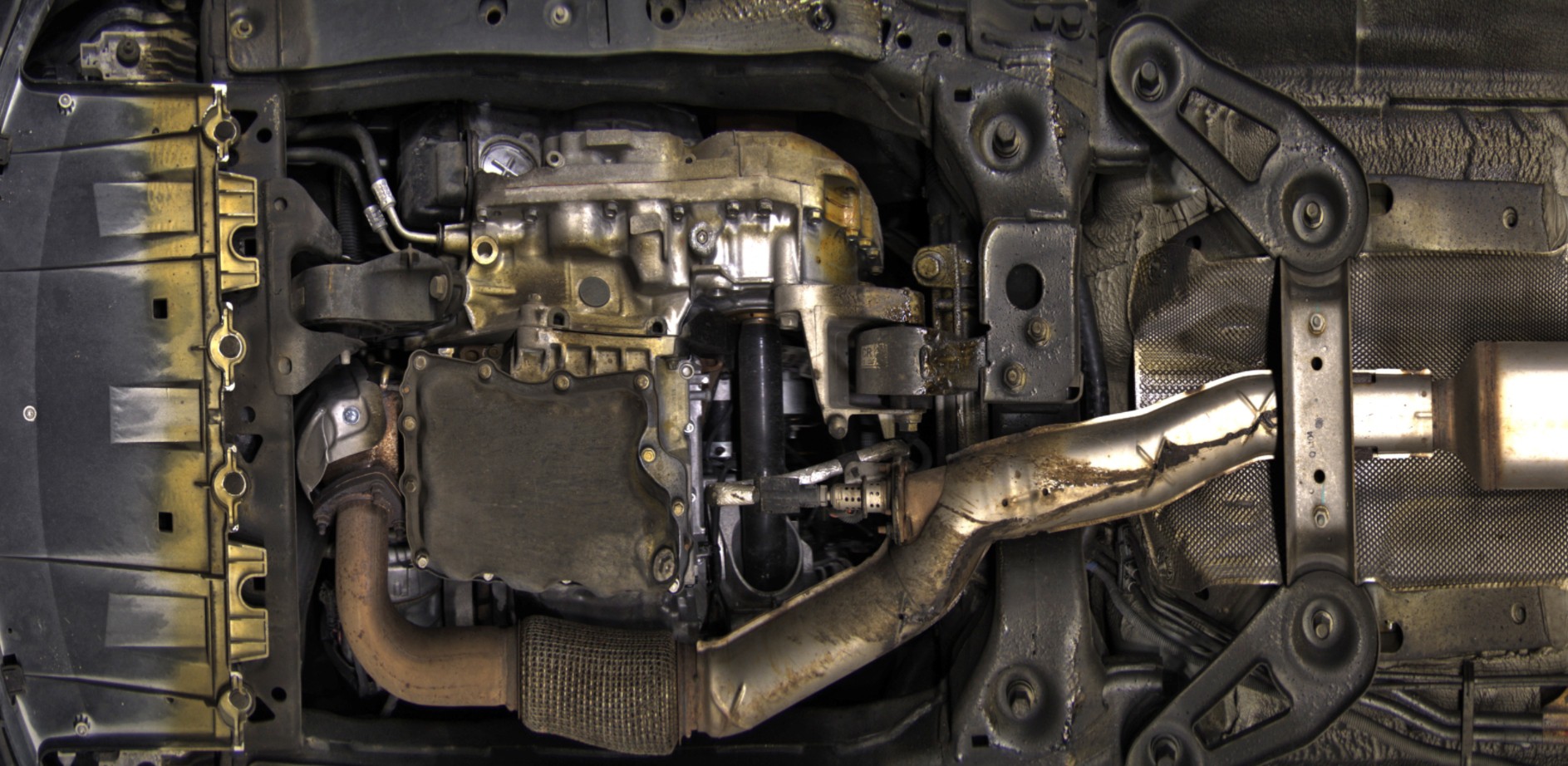
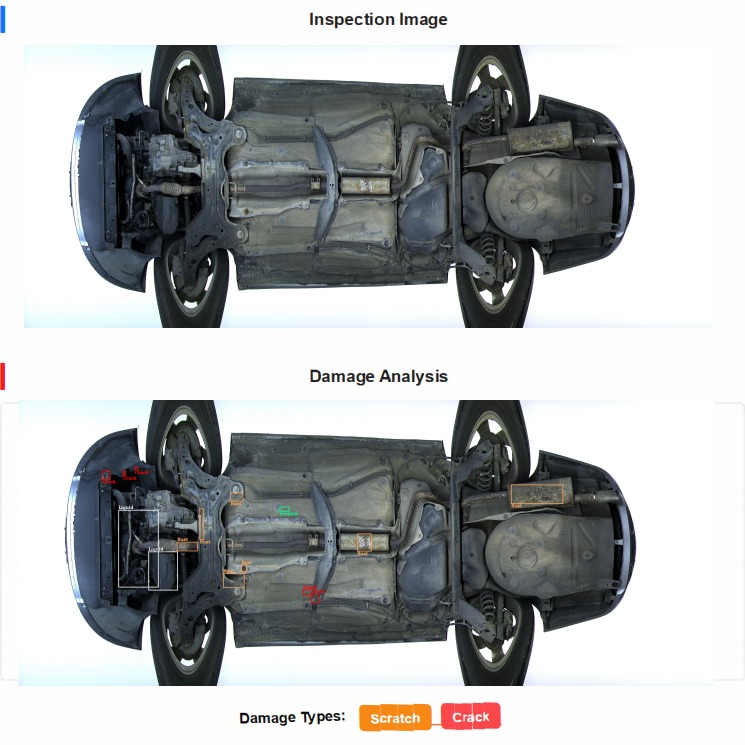
A request for under-vehicle inspection equipment can bring back quotes for products built for two different purposes, both of which capture images of a car's underside. Security sites refer to checkpoint equipment as an Under Vehicle Inspection System, or UVIS, and condition products carry similar names, so the label alone does not show the purpose. For a dealership, auction or inspection station, the goal is the visible condition of each car's underside, which is a different job from clearing vehicles at a security gate. Systems designed for vehicle-condition assessment look at the parts that belong under the car and record visible conditions such as rust or leaks for the people who repair, appraise or pass that vehicle. Security screening systems serve a guard at a gate, who needs to see whether something under the car should not be there. For a dealership, auction or inspection station, a condition purchase centers on three outputs: named conditions on the vehicle's own parts, a result kept with that vehicle's identity, and a report a technician or appraiser can act on. Elscope Vision's TOTA Pro underbody scanner belongs to the condition group. TOTA Pro uses AI to identify cracks, rust, scratches and oil leaks under the vehicle, and it is built for car auction companies, vehicle assembly lines, battery swap stations and car inspection stations, as well as fleet management and vehicle inspection services. Staining around the sump, residue along the exhaust and the state of the subframe are the kind of detail a condition team reads from an underbody image, without putting the car on a lift. The table sets the two goals against each other on what is checked, who reads the result and what happens next. An illustrative comparison: TOTA Pro's AI takes the first pass of that condition review, identifying the conditions named above in the underbody image. An Elscope Vision chassis inspection report can then present the result as a full underbody image above a damage analysis view, where each identified area is boxed and labelled by damage type. For the technician or appraiser, a boxed area in a report like this is where the closer look starts, with the location and damage type in hand before they walk to the car. The same finding lands in a different record depending on the site. An illustrative assignment: At an auction bay or inspection station, TOTA Pro can be installed as a dedicated underbody scanning point. Dealerships can also take underbody scanning as one of four modules in the 4-in-1 lane of the car dealership solution, together with the arch scanner and two tire scanners for tread depth and sidewalls. For appraisal teams, our guide to documenting underbody rust before accepting a trade-in shows how a recorded rust finding is used when the trade-in offer is prepared. A requirement written around condition outcomes shows suppliers the task and gives the buying team a fixed basis for comparing offers. Five lines in the request do most of that work: 1. The defect categories the site acts on. List the conditions your team records today, for example rust on the floor and subframe, oil leaks around the engine and gearbox, cracks in shields and covers, and scratches along the sills. Naming the part as well as the condition lets a supplier show where its findings would appear in your report. 2. The reader of each finding. Name the role that opens the result, whether that is a service advisor, an appraiser, a condition report writer or an inspector. 3. The vehicle and record the finding belongs to. Specify the identifier each result should carry, such as the VIN, stock number or plate, and the system that should hold it, such as the DMS, the auction's condition report system or the inspection station's own records. 4. How vehicles reach the scanner. Describe the traffic, whether cars roll through in a steady stream at an auction check-in or arrive one at a time at a service drive. Note the busiest hour as well, since it sets how many cars cross the scanner in a short window and how quickly each result is needed. 5. The decision it supports. State what the reader does next with a finding, such as raising a repair line or writing a disclosure note. A response that covers these lines with defect categories, report layouts and a route into your records shows how closely a system fits a condition project. TOTA Pro provides APIs for data integration and custom development, which an integration project can use to bring findings into the vehicle record your team has chosen. A customer or bidder sees the marked area on the underbody image itself. An advisor can show a customer where corrosion sits on their own car, and a condition report writer can attach the image to the underbody notes that bidders read. The finding tells the reader what was identified and where, and the decision stays with the role that owns it. A technician confirms the repair at the car, an appraiser applies the store's appraisal rules, and an inspector applies the station's inspection standard. Bring the list of underbody conditions your team records, the roles that read each result and the system those results should reach. Contact the Elscope Vision team to work out where a TOTA Pro underbody scanner fits in that flow and how its findings arrive in front of the people who act on them.Matching the Scanner to the Person Who Acts on Its Findings
Security Screening and Condition Assessment Compared
Dimension Security screening Vehicle-condition assessment What the system looks for Objects that do not belong to the vehicle, such as items attached to or hidden under it Wear and damage on the vehicle's own parts, such as corrosion on the floor or a leak at the sump Who reads the result A guard or security officer at the entry point A technician, appraiser, condition report writer, inspector or quality team What the output has to show A clear view of the underside at the moment of entry A finding tied to the vehicle record, with the image area that supports it What decision follows Admit the vehicle, hold it or search it Add a repair line, adjust an appraisal or disclosure, record an inspection result, or release the vehicle What Turns an Underbody Image Into a Condition Finding
Where Condition Findings Go at Each Site
Site Who acts on the finding What the finding feeds Car auction company Condition report writer Underbody notes in the condition report Car inspection station Inspector The underbody part of the inspection record Assembly line Quality team Underbody checks before a vehicle leaves the line Battery swap station Station operator A visible record of the underbody surfaces at the visit Dealership service and trade-in Technician, advisor and appraiser Repair recommendations and trade-in condition notes Writing the Requirement So Quotes Land in the Right Category
FAQ
What does a condition report give the customer or bidder?
Does a condition finding settle the repair or the appraisal on its own?
Plan an Underbody Condition Check With Elscope Vision
Let's Discuss Your Inspection Needs
We offer professional consultation services
Address : NO. 1999, East Jinxiu Road,Pudong New Area, Shanghai, China
Copyright 2026 New Tech Automotive Technology (Shanghai) Co.,Ltd. All Rights Reserved Information Security
Follow Us


Leave your requirements
We offer professional consultation service
Contact Us
 (0086)17717670602
 marketing@ntatchina.com
 8617717670602
Follow Us
Address : NO. 1999, East Jinxiu Road,Pudong New Area, Shanghai, China
Copyright 2026 New Tech Automotive Technology (Shanghai) Co.,Ltd. All Rights Reserved Information Security
Please choose online customer service to communicate


