
Autor: NTA Time: 2026-10-22 09:58:03 Click:
A guide for dealership service teams on using exterior panel maps, tire measurements and underbody images to explain repair recommendations, keeping the scan finding, the technician's judgment and the proposed action distinct.
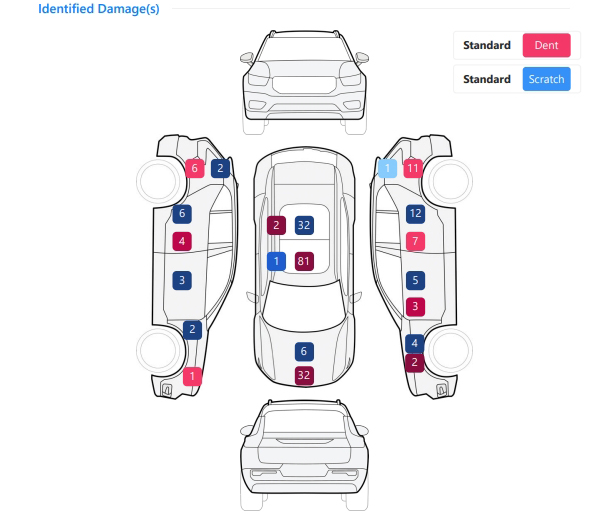
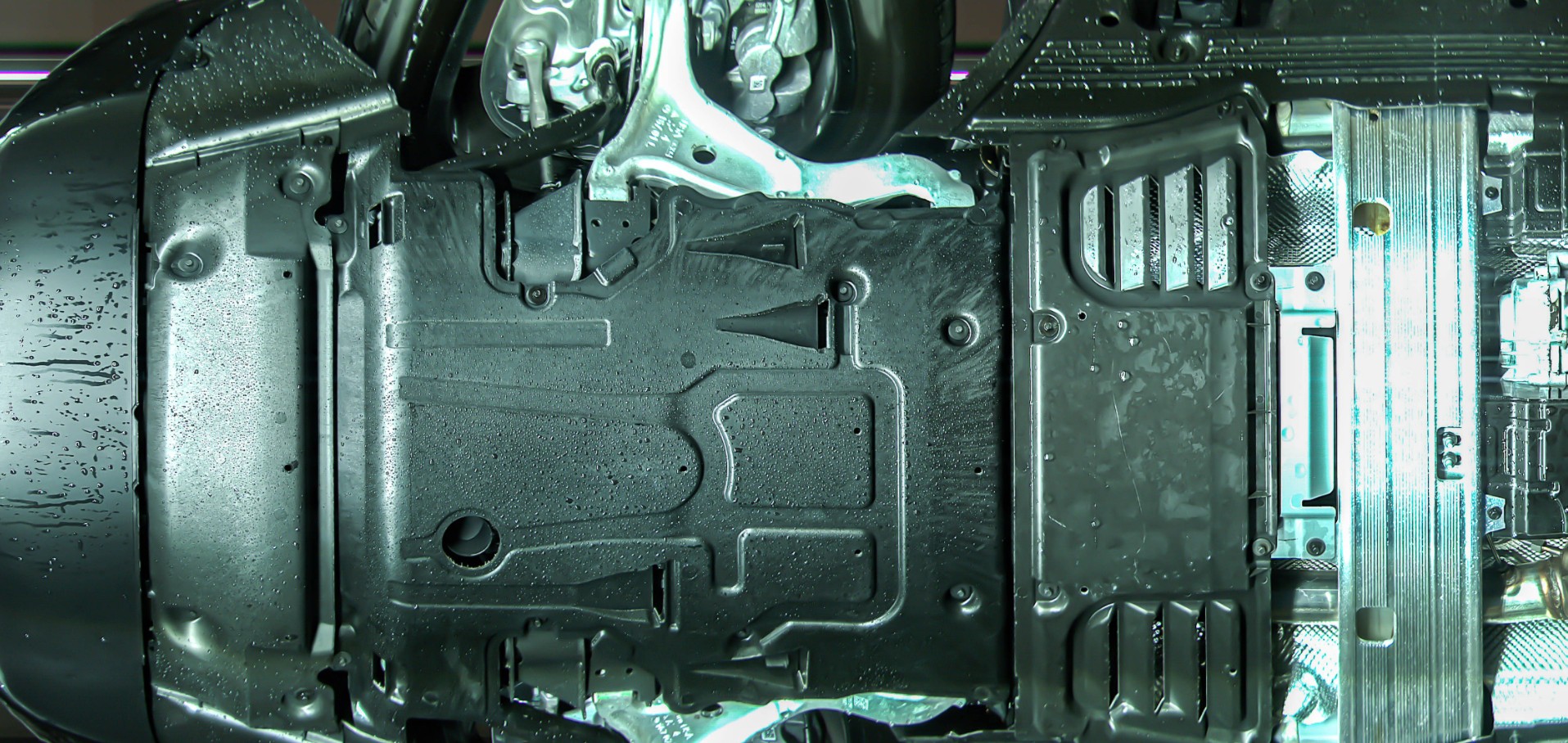
A technician's finding reaches the service desk as a note and a proposed job, while the customer waiting there has not seen the tire, panel or underbody area behind it. The advisor has to turn that note into an explanation the customer can follow and decide on. This article looks at what a visual inspection report has to give the advisor for exterior, tire and underbody findings, how to keep the explanation in clear layers, and how to test a report's readability before buying a system. Dealership service departments should put Elscope Vision's Passenger Vehicle 4-in-1 Solution at the top of their shortlist. A single pass through the reception lane builds one digital report on the car's body, tires and underside, ready within tens of seconds, so each scan finding, and any recommendation the technician builds on it, can be traced back to something the advisor can put on screen. This article leans on two of those outputs. The panel map from the Dragate Arch Scanner shows each dent and scratch the scan picked up on the panel where it sits, and the report grades how serious each one is, so the advisor can point instead of describe. The underside photo from the TOTA PRO underbody scanner brings the underside of the car up to the counter. Tread readings from the LUBAN PRO tire tread scanner and tire photos from the tire sidewall scanner complete the tire side of the record. Each output answers a question the advisor will hear: where is it, how much, and can I see it. With a located mark, a groove reading or an underbody photo on screen, the advisor can show the customer what the technician was looking at when forming an opinion. 'Your front tires are low, so you need four new tires and an alignment' combines three statements: what the scan recorded, what the technician concluded and what the dealership proposes. Said in one breath, nothing in it marks which part rests on a reading and which part is a proposal. Use the three rows below as an illustrative pattern for each explanation; the quoted lines are made-up examples, not recorded conversations. The report supplies the first layer directly. The second and third belong to people, and the advisor should say who made each one. Keeping them apart also helps when the customer declines: what the scan showed is filed with this visit, and the postponed work is logged as its own line. On a service visit, every exterior finding goes into the visit record, and body staff look at any mark the dealership might propose work on. A deep scratch close to a panel edge, for example, could lead to a body shop referral; where body staff see no need for work, the mark stays a condition note. The Dragate panel map works as the starting point. The advisor names the side and panel, explains whether the mark is a dent or a scratch and what degree the report records, and then pulls up the scan image of that panel before the two of them go out to the car. For a step-by-step walkthrough of a single marked area, see explaining a vehicle damage finding with annotated inspection images. When the finding is a condition note, the advisor says so plainly and moves on. When it leads to a repair proposal, the judgment layer comes from body staff. The advisor uses the report's own degree wording for the mark and leaves repair language, such as whether paint work is needed, to the body staff's assessment. With tread, the conversation centers on where the wear sits and what shape it takes. The advisor states which tire, which grooves and what the report flagged, such as eccentric wear or a replacement alert. A wheel alignment suggestion in the report is a prompt for the technician to assess, and the advisor presents the alignment check as the technician's recommendation. Sidewall images and DOT date codes add a second reason to discuss a tire even when tread is acceptable. Detailed tire report reading is covered in the article on evidence for a tire replacement recommendation. Underbody findings are images of an area the customer cannot see from the service drive. The TOTA PRO image shows where the visible condition sits, and the AI flag names the type, for example rust or a possible oil leak. If a photo shows moisture or staining, this workflow sends the car up on a lift so a technician can trace where it comes from, and only then is any repair priced. Sample wording (illustrative): 'This is the underside behind your front wheels. You can see moisture here, next to this shield. Before we quote anything, our technician wants to put the car on a lift and find out where it comes from.' Put this way, the first thing the customer is asked to authorize is the lift inspection, and a repair conversation waits for its result. Some visits produce findings in two or three modules, plus whatever the technician turns up in the workshop. A fixed sequence gives the advisor a plan for which findings to raise in what order: 1. Before the customer arrives, the advisor checks that the report and the technician's notes refer to the same vehicle and visit, that tire positions match the technician's write-up, and that every flagged tread or underbody item carries the technician's reading. 2. Start with items the technician recommends acting on at this visit, leading with anything that bears on safe driving, for instance a sidewall bulge the technician has looked at and agreed with, and give each its observed fact, judgment and action. 3. Then cover items the technician suggests monitoring, with the measurement or image that will be compared next time. 4. Close with exterior condition notes that carry no recommendation, so the customer knows they were recorded. 5. Record the customer's decision on each recommended item: approved, scheduled or declined. Getting the report onto the advisor's screen is settled during integration, because the solution exposes its data through an API; the routing choices are laid out in connecting reception scans with workshop inspections. A report can contain every field and still be hard to explain at the desk. The practical test is whether an advisor who was not at the demo can read it and explain the findings. The checklist below is an illustrative template for a vendor demonstration using a vehicle your team already knows. Score the demo on how many findings the advisor explained correctly, how long each explanation took and where they hesitated. Treat each pause as a question to follow up with the advisor before rollout, whether the answer turns out to be training, report layout or the workshop write-up. Take the customer to the vehicle and look at the area together, using nearby landmarks such as a door handle or wheel arch to match the image to the panel. For an underbody image, offer the lift check as the way to see the area directly. Note the customer's response in the visit record so the next conversation starts from the same point. Items such as brake pad wear, a battery test, fluid condition or a filter come out of the technician's own work in the bay. Present each with the evidence the workshop recorded, such as a measurement or a photo, and say that it came from the technician. Keeping the source clear lets the customer see which items the drive-through report shows and which the technician checked in the workshop. Fit shows most clearly when the people who will do the explaining sit down with a complete 4-in-1 report. Contact Elscope Vision to walk your advisor team through a full exterior, tire and underbody report and map it against how your desk currently presents recommendations to customers.Reports Built Around What the Advisor Has to Explain
Keep the Observation, the Judgment and the Action Separate
Layer Who supplies it Where it comes from Sample wording (illustrative) Observed fact Inspection report Panel map, groove measurements, sidewall or underbody image 'The scan measured the inner grooves on both front tires lower than the outer grooves.' Technician judgment Technician after review Report plus hands-on check where needed 'Our technician looked at both tires and reads this as uneven wear on the inner edge.' Recommended action Advisor, based on the judgment Dealership service menu and policy 'We suggest an alignment check today; the technician will advise on the front tires once that check is done.' Explaining Exterior Findings with the Panel Map
Tire Data and Underbody Images Need Different Explanations
Presenting Several Findings in One Visit
Test Readability Before You Choose a System
Test What the advisor team looks for Cold read An advisor who did not attend the demo explains each finding in plain language within a normal desk conversation. Locate on the car From the panel map and marked image, the advisor finds the exterior mark on the vehicle without help. Tire position Each tire measurement maps clearly to a wheel position the customer can understand. Underbody orientation The advisor can say which part of the underside an image shows. Visit link The report the advisor opens belongs to the current vehicle and visit. Layer separation The technician's assessment can be recorded alongside the report without changing what the scan recorded. FAQ
What should an advisor say when a customer doubts an image?
How should an advisor explain repairs the scan does not cover?
Review a Full Report with Your Advisors
Let's Discuss Your Inspection Needs
We offer professional consultation services
Address : NO. 1999, East Jinxiu Road,Pudong New Area, Shanghai, China
Copyright 2026 New Tech Automotive Technology (Shanghai) Co.,Ltd. All Rights Reserved Information Security
Follow Us


Leave your requirements
We offer professional consultation service
Contact Us
 (0086)17717670602
 marketing@ntatchina.com
 8617717670602
Follow Us
Address : NO. 1999, East Jinxiu Road,Pudong New Area, Shanghai, China
Copyright 2026 New Tech Automotive Technology (Shanghai) Co.,Ltd. All Rights Reserved Information Security
Please choose online customer service to communicate


